Windows Home Server Install, Part 1

I actually havent started the install. But my rage is now building up. The reasons are

  1. that the 300Gb hardrive I wanted to use and that caome preinstalled with my PC physically can’t come out – I can’t reach the screws since only one side of the case opens.
  2. i can’t use the Xp recovery console as its password protected my the manufacturer ( I was trying to fix the MBR for when Vista Beta 2  expires, so no luck there)

So my plan for a 380 GB Home server stopped before it started.  I’ll have to settle for 2x 80Gb drives. Given the fact that i have at least 30GB worth of downloads and 10GB of music (all legal), It only gives me 180 GB to back up 2 PC’s. Not ideal. Then you have to factor in room for growth.

if worst somes to worst, I have my eye on a nice Dell Poweredge server that will do nicely. But I’d rather use the hardware collecting round my feet before it gets too ancient.

Now if Microsoft could just make a handly MBR restorer…..

And the name of the infernal manufacturer that built my PC with the 300Gb harddrive? You’d never guess: Pc World.

Windows Home Server (Updated)

Well, I recieved my invitation to the beta prgram yesterday. I only got round the downloading the iso’s now. Somwhere between one and two hours to go ( depending on speed – I had 300kbps a second ago).  I was planning on installing it on my old PC that simply has nothing else todo. But, as luck would have it, it has no DVD drive. Grrr….

I’ll ahve to scavenge one from else where. Or buy a new server, which is just what I’ve been looking at. Dell is hard to beat for value.

I’m rather excited about this. WHS is just what I’ve been praying for. I think that I have a long wwekend of long nights setting things up.

I’d better get to work. 🙂

Update:

Since WHS does NOT use wireless from some strange reason ( Cue a “damn if I know” shrug). I just ordered an ethernet port for my aging PC. Its far cheaper than ordring a new server (its 1/25th  the cost of Dell’s cheapest).

Programming Languages: Thinking in Code

What precicely do we need out of a programming language? Steve Yegge has a list:

Here’s a short list of programming-language features that have become ad-hoc standards that everyone expects:

  1. Object-literal syntax for arrays and hashes
  2. Array slicing and other intelligent collection operators
  3. Perl 5 compatible regular expression literals
  4. Destructuring bind (e.g. x, y = returnTwoValues())
  5. Function literals and first-class, non-broken closures
  6. Standard OOP with classes, instances, interfaces, polymorphism, etc.
  7. Visibility quantifiers (public/private/protected)
  8. Iterators and generators
  9. List comprehensions
  10. Namespaces and packages
  11. Cross-platform GUI
  12. Operator overloading
  13. Keyword and rest parameters
  14. First-class parser and AST support
  15. Static typing and duck typing
  16. Type expressions and statically checkable semantics
  17. Solid string and collection libraries
  18. Strings and streams act like collections

Visual Studio missed the cross platform bit (Unless there’s a way for writing Linux readable C++ that no one has told me about). 

A language is not simply a series of sematic rules that work together to produce meaningful output ( written or spoken), but also the way we think. When I speak english, I think english. When I’m speaking itallian, I think itallian.

A programming language is the same. Progammers need to be able to think in a given language and also anticipate the reaction of the complier. A well thought out subroutine, is far better than one riddled with badly, though workable, code.

Thinking in code is important. (Its also a valid reason to say your’re working). When one thinks in code, the output becomes automatic. The trick is learning your chosen language(s) thoughly enough.

 Which brings me to the subject of switching languages. Do we want a new porgamming language to learn every 18-24 months? Can we even sustain that sort of learning curve?

At the end of the day, the Next Big Language (NBL as steve says) will have to be worth the effort to switch. BEcuase choosing the right programming language is crucial to programmers – if you can’t think it….

A wonderful, related, podcast here from OpenSource Conversations on Scott Rosenburg’s new book, Dreaming in Code:

Vista

Now over the past few days, I’ve seen a huge amount of people finding my blog posts on Windows Vista. Truth be told, I’ve still got the beta 2 installed, though don’t use it very much. The reason is simple. I never got round to it.

With the launch of Vista and Office 2007 i got a nastly surprise – Office 2007 Beta 2 stopped working. In the most literal sense of the Word. i had to re-install Office 2003. I’m insensed at this as it didn’t even give me the opportinutity of convert all my 2007 format documents and spreadsheets back to 2003 format. Wake up guys. So what on earth am i supposed to do now?

On to Vista.

I think its nothing less that pure brilliance. Stolen Mac OSX features or not, its great. The central question that Vista begs us to ask is “What do we want out of an OS?”. Seems Microsoft/Apple ( Depending who stole what from who) have asked themselves that and come out with an asnswer.

The times that i’ve used vista, I’ve never once failed to be impressed by some small but incredibly useful feature.  the integrated search in the start menu is amazing. The new layout of the programs is even better, avoising huge cascading menus that can end up taking up the whole screen.

The Network Centre is extremely useful for allowing you to instantly deduce the problem. It interfaces well with my router (XP tells me the Internet gateway is on, even when it isn’t).

The huge array of options to personalize your computer is extremly important.  The need to create somthing that’s distinctivly you is found everywhere, from the organisation of your desk to the decoration of your room.

The sidebar is extremely useful, as is the option to cconfigure which monitor it appears in in a multi-monitor setup (Microsoft is acknowledging the increasing populoarity of multi-monitor setups in a bid to boost productivity) . I’ve heard that developing Widgets is not every progrmmers cup of tea or coffee.

The way the file system is displayed is imortant. The new look and feel is extremly diferent to Xp, mainly being more userfriendly( while displaying more info) and givingthe user a great number of choices.

The parental controls are included out-of-the-box and are integrated with the accounts and games aspects of Vista. While i have not actually tested this, it seems pretty good. this is essentially Microsoft serving notice of its intention to expand into this tradtitionally third party domain.

The Account profiles are interesting. The new range of restrictions that can be leveled on an account is extremly extensive. This should  life easier on pleantly is network administrators.

The integrated Windows Defender is an inutive idea. The main question is about what advantages it offers over a third party product (ie Norton or McAffee).If Microsoft say greater OS integration, then Microoft open themselves up to a repeat of the EU Competition Commission debacle (only this time from those third-party developers as well). Microsoft need to ensure that all third-party developers have the opportunity to achive the same OS integration as Micorosofts own offerings.

The Aero Glass interface needs no explaination as it speaks for itself.

The irritating security popups become less irritating as time goes on and seem to appear less frequently as well ( did microsoft allow it to remember preferences?) .

Vista is a real RAM hog. On my machine  while doing nothing, it takes up a full 200MB more then XP running  a full set of services ( i.e nortons firewall, Ghost etc) and Visual Web Desingner. I can’t even get a DVD to play properly on  Vista. microsoft seems to have spotted this problem and allowd the use of memory keys as  RAM (“ReadyBoost”).

Vista is so large I’m probably missing a few things. Vista brings an entirely new .Net Framework for developers to work with ( formally Windows Presentation Foundation). I’ve yet to get round to using it since I’m only now getting to the height of my .Net version two programming powers.  I should give it a try.

Finally, I think the number of Vista Versions gives people more choices for their wallets. Coupled with the  ability to upgrade when you need to, its a huge plus for business procurement departments and people on a limited budget ( half with this months budget, half with next month’s) . The only thing missing here is the ability to download Vista from Microsoft ( saves shipping time and cost).

The only question left here is when to buy Vista. Now with all the bugs that are sure to be found.Of after the first Service Pack. It s a choice between too evils. Contend witht he bugs, or contend with the now obselete Windows XP. Which is the lesser of two evils ?

Vista Licenceing and Web 2.0

I was scrolling though my feeds and came across this post over at the One Man Shouting blog.

MSFN is reporting that all Vista Editions will be included on the same DVD, but that the discs will be color coded to indicate which version the consumer purchased.  The good news is that consumers will be able to upgrade to a higher version of Vista if they decide they need more features.

I’m thinking. Perhaps Microsoft should go one better (or worse, you decide) and bill users according to the features not in their current license that they use. So, if I don’t usually use, say Media Centre, but suddenly need to use it one night when my friends come over, Microsoft could just bill my PayPal account for that time. So I would choose the features I want year round access to and anything extra gets billed ( at a higher rate, obviously, to encorage people to buy an Ultimate license). Sun Microsystems do something similar to this, I belive ( Salesforce.com?).

But then again, perhaps bothering people for their Paypal account details everytime they open Media Centre or send a fax mught just bring out the extremist side in Microsoft customers 😉 .

 Why I’m posting about a lame idea, I don’t know. Perhaps its just the novelty of it. Web 2.0 and the fact that most people are connected tot he internet 24/7 are the reasons why these kinds of things possible.  The idea is, in essence what Sun CEO Johnathan Schwartz calls “The Network is the Computer”, the idea that the exististance of a network beyond out immidiate hardrive  increases the amount of things that we can do.

So, although Web 2.0 is a concept, its a powerful concept. We use new tools and technologies to turn what uised to be a static web into an extension of an application. in other words, we can use web pages and services as if they we local applications running from a local hard drive.  

I think I’m going to spring for Vista Ultimate myself (Media Player definately included :) )

Like.com

Thanks to Scoble, I’m clued into the latest, geekest development onthe web. google introduced the much refineed version of searching that is synonomous wiht, well, search. Google’s oversight was that it searched text  (ie. filenames, titles, etc). Even the image search.

Like.com, however, searches the image itself for other similar items. For an alpha release its increbibly sophisticated, allowing you to fine tune the search according to color, shape and pattern You can choose the color you want. You can also toggle how important each charecteristic of the item is for your search.

This will do wonders for my bank balance. And the simple reason is: it works. While tags do go a certain way to describing an item, article ir webpage, the visual aspect is far more powerful. They say a picture is worth a thousand words – this proves it.

The facinating part of all this is that back end. Exactly what software its running on i’m not sure. but the hardware is impressive enough. 250 servers with 4 processors each and 20 gigs of RAM.  While the number of categories you can search may seem rather samll compared to the hardware arrayed for the task, using like.com and seeing its sophistication makes you see why.  

I’d love to see the code for this ;). Something tells me thats not gonna happen.

The idea is simple, buy mudersly complex in exectution. I’m not into image manipulation this far in my course, but getting the computer to think is a big enough job.

I hope the set of seaches expands in the near future. They are tweaking and testing and trying to wring every extra processor cycle out of the program. I know the drill.

 I just hope that a web service comes out of this. I already have an idea. Combine like.com with google maps ( or Windows Live Local) to show the nearest store you can buy the item from. That would be cool.

Anyway Scoble has a few titbits:

Some stories about Like.com.

1) The URL cost him $100,000. In the interview he explains how they bought it. It involved finding the guy who owned it, jumping a fence, and leaving a bottle of wine with a note on it (he wouldn’t answer his email).
2) Riya was pretty close to being sold to Google. If it had been, they never would have worked on this search engine. So, by getting turned down by Google Riya came back with a much better business.
3) Just the jewelry set takes 20GB of RAM.
4) Munjal still believes in blogs, but for this launch Riya talked with fashion bloggers, and journalists outside the tech world like at People magazine. Why? Well, this site — in its current incarnation — will be most interesting to women and non-geeks. If you’ve looked at who participates here, it’s heavily male.
5) Why not keep working on face detection? Because they learned through user testing that they’d never be able to make it good enough. They found that by focusing on visual image searches they can get a much more satisfied user base.

More  here and here.

YouTube or GoogleTube?

Saw this yesterday on CNN. Again Google is expanding, trying to justify such a high shareprice. And I like the idea. Google, worlds most powerful seach engine and No.1 adsite buys YouTube worlds mostwatched video site. google needs ads, Youtube needs funding etc – an alliance of convinience unified by a common goal and purpose. Both of which are to do with Web 2.0. Scoble has a good write up here. He has an interesting analisis why Youtube is more popular than Blinkxs ( and I too had to triple check my spelliong of the name):

Also, the home page is WAY overbearing. Too many moving things. And one design principle I learned in college: pick ONE thing and make that twice as big as anything else on the page. YouTube wins here. Why? Because your eye needs something to enter the page with. If everything is the same size, as it is on Blinkx, your eye feels uncomfortable. Doesn’t know where to look.

He also make this interesting point. Coming from him as a student and connisour of new age media ( blogs, podcast vblogs and the like), its interesting:

Blinkx has lots of big-name videocontent. Movies. TV shows. Etc. YouTube has lots of “small-name” videocontent. Kittens. Goofy videos. We’re all looking for different kinds of content. Stuff to impress our friends with that they probably won’t have seen. Here’s a hint: your friends and family have probably already seen the latest Lost. But they haven’t seen the latest cute kitten video. Microsoft makes this mistake too (remember IE 4 with ActiveDesktop? What was there? Big name media companies. No small guys. I wonder if Microsoft will learn that it’s the small guys that make an experience different and interesting?)

Never thought about that. Again this is how the market regulats itself. Both ends of the market need satisfying. Youtube gets it nearly right with its mix of videos from the crowd. Those that dont get the mix right end up in the cold.

 Microsoft is too big to end up right out there becuase its product range is so broad so s to ward off blows easily but the effect will show on individual products (examples, anyone?). Microsoft also has the money to throw at the problem. Youtube didn’t have that then yet did a great job. my compsrison is unfair due to different business models and operating enviroments (you too, scobe), but its valid nonetheless. 

With google behind Youtube, I’m looking foawrd to hearing of new features ( purely to shake my head in amazement at thier


Windows Vista: All I need is…

With all the hoohah going on about Vista RC1, I thought that this gravity-inducing post was rather good.

  Windows XP (2001) Windows Vista (2007)
CPU 233 MHz 800 MHz
(1 GHz recommended)
RAM 64 MB
(128 MB recommended)
512 MB
(1 GB recommended)
Video Super VGA (800 x 600) display DirectX9 video card
(128 MB video RAM recommended)
HDD 1.5 GB 15 GB

Vista requires 10x the drive space, 8x the memory, and 4x the CPU power. It also substantially raises the bar for video; most integrated video solutions are no longer acceptable. The increase in minimum spec is not unreasonable, considering it’s been 6 long years since the last release of a mainstream desktop operating from Microsoft.

Since I havn’t had the chance to download RC1 due to a non-existant broadband connection, I’ll jusrt go by Beta 2 that I’m using.

Running only Media Player, nothing else, Vista uses nearly 650MB of RAM. Thats still 200Mb more that XP with all the bells and whistles running in the background (i.e.Nortons, Getright, etc). I can’t even, and this is ridiculous, play a DVD becuase most of my RAM is taken up.

I actually like Vista. Its great. Totally rebuilt. Now i thought, and correct me if I’m mistaken, that rebuilding the OS was supposed to strip out all the ancient, slow code and replace it with somthing rather more efficient. Sure, there is alot of extras in Vista that makes it impossible to to a straight comparison.

The simple fact is that the more demands placed on a pc the narrower the market becomes ( in the sense that it alienates pople who are unwilling or cannot replace or upgrade a pc to the new standards). I have a 1996 era pc running at home that requires a rebuild. What do a I do? Wait for Vista? Or go ahead and reinstall Windows and only to have it crash quickely and loudly? Can’t Microsoft release somthing lightweight to run on pre-XP pc’s? We don’t need all the bells and whistles somtimes.  All I need is a computer to share the harddrive space to the rest of the network.

Maybe Google can take up the slack?

Windows Vista: Screen Shots part 2

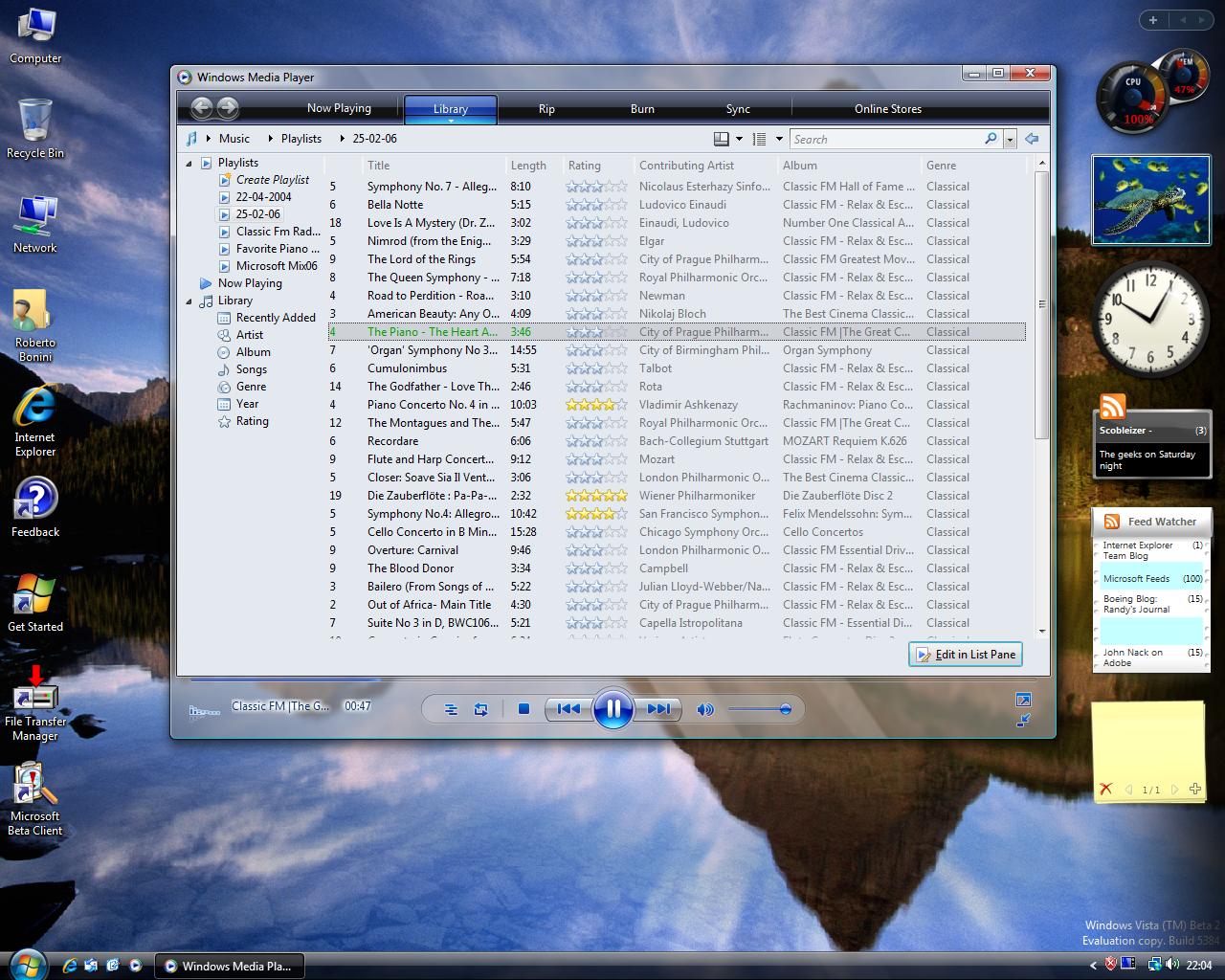
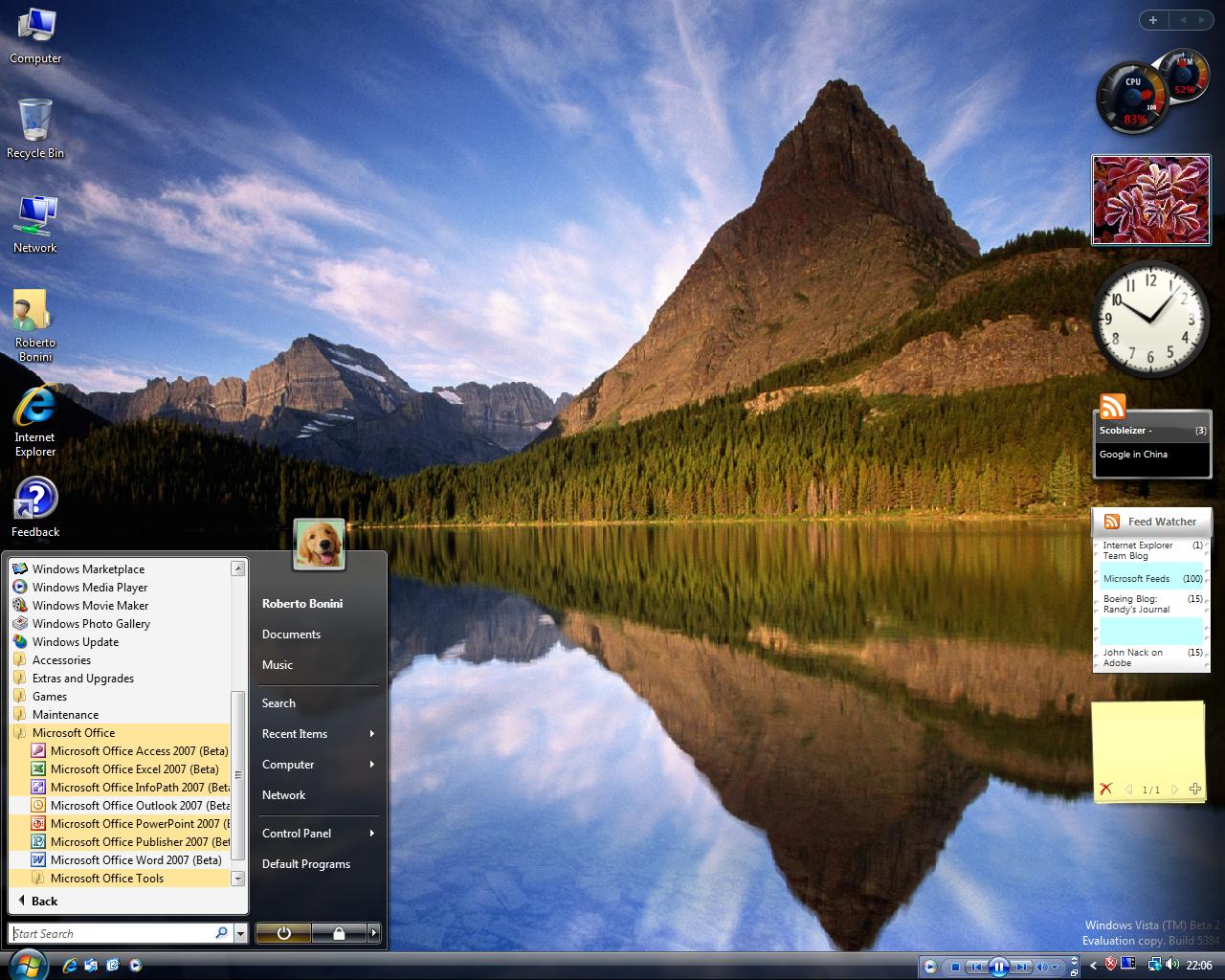
Here are a few more screen shots. As you can see I did manage to trick on the glass and it looks way better now.Even better than I expected it to.

startmenu.JPG

windowsmediaplayer.JPG

login.JPG

Also, adding pictures to this post in IE7 beta was a nightmare. had to add my blog to my trusted site list and this turn all the trusted site settings off. And then had to click display blocked content after saving,twice (once for each picture). Another bug report.

Secondly, Nortons will not work in Vista. Wrong. An update has just been released that should fix this. Its installed and time to restart. 🙂

Update: I'm not going through the hassel in IE7 of redoing the pictures so that you can see the full res versions. I'm going to reboot to XP to do that. Or install Firefox 🙂

Update2:  Norton Internet Security 2006 still will not work. And the firefox install was a breeze.