
via Instagram http://instagr.am/p/N5tr7cOgIz/ August 04, 2012 at 10:51AM
Random Technology Musings




I’m running a little bit of an experiment here on the blog.
Like the seemingly the rest of the world, I’m a regular user of Instagram (username: rabonini). I’m also a timid user of IFTTT– basically a routing system for the web. In this case, I’ve routed new Instagram images I’ve taken to the blog and they appear as new blog posts.
What I’d really like to do is route them to a kind of gallery page here on the blog automatically.
It might not stay, but consider the images as proof that I’m still alive.


Being a card carrying member of the To-The-Cloud camp, anything that uses the cloud gets my attention.
Creative Cloud is pure dead brilliant. Not to mention affordable. Its definitely the way forward for Adobe.
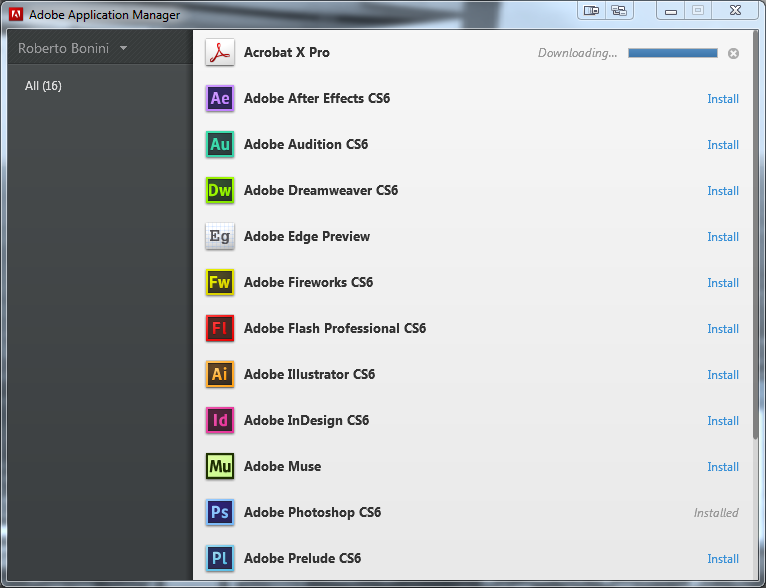
However, my gripe is with the Adobe Application Manager. As lofty as the name sounds, mission control a la Adobe its not. There definitely is room for more functionality.
Now, being on the far end of a bad broadband line, I rely on Download Managers more often than not. Being able to reliably pause and restart downloads is key when you’ve got to ration bandwidth.
Firstly: Do you see a pause button in that screen shot? Nope. There is only a cancel button. When you’re 60% of the way through a multi-gigabyte download, that’s the last thing you want to do. So a way to a pause the downloads and restart would be nice.
Secondly, having two computers means I want CS6 installed on both of them. The Application Manager, as far as I can tell, does not cache the installer files at all. And I’ve really gone looking for them. So it requires a separate download on the laptop. This does not please me. Its a hassle. Its very un-user friendly. A fix would be nice – or at least THE OPTION of keeping the files.
If there is already a cache – a link to it would be helpful.
There are basic features that are lacking. And its disappointing that they’re missing.
But looking at the application as a whole, it is Spartan – there is a certain lack of features. Yes I’m sure we’re supposed to use the website for all the other management tasks.
But, for example, installing language packs. Now this is not a problem for me. English is fine. Or even Pirate. But its a bit of a convoluted process switching language and getting it to download the correct language packs.
What about an auto uploader to the Creative Cloud storage? A Dropbox for Designers anyone?
So a little love and attention would be nice to complete the experience.
I suppose the point to my little rant here is that as great as CS6 and Creative cloud are, the Application Manager is somewhat lacking in comparison.
Ok its a little out there, I admit.
I predict that ThunderBolt will make its debut on the iPad. Maybe through the oft rumoured new connector??
It makes sense, right?
Being able to move things on and off the iPad 3 quickly – such as Photos or Video would be one use. A use which I’d love and buy any accessory required immediately.
I don’t know what else the accessory manufactures would dream up, but it sure gives them a range of possibilities.
It makes good business sense for Apple as well – It really does get Thunderbolt out to the masses and give the manufacturers good reason to start churning out Thunderbolt devices. More Thunderbolt devices mean even more sales of ThunderBolt enabled Macs and iPads.
Anything would be better than USB 2.0
 Random Musings
You must be logged in to post a comment.