Sliverlight 2 Ships!!!!

The next version of Microsoft’s Flash competitor is out.

And why is this big news? Well, a number of things stand out about this release.

The first big one is the number of languages that you can use with Silverlight: VB, C#, JavaScript, IronPython and IronRuby. though this, potentially isn’t the whole list. Any language that is targeted for the .Net CLR can, in theory, be used. This opens up the number of developers with the skills to use Silverlight. Microsoft may not have the install base that Flash has, but its making that up  by allowing as many developers as possible to get started quickly.

So Microsoft will leverage the .Net developer corps as well as the Python and Ruby community to jumpstart Silverlight and Silverlight Adoption.

In addition, Scott Hanselman says that you can use Eclipse to code Silverlight:

But there’s also http://www.eclipse4sl.org/. Yes, that means you can code Silverlight in Eclipse. Details and progress at the Eclipse Tools for Silverlight Blog. It’ll be licensed under the EPL 1.0 License.


Scott Guthrie  adds (I missed this on first reading):

Today we are also announcing that Microsoft is partnering with Soyatec to sponsor additional tools for developing Silverlight applications using the cross platform Eclipse development platform.  Click here to learn more about this and download the free Silverlight Eclipse plugin.  Click here for a step-by-step tutorial that walks-through how to use their Eclipse tools today to build a Silverlight 2 application.

The other big thing, at least for me is the tools library. This has been the one thing stopping me from enjoying Silverlight to the full.

Scott Guthrie provides the details:

Today we are also announcing the "Silverlight Control Pack" – which will deliver dozens of more controls that you can use with Silverlight 2.  We will continually add new controls to the control pack over the next few months (we expect to ultimately have more than 100 controls total).  The first release of the control pack will include controls like TreeView, DockPanel, WrapPanel, ViewBox, Expander, NumericUpDown, AutoComplete and more.  All controls will ship with full source, and with a OSI license that allows you to modify and use the source for any purpose.

Let me repeat that: All controls will ship with full source, and with a OSI license that allows you to modify and use the source for any purpose.

Unbelievable. I’m gonna have some serious fun playing with and tweaking those controls.

This is yet another element of Silverlight that will attract developers in droves. It all fits into to Microsoft’s pan of driving adoption of the platform on both the developer and client sides. I mean, Flash has no controls (except the most basic root level elements). And here is Microsoft offering developers the nirvana of controls and full source. It will boost productivity not only for developers, but also for designers who want to add that extra special flourish for their customers – its just a small tweak away.

Also, there’s one little line in Scotts post that jumped out at me:

We are also announcing today that we are releasing the Silverlight XAML vocabulary and schema under the Open Specification Promise (OSP), which enables anyone to create products that read and write XAML for Silverlight.

That’s really interesting. Is Silverlight XAML going to become like XML is now? Where we output XAML on the fly? The possibilities that can come out of this little bombshell are quite amazing. can’t wait to see what people come out with.

That’s what got my attention (of course, there is more in Scott Gu’s post)

And just to wet your appetites, Scott Hanselman has a talk at PDC which includes Silverlight and his now famous Babysmash application that will showcase the networking capabilities of Silverlight:

I’ll also show a Silverlight version of BabySmash that talks to the same server-side endpoints, and we’ll all (the audience) run BabySmash Silverlight on our laptops during the talk (better than just checking your email, which is what you usually do in talks) and see if we can’t crush my server live. Then I’ll talk about new .NET 4.0 features that I could use to take the whole solution to the next level.

The Boom is Over

It is all over Techmeme and FriendFeed: Sequoia Capital (the venture capitalists behind Yahoo and Google, to name just two), have called off the tech boom and told their companies to start preparing for the worst.

image

Lets think about this for a second. Is the technology sector as a whole vulnerable to this downturn? Yes, but probably not that much.

Consider Google as an example. Google gets bundled with every install of Firefox ( and if memory serves, some OEM PCs as well). And Google is pretty much the homepage of the Internet. So Google’s traffic probably wont suffer that much.

However, Google make money off ads,and it requires advertisers to buy those ads (or be charged for them). Now this could be very bad or very good depending on the industry doing the buying.

For example, Jeremiah Owyang just said on FriendFeed:

“The economic downturn is a good thing for social media, it’s going to force innovation, revenues, and productivity benefits –the other tools will fall by the wayside. Agree or disagree?”

So either ads will become more aggressive in an effort to lure ever reluctant consumers into the open.

Or they will cut back. Some ads just don’t work as well as traditional methods.

My bet is that, as Jeremiah said above, the online space of ads and social media will be leveraged to an ever greater degree and firms try their level best to stay above water.

So why did Google’s stock drop yesterday? Again, I think that investors are nervous that Google, while having a very broad range of services, hasn’t spread its revenue streams widely enough.

Google need to figure a way to monetize Youtube ( for starters), rapidly. Youtube gets millions of views per day that Google earn $0 from.

I’ll tell you what Google should do. They should go to Adobe and license that audio-to-keyword tech in CS4 and run every video on Youtube through it.

Gmail is another one. Personally I have never EVER clicked on a link from the Ads in the sidebar. Sure they are accurate and frighteningly well targeted, but I have never clicked on them.

For the tech industry as a whole, software is integral to the lives we now live. It ain’t going away anytime soon.

FriendFeed Gets My Images, Too – FriendFeed Notify 0.2

Like this picture?

(Yerba Buena Island – Thomas Hawk)

Me too. How about this one:

(Passage- johopo)

Nice huh?

One more:

(Untitled – Me)

Couldn’t resist.

My point is that the above three images will be posted to FriendFeed along with the link to this post by the new release of FriendFeed Notify 0.2.

Now this isn’t for just for photography buffs like me and Thomas Hawk. It works for any images embedded in an img tag and greater than 50x100px.

Now the release isn’t actually feature complete. There are a few things I’d like to add to it. These will be in the 0.2.1 release. Including picking and choosing which images to post and  the posting of a comment by way of summary. These are simple to implement and I don’t thing it will be too long before they are out.

So go and get it from here.

Anyone looking at the code will see that i am using the .Net frameworks webbrowser control to retrieve images. This runs in the same dialog you are shown the images.The regexes I tried are all in the code, but commented out. If anyone can help with these, that would be great. It would cut down on the overhead. Thanks.

For those of you reading this and wondering hat happened to my Smugmug add-in for WHS.its been on the back burner for a while. I didn’t expect the hiatus to take this long. In the meanwhile, Omar Shahine has updated his Send To SmugMug utility. Some of the features for the next release that people are voting on are similar in concept to my add-in. So, go vote. I still intend to do this Add-In and get it integrated with WHS.

Enjoy.

Google’s Chrome

Google today launched a new browser, called Chrome.

And you can get it from www.google.com/chrome

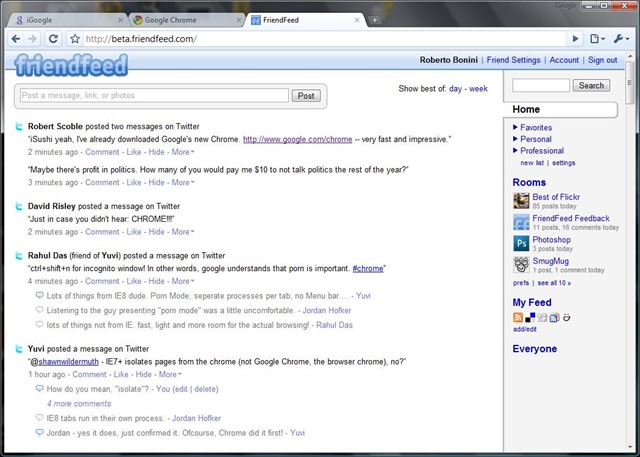
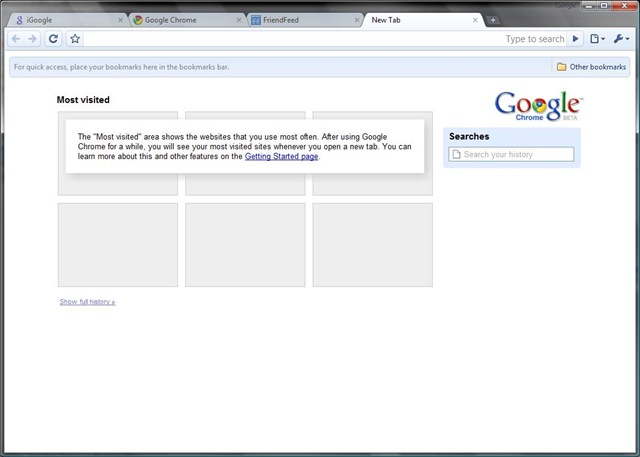
Its lightweight, refreshing and has a few nice features I’ve been looking for Mozilla to implement in FF. Namely that you can move tabs between windows. And it has a spellchecker built in (I’m too lazy to install THAT FF plugin). And a privacy mode ( why on earth one would want to use it is beyond me). And its based on Webkit, like Safari.

Some screenshots:

chrome 1 

chrome 2

chrome 3

Now thats as far as I’ve got with using the new browser.

Its already good enough for me to consider making it my default browser.

The Friendfeed bookmarklet works (although it detects that I’m using Safari).

There is no Delicious plugin yet (critical to me I can’t imagine not having it).

And Firebug would be nice as well – it would make developing with yet another browser slightly easier.

Robert Scoble has reported over on friendfeed that Google properties appear to be faster on Chrome ( not sure abut that yet).

And Yuvi, of statbot.com, reports that some Sliverlight apps load, but the heavy ones hang.

I’m betting that Microsoft offices are a touch louder than usual.

Lets see what happens here.

WHS Add-In: WHS2SmugMug – Update

I’ve neglected this project for a while mainly due to me being so busy with other stuff.

The hiatus has actually done the project good as feature creep was threatening to de-rail the thing the last time I had a look at it.

So I’ve cleaned up the requirements for the data to be stored locally. I’ve eliminated just about everything I can pull from SmugMug leaving me with a nice, clean object model to work with.

I was also struck by the fragmenting of the project into three – scheduled, service and WHS Console Add-in.

While this seems logical, it is a bit over the top. So I’m dropping the scheduled uploader and having uploads handled by the service.

Work is progressing nicely and I hope to have a working  service app soon ( if not a console add-in).

I’m now using the SmugMugAPIWrapper from Codeplex. Its MIT Licenced so WHS2SugMug will have to be too. This library is one that I can actually use without looking at the source as its built to use the current SmugMug API, so no worries there.

As with my Windows Live Writer add-in, I’ll host the project on Codeplex as soon as there is a release-ready codebase.

FriendFeed gets my posts, Twice

I’ve noticed that there is a lag between my post being published and it showing up in FF (From Michel Arrington’s stream):


image

I’ve actually noticed that this is becoming the exception rather than the norm slowly but surely:

image

Nevertheless I wrote a plugin for Windows Live Writer that automatically posts a link to FriendFeed every time I publish a post. In fact the link in the above picture ws posted using this plugin

Since I’ve never written a WLW plugin I used the Twitter Notify plugin that is included as part of the SDK as a springboard. You might notice that there is very little code left of the original.

Since it uses the new SDK feature unavailable in WLW 2.0, you’ll need the WLW 3.0 CTP for this plugin to work.

You can get it from Codeplex here.

It will ask you for your FriendFeed username and Remote Key as well as a preamble to accompany the posted link. This is set, by default, to “Blog Post”. As you can see mine is set to “New Blog Post”. All these settings can be changed from the Plugins page of WLW options.

Suggestions are welcome as are bug fixes, etc.

The plugin is working well for me and I’ve encountered no issues, other than WLW taking slightly longer to start up ( this could be a CTP issue).

I currently thinking of:

  • Putting a link to the discussion on FF in the post( as far as I can tell this would require a re-write)
  • Linking to FF when you Update the post

Anyone else got any ideas?

WHS: Virtual Server

As I promised, I’m posting a How To for installing Virtual Server on WHS.

A word to the wise:

I’ve a 2.8Ghz Celeron D with 2GB RAM to run this on. Virtual Server can provision processor usage to an extent, but it uses RAM like there’s no tomorrow. Don’t forget that it has to play nicely with WHS (specifically DEmigrator.exe that burns CPU cycles) and other stuff like defrag passes and anti-virus.

Since WHS is built on top of Small Business Server,  the underlying OS is essentially the same. Hence no compatibility issues.

Installing Virtual Server is relatively straight forward.

First, download Virtual Server 2005 from here.

Then Download the Service Pack from here.

Open a Remote Desktop Session or use the Advanced Admin console tab to access the WHS desktop.

Now, its up to you whether you want to install the program files to C drive or D drive. Its worth noting that the Virtual Machines are stored separately in a location you specify on a per VM basis.

Once the install( including that of the service pack) is completed go to Start -> All Programs -> Microsoft Virtual server and hit the Administration Website shortcut.

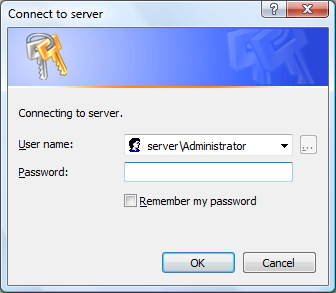
You get this:

image

Note: I was accessing this remotely so had to prefix the user name with “server\”.

Otherwise, these are your WHS credentials that you use to access the console or remote in to WHS.

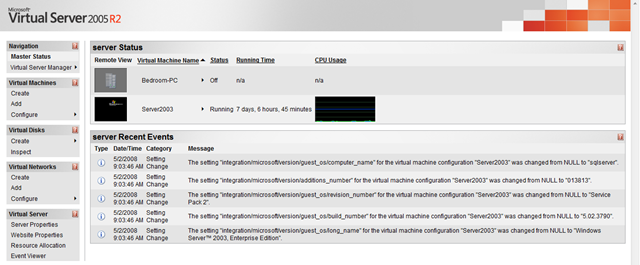
This is the webpage you get to (click for a larger version):

image

As you can see I have two virtual machines listed. One of which is currently  running.

I find that its easier to manage the server remotely, so copy the web site shortcut from the Start Menu to a network share. This now allows you to reach the web site from any connected PC.

If you’ve done this, close Remote Desktop and try it. The Default IIS settings that the install configures for you should be OK.

Setting up a Virtual Machine couldn’t be simpler:

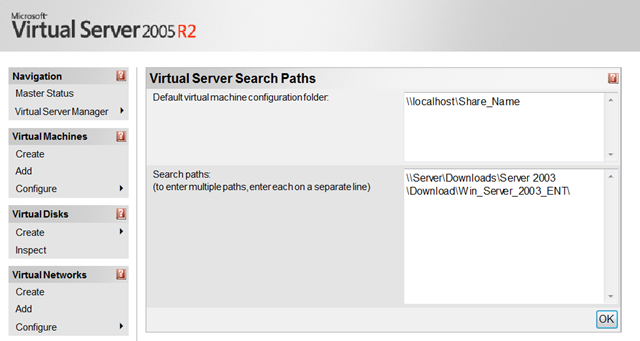
First we want to set the default location of our Virtual Machines. Go to Server Properties at the bottom of the Sidebar and click on Search Paths. Change the Default virtual machine configuration folder to your desired location. I’ve been using a network share with replication turned off.

image

You can also set default paths for ISO’s that you will use. These will show up when you configure the VM’s Cd/DVD drive.

And press Ok when you’re done.

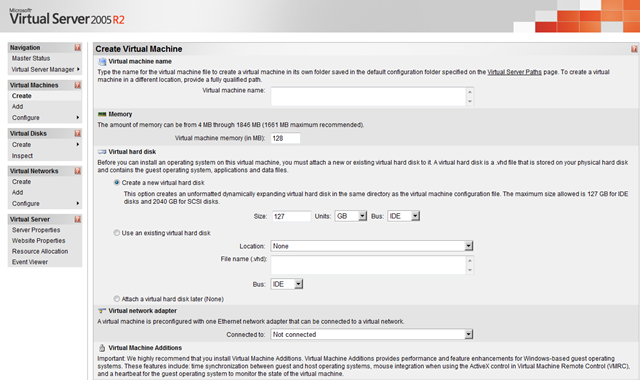
Hit Create under the Virtual machines section of the sidebar:

image

Enter all the info on the screen.

The RAM that the Virtual Machine is assigned is occupied as soon as the VM starts up. So be careful when doing this.

You have a choice of creating a new Virtual Hard Drive or attaching an existing one. make sure that the size of the hard drive is enough for your needs. Expanding it later can be a little difficult.  And choose a SCSI bus if you intend to have multiple VHDs attached to the same machine.

The VHD actual file size increases as you add data to it. It stops at the logical size of the VHD. So a 80Gb VHD can no be larger than 80Gb on disk.

You can also choose to create the VM without an attached hard disk.

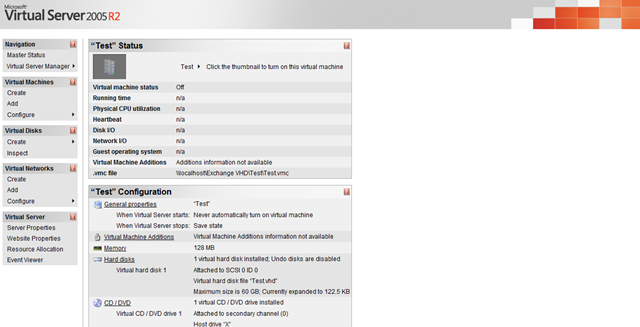
Pressing “create” takes us to the Vm config page:

image

You can also reach this page by selecting your VM from the Configure menu under the Virtual Machines Section of the Sidebar.

This is where you change items such as memory, hard disks, CD/DVD ROM drives, Networking, SCSI Adaptors, COM and  LRP ports.

Each option takes you to a new page were you configure settings specific to that area.

Its worth noting here that the VM needs to be Shutdown for some operations. But you can still change the location of the media that the CD/DVD ROM drive captures while the VM is running.

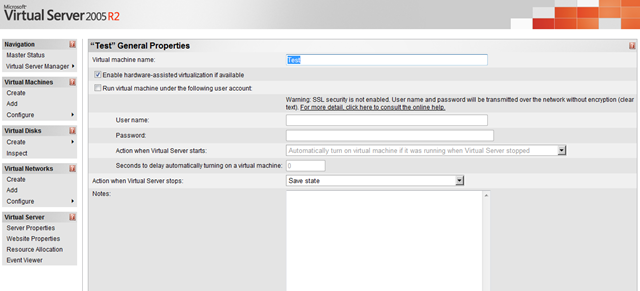
You can also set the VM to start up automatically with WHS by going to the Server properties.

image

With my Windows Server 2003 VM running constantly, the WHS automatic restarts could be a problem. All I do is check the box, input the account details, set a delay ( in my case, 600 seconds) and tell Virtual server to save the VM’s state when WHS shuts down. The delay is actually a pretty nifty feature as it allows WHS to initialise itself, bringing all its processes online, before starting the VM.

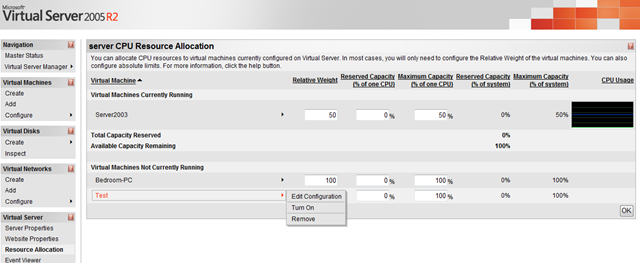
One more thing I have to cover for running this on WHS is Resource Allocation:

image

You’ll find it the bottom of the sidebar.

As you can see my VM has 50% Max Processor capacity to play with. This protects the WHS processes from being starved of resources.

Once you’ve got your VM set up and you’ve installed you software all you have to do is remote in using the Remote Control facility the web site provides you with ( its good for the initial setup such as enabling Remote desktop Connections and so forth). All you do is double click on the VM icon  on the front page.

I also recommend installing VM Additions (the ISO for it comes with Virtual Server and is a default option for the CD/DVDROM drive) that will improve the way the VM behaves within the Virtual Server environment.

Additionally, this post probably scratches the surface of what’s possible with this.

And I’m sure I’ve got a few things (unintentionally) wrong along the way so its not fool proof, so YMMV ( Your Mileage May Vary).

Happy Hacking…

Link of the Day

via Scott Rosenburg:

Pentagon’s Accounting Mess – Portfolio.com: Yet Another Federal Software Quagmire (cf. the IRS, the FBI, the FAA, etc.). An account of the Pentagon’s failure to upgrade its ancient mainframe-era accounting system; the tale unfolds in a building in Indianapolis the size of 28 football fields, and explains why the U.S. military cannot be audited. The Pentagon literally cannot tell you how much it has spent or what it has purchased. If you ran your family this way, they’d disown you.

Err, this is the 21st Century and this should not be too difficult to accomplish.

And they’re still using COBOL?? What can I say?

<humour> Solution? Call Microsoft </humour>

Subversion Source Control

This post has been bouncing around my head for sometime since finding the time to write has been a little hard.

The fact is that the whole Subversion vs Git vs TFS vs [insert preferred system here] debate can get to the point where its quasi-religious (as are numerous other tech debates – windows vs mac being one of the notable ones).

Now I, bad developer that I am, have only recently started using Subversion. The need to sync source code between my desktop and my laptop outgrew the copy/paste via Windows Home Server share approach.

The fact that Subversion is free is also a big deal maker ( compared to, say Team Foundation Server).

I have been using it on another free product, namely Netbeans 6.01 for my Java development. Its nothing major, only university projects. 

The fact is that Netbeans comes with Subversion and CVN support baked into the IDE. Additionally, Netbeans uses its own Local History feature to keep track of your files wether you’re using formal source control or not. Every time you build your project it makes a commit to your Local History. This means that one has both Local history for the small changes and Subversion for the big changes.

The fact is that having it baked into the IDE makes all the difference – it allows one to interact with the code in revisions directly. Let me explain. One can make line-by-line rollbacks from your previous versions wether you are using Local history or Subversion or both. Powerfully, the rollbacks count as changes to your code and are committed right back to the database.

(I plan to do a post on the value of a good IDE soon as well)

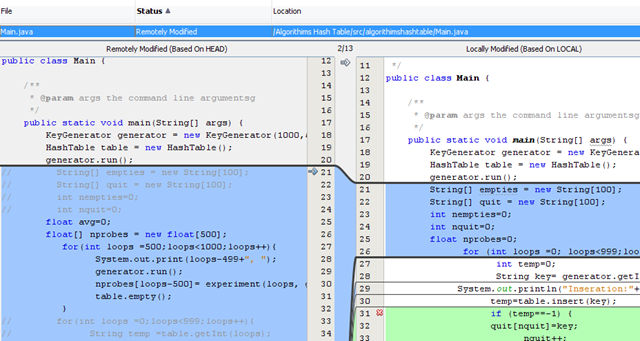
image

In the (Subversion) case above, the local copy is out of date (on the right) and the remote changes (on the left) are shown in blue. The changes were made on my laptop, committed and I’m comparing them against the desktop copy of the files.

By clicking on the blue arrow one can insert the changes into the local copy with out inserting all the changes. The same applies for replacements (in cases where the lines have been modified rather than outright replaced).

The green area in the local copy no longer exists and by clicking on the red cross one can delete the highlighted lines.

Local History works in exactly the same way.

This is a small example and one needs to actually use it to understand the power of the concept.

Now, the fact is that the vast majority of my coding gets done in Visual Studio. And Visual Studio , the TFS edition aside, does not support source control. Period.

However, VisualSVN actually has an Add-In for Visual Studio that brings this functionality into the IDE. The problem is  that the Add-In isn’t free. Its $49 per licence. Personal licenses are restricted to one per order ( but not corporate licenses) and open source projects qualify for free licenses. And, no, I haven’t yet decided whether to get a license.

I agree with Jeff Atwood that software such as Firefox should take the most popular Add-Ins and fold them in the main code base. Which gives rise to the question that if Source Control is so important and popular (is it for non-TFS Visual Studio users????), why doesn’t Microsoft add it in?

I mean its only Subversion. Surely Microsoft must have some pretty good selling points related to why TFS is, like, totally better than Subversion ( 😉 ). That takes care of the “They already have source control” pundits.

Source Control is simply good programming practice and if Microsoft is serious about attracting people to its platform (and the freely available express editions shows that they are somewhat serious), they should provide it.

Contrast Visual Studio to Netbeans and that’s enough said on the subject.

Now the easiest way to install Subversion is to head over to Jeff’s blog post about it. If you don’t subscribe to Jeff’s blog, i suggest that you do – its invaluable.

I went the VisualSVN server route which set everything up with the addition of  the ability to browse the server using a web browser (it does this by using Apache). To avoid Apache conflicting with Windows Home Server, its running on a Virtual Server virtual machine ( that image runs a few other odds and ends). Setting up Virtual Server on WHS is itself the subject of another blog post. It took me literally 2 minutes.

Before letting you go, Scott Hanselman has a great podcast on Subversion vs Git for Source Control and it comes highly recommended.