Bad Design, Illustrated

image

So here I am. Sick as a dog. And I need to renew my tvtv subscription. Which mean I need to re-select my device (why I need to do this in the first place is a mystery to me).

So I get to the above screen. What does it say? Read it: Select Device Password. Which leaves me wondering.

Call it stupid ( or not, depending on you point of view – but remember that this is seen through the fog of a muddled brain), but I check all my instruction manuals in vain. I spent a few hours scouring various forums. Only then did it dawn on me that since there was nothing on this mythical device password, there must be none.

So I went back and checked ever so carefully the help section of TVTV’s website for the 21st time. And there it was “Please re-enter your password for security reasons”. Since this is not part of the shopping bit, I can’t imagine why all the security.

My point being that a little clarity on the above page would have saved me loads of time.

In 20/20 – hindsight, the page does make some sort of sense. “Select” is never used in conjunction with a textbox. But the style of both the headings (since they are indeed supposed to be separate) is the same – font, weight, colour, size. And they are right underneath the other, as if following on. Separation of these two headings in some way – certainly i terms of style or better yet, in spacing – would clear any confusion.

“Please retype your password” makes sense in the light of know that its your password they want. But given the design miscues above, looked out of place and perhaps referred to when I’d actually have to retype this mythical device password .

There is no obvious help button or icon, or even tooltip that is visible on this form – bad practice in any situation. A tooltip/label saying “Please enter you TVTV password here” would do wonders. I’ve seen websites that actively display help in a side bar, explaining the purpose of each and every form field. A “what does this do” explanation never hurts either.

Even when one is confronted with readily intuitive fields such as credit/debit card forms online, help makes the process a whole lot less daunting ( one is after all, dealing with real money. Making mistakes is not the way forward).

The point is that as winforms, webforms, WPF, Silverlight –developers and UI designers, making our users happy is the number one priority. That means designing good, intuitive UI’s and helping them to use it, too.

I’ve had my share or websites that the thought of using them gets me angry. There are others that I think are a little too liberal with their help information, coddling their users in wool. But I’ve never ever had an issue with those websites, ever.

The iPhone is, I think, the canonical expression of a good UI. My very tech-limited mother likes mine so much that she is getting one herself ( she’s had her current phone for two years and still hasn’t figured out how to text/SMS, yet has almost total command of the iPhone). Its a combination of UI touch screen that makes the difference. touching, pointing, dragging, pinching. These are all actions we use naturally every day – no mice to move and click, no keys to press. Its the intuitiveness of the whole experience that makes it so successful as a UI.

So while we may still depend on mice and keyboards, intuitiveness in our UI is something that our users will be grateful for.

Apple’s Saving Grace – I’m Not Sure

 apple-new-macbook-hands-on-top

That’s the new Macbook on top (via Engadget).

We still have the old one around, for the reduced priced of $999 ( or £719).

I’m wondering how much of a price difference there is between this one ( the $999/£719) and your Typical Dell.

13” Macbook (£719- base):

  • 2.1GHz
  • Intel Core 2 Duo
  • 1GB DDR2 Memory
  • 120GB hard drive1
  • Intel GMA X3100 graphics

The Dell Inspiron 1525 from dell.co.uk (£399 – no customisations):

  • Intel® Pentium Dual Core Processor T3200 (2.0 GHz, 667 MHz FSB, 1 MB L2 cache)
  • 15.4" Wide Screen WXGA (1280 x 800) Display with TrueLife™
  • Integrated Intel® Graphic Media Accelerator X3100
  • 2048MB 667MHz Dual Channel DDR2 SDRAM [2×1024]
  • 250GB (5400RPM) SATA Hard Drive

Ok. Here is the same 2.0 GHz Inspiron 1525 from Dell.com ($699):

  • Intel® Core™ 2 Duo T5800 (2.0GHz/800Mhz FSB/2MB cache)
  • Glossy, widescreen 15.4 inch display (1280×800)
  • 3GB2 Shared Dual Channel DDR2 at 667MHz
  • Size: 320GB3 SATA Hard Drive (5400RPM)
  • Intel Graphics Media Accelerator X3100

That’s a £310/$200 difference in price.

Of course such a comparison doesn’t take into account the MacBooks multi-Touch trackpad or Apple’s legendary Customer Service ( Dell Uk is good, too), or Vista Media Centre that is bundled With Vista Home Premium, or Dell’s cheap colour upgrade.

There’s a gap. But is it Worth It?

Sliverlight 2 Ships!!!!

The next version of Microsoft’s Flash competitor is out.

And why is this big news? Well, a number of things stand out about this release.

The first big one is the number of languages that you can use with Silverlight: VB, C#, JavaScript, IronPython and IronRuby. though this, potentially isn’t the whole list. Any language that is targeted for the .Net CLR can, in theory, be used. This opens up the number of developers with the skills to use Silverlight. Microsoft may not have the install base that Flash has, but its making that up  by allowing as many developers as possible to get started quickly.

So Microsoft will leverage the .Net developer corps as well as the Python and Ruby community to jumpstart Silverlight and Silverlight Adoption.

In addition, Scott Hanselman says that you can use Eclipse to code Silverlight:

But there’s also http://www.eclipse4sl.org/. Yes, that means you can code Silverlight in Eclipse. Details and progress at the Eclipse Tools for Silverlight Blog. It’ll be licensed under the EPL 1.0 License.


Scott Guthrie  adds (I missed this on first reading):

Today we are also announcing that Microsoft is partnering with Soyatec to sponsor additional tools for developing Silverlight applications using the cross platform Eclipse development platform.  Click here to learn more about this and download the free Silverlight Eclipse plugin.  Click here for a step-by-step tutorial that walks-through how to use their Eclipse tools today to build a Silverlight 2 application.

The other big thing, at least for me is the tools library. This has been the one thing stopping me from enjoying Silverlight to the full.

Scott Guthrie provides the details:

Today we are also announcing the "Silverlight Control Pack" – which will deliver dozens of more controls that you can use with Silverlight 2.  We will continually add new controls to the control pack over the next few months (we expect to ultimately have more than 100 controls total).  The first release of the control pack will include controls like TreeView, DockPanel, WrapPanel, ViewBox, Expander, NumericUpDown, AutoComplete and more.  All controls will ship with full source, and with a OSI license that allows you to modify and use the source for any purpose.

Let me repeat that: All controls will ship with full source, and with a OSI license that allows you to modify and use the source for any purpose.

Unbelievable. I’m gonna have some serious fun playing with and tweaking those controls.

This is yet another element of Silverlight that will attract developers in droves. It all fits into to Microsoft’s pan of driving adoption of the platform on both the developer and client sides. I mean, Flash has no controls (except the most basic root level elements). And here is Microsoft offering developers the nirvana of controls and full source. It will boost productivity not only for developers, but also for designers who want to add that extra special flourish for their customers – its just a small tweak away.

Also, there’s one little line in Scotts post that jumped out at me:

We are also announcing today that we are releasing the Silverlight XAML vocabulary and schema under the Open Specification Promise (OSP), which enables anyone to create products that read and write XAML for Silverlight.

That’s really interesting. Is Silverlight XAML going to become like XML is now? Where we output XAML on the fly? The possibilities that can come out of this little bombshell are quite amazing. can’t wait to see what people come out with.

That’s what got my attention (of course, there is more in Scott Gu’s post)

And just to wet your appetites, Scott Hanselman has a talk at PDC which includes Silverlight and his now famous Babysmash application that will showcase the networking capabilities of Silverlight:

I’ll also show a Silverlight version of BabySmash that talks to the same server-side endpoints, and we’ll all (the audience) run BabySmash Silverlight on our laptops during the talk (better than just checking your email, which is what you usually do in talks) and see if we can’t crush my server live. Then I’ll talk about new .NET 4.0 features that I could use to take the whole solution to the next level.

The Boom is Over

It is all over Techmeme and FriendFeed: Sequoia Capital (the venture capitalists behind Yahoo and Google, to name just two), have called off the tech boom and told their companies to start preparing for the worst.

image

Lets think about this for a second. Is the technology sector as a whole vulnerable to this downturn? Yes, but probably not that much.

Consider Google as an example. Google gets bundled with every install of Firefox ( and if memory serves, some OEM PCs as well). And Google is pretty much the homepage of the Internet. So Google’s traffic probably wont suffer that much.

However, Google make money off ads,and it requires advertisers to buy those ads (or be charged for them). Now this could be very bad or very good depending on the industry doing the buying.

For example, Jeremiah Owyang just said on FriendFeed:

“The economic downturn is a good thing for social media, it’s going to force innovation, revenues, and productivity benefits –the other tools will fall by the wayside. Agree or disagree?”

So either ads will become more aggressive in an effort to lure ever reluctant consumers into the open.

Or they will cut back. Some ads just don’t work as well as traditional methods.

My bet is that, as Jeremiah said above, the online space of ads and social media will be leveraged to an ever greater degree and firms try their level best to stay above water.

So why did Google’s stock drop yesterday? Again, I think that investors are nervous that Google, while having a very broad range of services, hasn’t spread its revenue streams widely enough.

Google need to figure a way to monetize Youtube ( for starters), rapidly. Youtube gets millions of views per day that Google earn $0 from.

I’ll tell you what Google should do. They should go to Adobe and license that audio-to-keyword tech in CS4 and run every video on Youtube through it.

Gmail is another one. Personally I have never EVER clicked on a link from the Ads in the sidebar. Sure they are accurate and frighteningly well targeted, but I have never clicked on them.

For the tech industry as a whole, software is integral to the lives we now live. It ain’t going away anytime soon.

A Word of Caution

Since the quake in California,  old Vimeo and Youtube videos that people have favourite have been showing up in FriendFeed. Current thinking has it that the data must have been destroyed and recreated from backups.

Some of them are, NSFW, shall we say (I’m putting it very, very delicately). There is even one particular user that has a lot of these videos showing up in his stream (and I’m not linking to them – I’m keeping this blog respectable).

So given the current employers habit of Googling prospective hires, it might be safer to be careful what we add to our online personas.

Just saying.

Google’s Chrome

Google today launched a new browser, called Chrome.

And you can get it from www.google.com/chrome

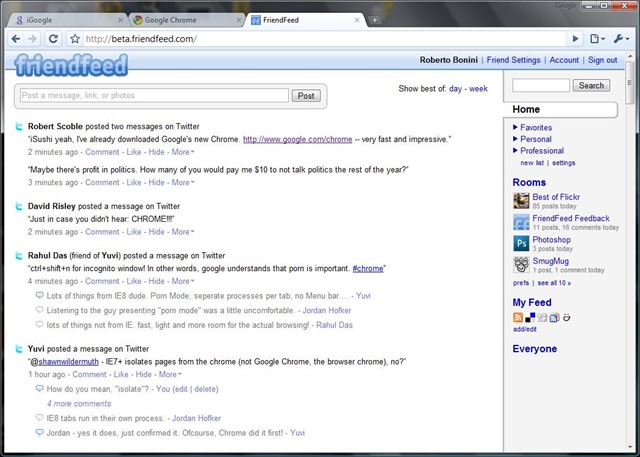
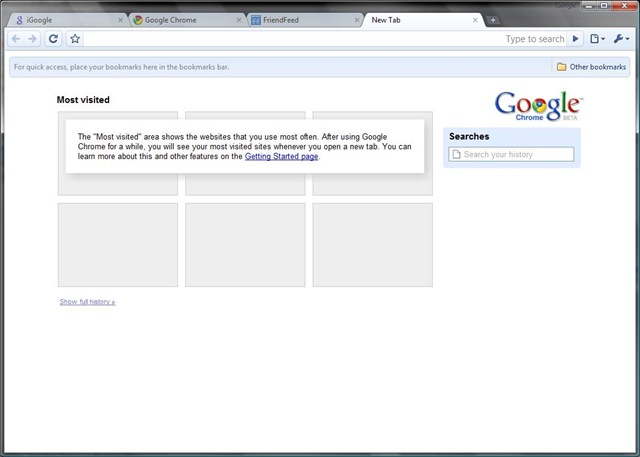
Its lightweight, refreshing and has a few nice features I’ve been looking for Mozilla to implement in FF. Namely that you can move tabs between windows. And it has a spellchecker built in (I’m too lazy to install THAT FF plugin). And a privacy mode ( why on earth one would want to use it is beyond me). And its based on Webkit, like Safari.

Some screenshots:

chrome 1 

chrome 2

chrome 3

Now thats as far as I’ve got with using the new browser.

Its already good enough for me to consider making it my default browser.

The Friendfeed bookmarklet works (although it detects that I’m using Safari).

There is no Delicious plugin yet (critical to me I can’t imagine not having it).

And Firebug would be nice as well – it would make developing with yet another browser slightly easier.

Robert Scoble has reported over on friendfeed that Google properties appear to be faster on Chrome ( not sure abut that yet).

And Yuvi, of statbot.com, reports that some Sliverlight apps load, but the heavy ones hang.

I’m betting that Microsoft offices are a touch louder than usual.

Lets see what happens here.

Hard Drive Troubles

image

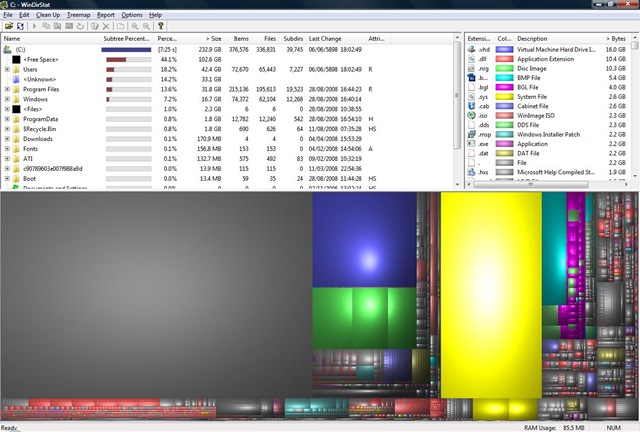
This picture was taken using WinDirStat to image the drive. Great utility, by the way. Its part of my Software Keychain now.

See that yellow area over there? Its 3.5Gbs of space that are used, but not accessible via Exploder and thus the Windows API.

Before you ask, I already tried RootkitRevealer from SysInternals, but it doesn’t work on Vista.

It was 63Gbs yesterday. Here’s what I did:

Then I decided that if I restore from a Windows Home Server backup, the unknown space shouldn’t be there as its effectively invisible to the Backup service at the time of making a backup.

Which I did. After booting up, it didn’t work.

However, this morning chkdsk started as part of the boot sequence, no idea why. And the hole in my hard drive is gone  reduced.

Whew. I was contemplating a complete rebuild of my laptop.

Out of curiosity I ran WinDirStat on my Desktop.

Here’s what I got:

desktopwindirstat

Again, there’s a 30Gb hole in the hard drive.

I ran chkdsk.exe and got a slightly tidier picture, but with the 30Gb hole still there.

Looks like I’m going to have to restore it from WHS as well.

Social Networks at Work

IF you’re surprised that I’ve gone so long without posting here properly, its because I’ve been spending so much time on Friendfeed.

Friendfeed suits my style so much better than blogging. With its link/article centred comments threads, it allows short comments about a particular subject that aren’t a blog in length. Its suits my free ranging style, commenting of just about anything that I’m interested in.

Two incidents this week, both well publicised on Friendfeed illustrate the power of the social network.

The first, and arguably most public, is the PR battle now erupting between Thomas Hawk (the photographer) and his supporters on the one side, and the San Francisco Museum of Modern Art on the other. In the middle there are a few moderates keeping a steady and cool head.

Thomas Hawk:

After purchasing my family membership and visiting the museum today I was forcibly thrown out of the museum by two museum security guards at the direction of the Director of Visitor Relations Simon Blint.
My crime? Taking a photograph from the second floor stairs in the SFMOMA’s atrium (an area where the SF MOMA’s own website explicitly says photography is allowed).

image

And again ( the following day):

One allegation that has been raised is that Blint threw me out because he felt that I was shooting down a low cut blouse of one of his employees sitting in the atrium below where I was shooting. The photo above is a photo that I snapped of Blint as he was publicly admonishing me from the floor, that’s him with his arms crossed there — he’s about the size of an ant in the photo.

image

I can vouch for the absurdity of shooting down a low cut blouse with  14mm lens from the top of those stairs

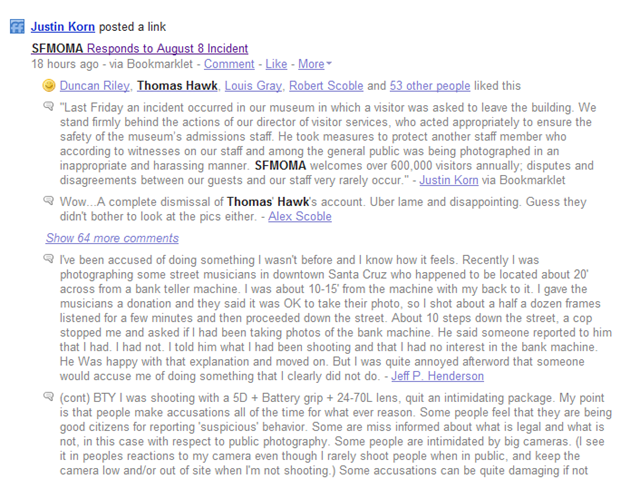
The comments are prolific on both these posts with a number of differing viewpoints about Thomas’ account. While most are not explicitly for or against, there is a searach for a middle ground between emphasising Photographers Rights and the way in which the situation was handled. Just do a search for “Simon Blint” on Friendfeed. Here.

SFMOMA responded with this Press Release:

Last Friday an incident occurred in our museum in which a visitor was asked to leave the building. We stand firmly behind the actions of our director of visitor services, who acted appropriately to ensure the safety of the museum’s admissions staff. He took measures to protect another staff member who according to witnesses on our staff and among the general public was being photographed in an inappropriate and harassing manner. SFMOMA welcomes over 600,000 visitors annually; disputes and disagreements between our guests and our staff very rarely occur.
This was not an issue relating to the museum’s official photography policy. In fact, SFMOMA recently made a policy change to allow photographers to take pictures of the permanent collection, the architecture of the building, and the museum’s public spaces.

image

The comments on this link on Friendfeed are quite interesting, you can find them here. Most are wondering why the other side of the story is not being told here (Since all the information we have is from Thomas). I can understadn them drawing a line under the incident. I’d want to as well:  the issue of Photographers rights has well and truly been highlighted.

This whole discussion has gotten way out of hand. Someone even posted a link to Simon Blints Facebook page ( Which I will not link to, on principle). On the one hand, this will dominate any Google searches for Simon and potentially portray him in the wrong light. On the other it portrays him as on his toes, looking out for the needs of his employees and visitors alike (tenuous, I know, but still).

Do I think Thomas should have blogged this? Yes indeed. Do I think both sides could have handled it better. Yes again.

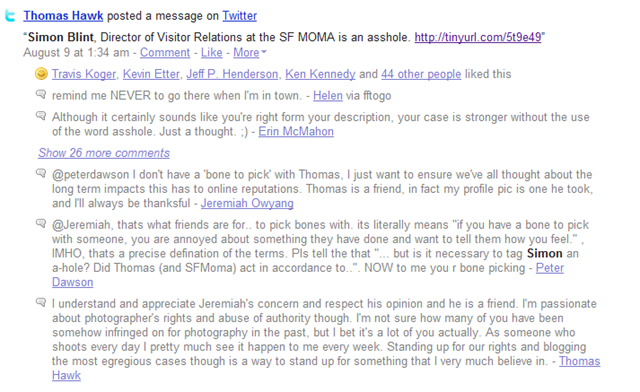
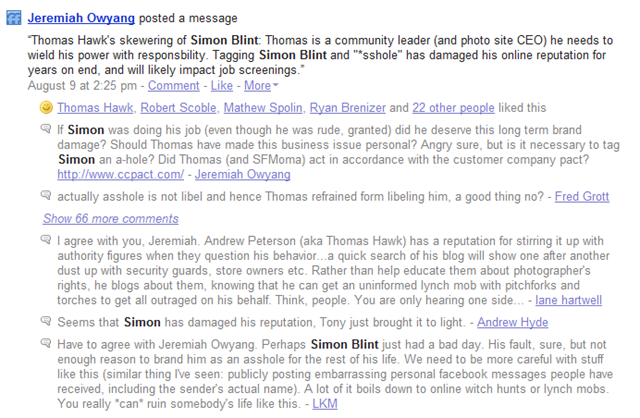
In closing, Jeremiah Owyang said the following:

Thomas Hawk’s skewering of Simon Blint: Thomas is a community leader (and photo site CEO) he needs to wield his power with responsbility

And you can see the level of discussion that generated below:

image 

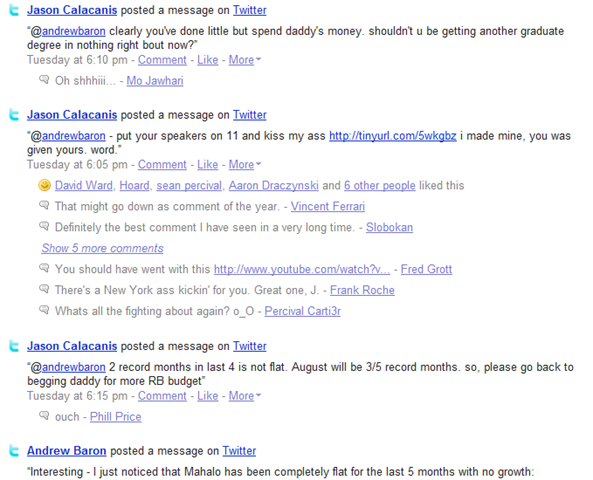
The other one, which I am less informed about is a solely a twitter affair. Usually Twitters popup in my feed entirely out of context. This time, however almost my entire page way covered in Twiters between Jason Calcanis of Mahalo and Andrew Baron.

And boy were the insults flying back and forth.

image

It takes up the first page and a half of this FF search.

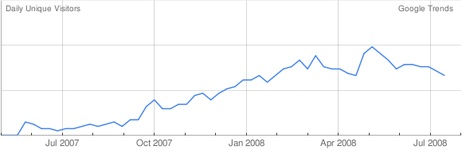
That last entry in the picture above refers to this chart regarding Mahalo traffic numbers:

image

And that’s how this whole thing kicked off. Exactly what was the bone of contention, I’ve no idea.

Again, the power of social networks was leveraged since the combined communities of Twitter and Friendfeed were spectators to the whole debacle.  What ordinarily would be solved via email just a few years ago, now is thrust on to the Internet for all to see.

What is particularly troublesome of this kind of behaviour across multiple social networks is the effect that they have. No matter who was in the right or wrong, it leaves a bad taste in my mouth.

These two incidents also shows the difference in format between two highly successful social networks (can you even describe FF as a social network?). It emphasises that we can either interact with the content or which each other. Interacting with the content gives us a starting pint for conversation, interacting with each other, apparently, can be much shakier.

Of the two choices, I would rather join a discussion centring on something solid, a blog post, link, photo or even an informative twitter.

FriendFeed gets my posts, Twice

I’ve noticed that there is a lag between my post being published and it showing up in FF (From Michel Arrington’s stream):


image

I’ve actually noticed that this is becoming the exception rather than the norm slowly but surely:

image

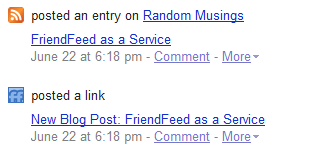
Nevertheless I wrote a plugin for Windows Live Writer that automatically posts a link to FriendFeed every time I publish a post. In fact the link in the above picture ws posted using this plugin

Since I’ve never written a WLW plugin I used the Twitter Notify plugin that is included as part of the SDK as a springboard. You might notice that there is very little code left of the original.

Since it uses the new SDK feature unavailable in WLW 2.0, you’ll need the WLW 3.0 CTP for this plugin to work.

You can get it from Codeplex here.

It will ask you for your FriendFeed username and Remote Key as well as a preamble to accompany the posted link. This is set, by default, to “Blog Post”. As you can see mine is set to “New Blog Post”. All these settings can be changed from the Plugins page of WLW options.

Suggestions are welcome as are bug fixes, etc.

The plugin is working well for me and I’ve encountered no issues, other than WLW taking slightly longer to start up ( this could be a CTP issue).

I currently thinking of:

  • Putting a link to the discussion on FF in the post( as far as I can tell this would require a re-write)
  • Linking to FF when you Update the post

Anyone else got any ideas?

FriendFeed as a Service

I’m on holiday and just logged on to FriendFeed after a week away.

What I found was a load of Twitter comments that make no sense outside of their conversation context and two items of interest (Why Twitter is better than FriendFeed – which makes little sense and Internet-savvy voters shake up US presidential election which does).

The point being that on any particular day one’s  noise filter varies – in this case I wish to be rid of Twitters because I’m out of time (I’m being charged for WiFi – Net Neutrality for you!!).

Second, the interestingness ( yes, Yahoo I’m infringing on your patent) of the items is arbitrary. Thus what appeals to me one day may be the next based on my current circumstances ( this time I’m in a hurry and a summary would be best). In this second point, FF has done very well, giving Best Of filters for the Day, Week and Month ( through one could argue for the value of a Year filter). The Weekly best of gives me this item that springs to my attention:

Steve Rubel: “I am working on a post about the implication of Friendfeed, Mahalo and other human discovery engines on PR and journalism. Interested in your thoughts please share. ”

There’s  fascinating discussion in the comments. Its rather noticeable that items with lots of Likes and Comments appear in this filter.

Buts its my first point that needs to be addressed: I want to temporarily blog twitters, for example when I’m busy. Its noise control for when its needed.

But don’t get me wrong – I like the noise.