Google Just Made My Life Easier

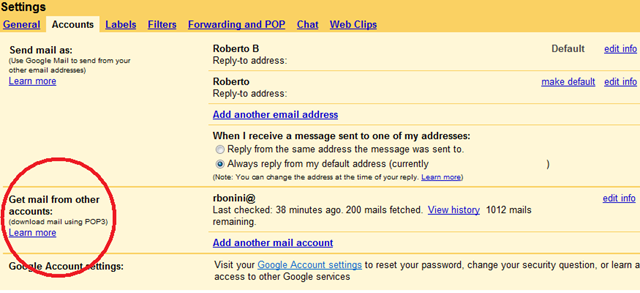
I’m not sure anyone noticed since I haven’t read any blogs on it. But Google just added a nifty option to bring mail from other pop3 email accounts into GoogleMail.

image

[addresses have been redacted out – thanks Paint!!!]

This is really useful as I can turn GoogleMail into a Personal Email Nerve Center. And I don’t need to resort to hacks either. Mail can either be sent to the inbox or labeled and archived. And you can specify the reply-to-address associated with the account.

It essentially means that my email is independent of the individual email services I use (not sure it works with Hotmail).

So using Googelmail is now a really compelling option. Its easier than running your own Exchange or other mail server. I mean think of all the costs associated with a server that evaporate. Electricity, server hardware, software licenses, service and support.

Now obviously a work email account should come straight into Outlook, ThunderBird or your friendly email application of choice ( aside form Googlemail, naturally).

Since the whole family has a Googlemail account, I’m setting this up for everyone (even if I do have to download  the final deluge of mail to Outlook for the pre- web 2.0 style of accessing mail they’re used to 🙂 ).

Now on a related note, what does this do for Chandler – Mitch Kapor’s total redefinition of the Personal Information Manager in the spirit of Lotus 1-2-3?

The thing is, can Google and Chandler get along? I.e can chandler use Google as the server for you stuff? On first look, you might think I’m joking. Scott Rosenburg’s Dreaming in Code makes the point that Cosmo Server was written specifically to preserve the Chandler-ness of the application data. But that’s not what I’m saying. The Application, Presentation and Data Access Logic remain on the local Application. The Application simply uses Google as a data store. Just an idea. My 2 cents.

Windows Vista Desktop Screenshots

(this follows on from my posts here and here about the Vista Beta 2 desktop)

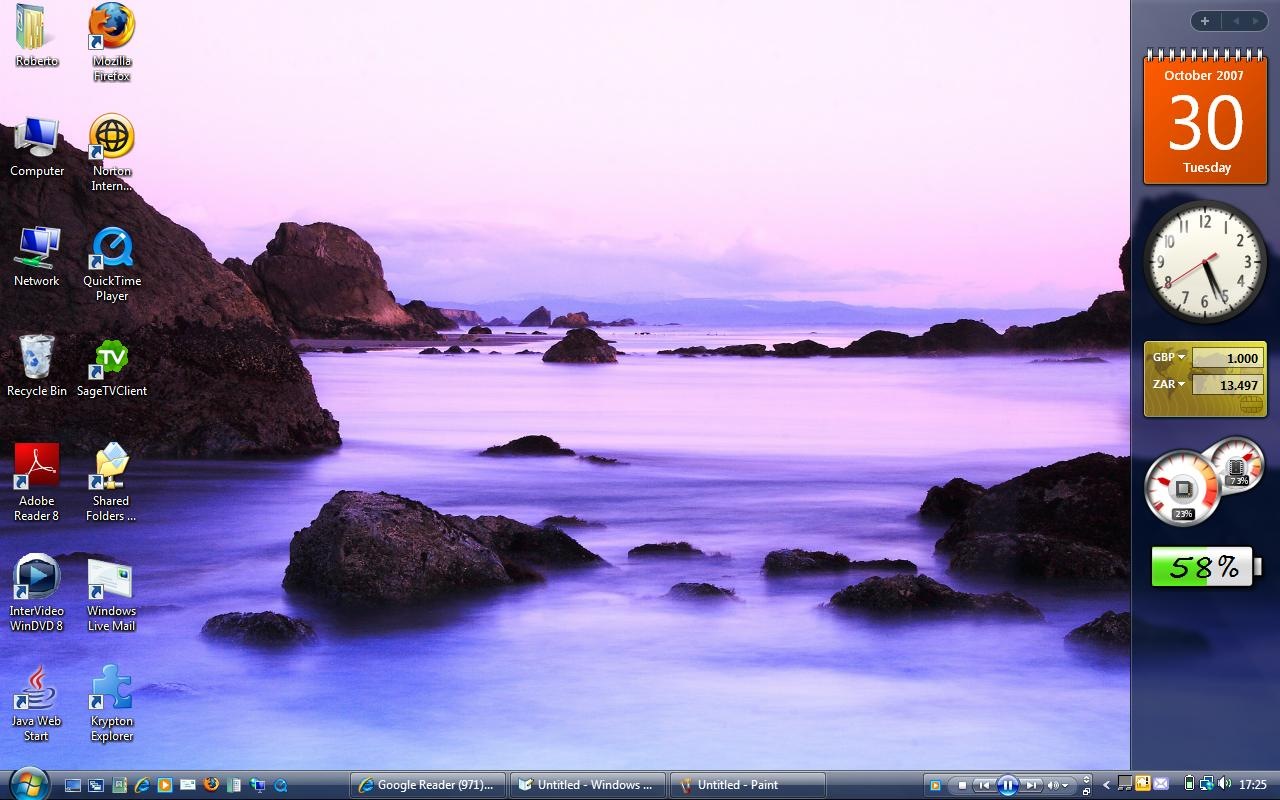
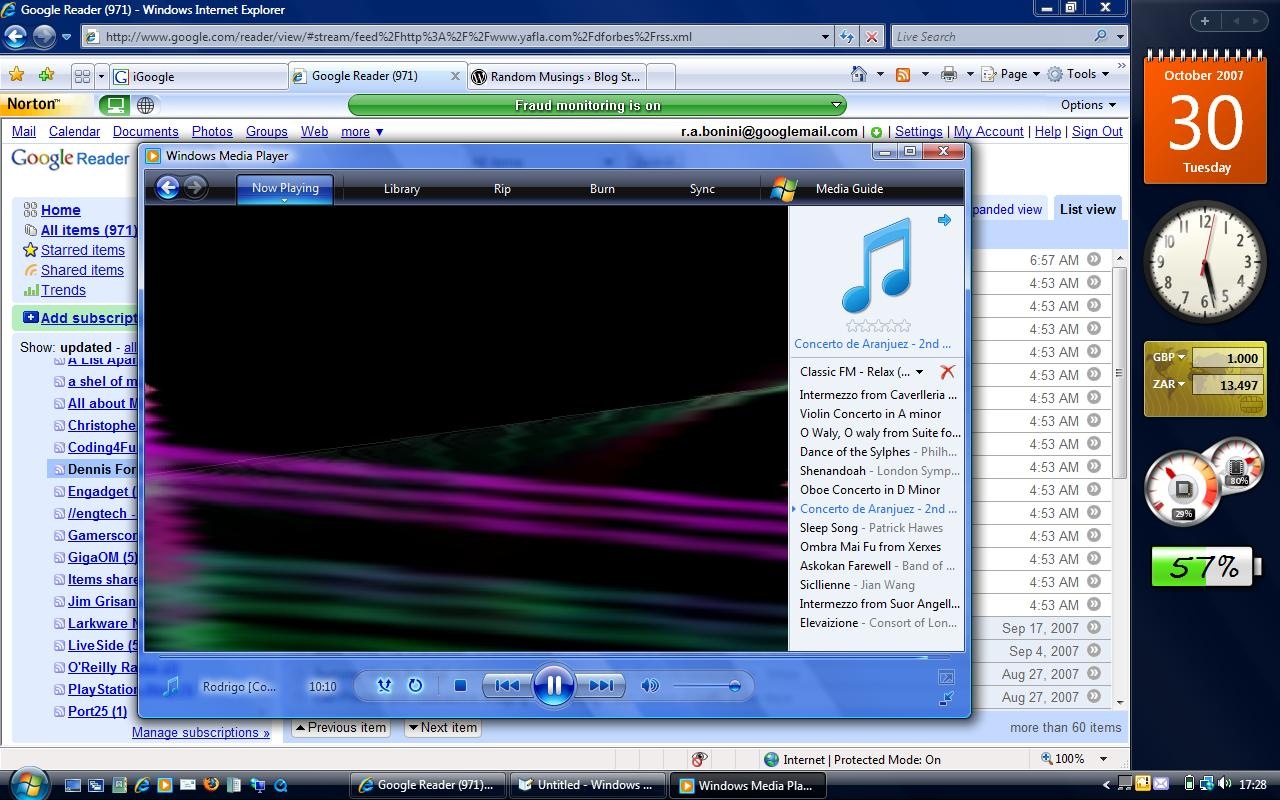
Finally got round to posting screen shots of Windows Vista Business (click for high-res):

laptop_desktop_1

laptop_desktop_2

The desktop comes from the Hamid Darwish collection (for my write up and a view of the whole collection).

You can download  the whole collection as a ZIP file from his site. I’d unzip it directly to C:\Windows\Web\Wallpaper\ so it’ll show up when you personalize your desktop.

Quote of the Day

On Youtube’s imminent demise:

Traditional media can give people what they want – a comprehensive collection of high-quality video, free of spam and crappy user-generated content. While we’re longtime advocates of user-generated media, a lot of it’s crap – and people don’t want to wade through crap when they’re looking for their Lost fix.

-Podcasting News

I agree.

Go on. Read the whole post.

Random Thoughts for the Day

I might make this a regular thing.

  • I was at Costa’s this afternoon and a guy walks in with a  brand new iMac. Must have been at least a 20" if not more. never felt so jealous in my life. He must have got it from the Glasgow Apple Store. I’ve been meaning to go past, but haven’t had the time yet
  • My 19" Xerox TFT died today. Its a display model that I got slightly cheaper and have had it for 2 years. Its one of those lookers -black with a glass front so its completely flat. Damned thing. Multi-monitor setup anyone??
  • TCP/IP – spent the weekend doing revision on it. No wonder the Vista networking team re-wrote it.
  • Wouldn’t it be easier to replace RAM if you could plug the old or new RAM into a USB port and use it with ReadyBoost??? I mean, you need every megabyte of RAM you can find these days.
  • I keep thinking that you can do so much with technology around the home (RSS on your TV for example). Its just so difficult. Windows or Linux?? Windows Home Server??? Media Centre Edition??? Mac Mini with Front Row??
  • I’m starting to think that a separate machine running Media Centre Edition would be better than SageTv for Windows Home Server. I’m fighting SageTv tooth and nail to get it working properly ( EPG and all).It should be easier than this. Might get a refund
  • Could we please have a virtualisation hardware solution for small business/ home. It’d be cheaper than buying the MCE Server.
  • How many Vista Sidebar gadgets are actually useful??Google desktop is much, much better at useful gadgets. The mail gadgets for GD actually tells me when any new email arrives ( even if its automatically archived).
  • And could we please get a free sunclock for either sidebar?? You know, the ones that show where its day and where its night on a map of the world.
  • Also, back to sidebars, I’ve noticed that Google desktop loads its widgets off the Internet. You could theoretically see your widgets at any PC with GD installed if you’re logged in. Which is logical for Google in becoming the hub on which our lives revolve. I wouldn’t be surprised if they were building a HealthVault competitor – on the web of course.
  • I’m seriously considering the iPod Touch. DRM or no DRM. iTunes integration or no integration. The Design blows me away everytime. Why did el Jobso have to come up with a design that puts every other portable music player ( and iPod, mind you) to shame?????? And don’t tell me the iPhone is the best iPod to have. I think I’ll put that SageTv refund money to wards it if it comes to that)

Good Microsoft, Bad Google??

Taking a break from the innards of TCP/IP, I bring you two interesting blog posts.

First Verturebeat’s Matt Marshall asks: In history revision, Microsoft now a friend of the valley?

Second, Robert Cringely opines: The Future is Cloudy: Google’s plan to host ALL our applications.

Both may seem to be unrelated, but lets consider them both.

Matt says:

But now that Google has emerged as the all-pervasive menace, Microsoft has been transformed into an aging, less threatening knight, albeit with pockets and interests deep enough to help you against the Google onslaught. Microsoft’s alliance with Facebook — which calls for Microsoft to invest $240M in that company — has capped the transition.

Interesting inversion, don’t you think? Kind of like America springing to plucky little Britain’s aid after Pearl Harbor. In this case Microsoft’s Pearl Harbor was Google’s huge IPO and the raft of  highly successfully geek-drool-inducing products they released. And the Britons are everyone else in the Valley that have yet to go over the the Dark Side ( 🙂 ).

Think of the perceptive transformation that Microsoft has gone through. 3000 Microsoft Blogs (last I checked, which was while ago) and Robert Scoble have done loads to bring a human face to Microsoft. I remember once emailing Robert just after Office Live had its public debut for some specific details ( I was looking for a platform for a company web presence) and got a reply from the program manager 8 hours later.

Microsoft has done plenty to reach out to the community. Think of Mix06 and Mix07. The entire conference is on video with slides available from visitmix.org so anyone can take a look (I’ve still to get round to watch the sessions I downloaded 🙂 ).

Now take Robert Cringely. He looks at what Google’s Data Centre build out means, taken together with their MySQL contributions and their agreement with IBM to promote Cloud Computing to Universities.

By working with IBM to promote cloud computing to universities, Google is accomplishing two very important goals. It will first put them in touch with every graduate student doing work Google might find interesting. So it is first a hiring tool. But by teaching students about cloud computing Google and IBM are also seeding the technology in the companies where those students will take their first jobs after graduation. Five years from now cloud computing will be ubiquitous primarily for this reason.

But Google wants us to embrace not just cloud computing but Google’s version of cloud computing, the hooks for which will be in every modern operating system by mid-2009, spread not by Google but by a trusted open source vendor, MySQL AB.

Mid-2009 will also see the culmination of Google’s huge server build-out. The company is building data centers large and small around the world and populating them with what will ultimately be millions of generic servers. THAT’s when things will get really interesting. Imagine a much more user-friendly version of Amazon’s EC2 and S3 services, only spread across 10 or more times as many machines. And as with all its services, Google will offer free versions at the bottom for consumers and paid, but still cost-effective versions nearer the top for businesses and education.

Google’s goal here is to help us, of course, but along the way the company will have marginalized most higher-end computing vendors, especially Microsoft. They will have also made us totally dependent on Google services in such a way that we’ll never, ever, be able to extricate ourselves. We’ll be slaves, but happy slaves, and Google will come to dominate all computing for the next generation.

Now if Microsoft ever tried anything like this, I’d probably have to turn off comments to avoid the Death-To-Microsoft chants from the virtual mob.

This, of course, risks taking a left turn into the whole Dependency on Microsoft Question. But, for the sake of argument Leopard and Linus’ Every Flavor Linux settle that question just fine.

I use Google Mail for correspondence, Calendar for scheduling , Search for the obvious reason, iGoogle for my dashboard-view-on-the-world, Webmaster Tools.

What if we’re all reduce to running dumb terminal emulators connected to our Google-Instance on their servers? Fascinating idea, I’m sure. I mean what’s not to like about carrying your whole computer around with your Google Account and password (would save my shoulders lots of grief that’s for sure 🙂 )???

Taken with Google’s insatiable hunger for startups, is Google Microsoft-that-everyone-loves-to-hate 2.0???

FSJ Redeems Himself (a la Twitter)

After “PodtechGate” ( see this, this, this and this). With this:

TWITTER UPDATE: This just in from Scoble’s Twitter feed. PodTech receiving an investment from unnamed large industry player at a $20 billion valuation. Bubble be damned!
TWITTER UPDATE: Scoble denying on Twitter the rumors of investment at $20 billion valuation.
TWITTER UPDATE: Scoble now in his car, talking on iPhone about $20 billion rumor.
TWITTER UPDATE: Scoble now off iPhone, thinking about $20 billion valuation.
TWITTER UPDATE: Scoble believing it may actually be true.
TWITTER UPDATE: Scoble stopped at red light.
TWITTER UPDATE: Scoble making right on red.
TWITTER UPDATE: Scoble thinking about coffee.
TWITTER UPDATE: Scoble in Starbucks.
TWITTER UPDATE: Scoble tells barista PodTech now worth $20 billion. Offers to pay for coffee with a share of Podtech stock. Barista declines.
TWITTER UPDATE: Scoble on phone to Google, asking for Sergey.
TWITTER UPDATE: Scoble on hold.
TWITTER UPDATE: Scoble realizes line is dead.
TWITTER UPDATE: Scoble redialing. Willing to settle for $15 billion.

Windows Media Home Server

Now that I have the time, I’d like to respond extend Terry Walsh’s article reporting on rumors of WHS v2.

The potential of a Windows Media Server (possibly a WHS v2 box?) is an exciting proposition for many people – my concern would be a [boosting] of WHS’ minimum hardware requirements. One of the main reasons Windows Media Center was such a problem to self build was TV tuner drivers – I’m no longer a big Media Center user (I’m a big fan of the UI and TV Guide, but it’s a cumbersome solution compared to Sky HD), and I’m sure tuner drivers and the built in MPEG decoder in Vista Media Center are helping drive a better experience, but I love WHS’ simplicity – both hardware and software – and I’d hate to see it be compromised in the future through more complex hardware.

The fact is that Home Server and Media Center are separate entities. The WHS team was right to do it this way since they both perform entirely different function. WHS is a backup and file server while MCE is a  TV and recorded media server.  I can see the sense of having both  and syncing files back and forth at 4am or something.

Terry makes a valid point about hardware. Could this server backup and stream media at the same time? It’ll probably be HD stuff by the time it comes out so we’re talking some pretty large data files here. Sure, the network will probably sweat a little, but that’s not the problem. 

If you’re going to actually write this thing, its going to have to be a pretty large undertaking.  Its going have to be able run on two or more cores efficiently. So in the four core environment that’s going to be pretty common two years or so  from now ( given Redmond’s release cycle) , its going to have to distribute the load across all four cores. Different hard disks will have to be used by each core ( i.e one for backups and one for media to avoid I/O conflicts and such). That’s one hell of a lot of programming logic right there,and that’s before we get to using network bandwidth efficiently.

It’ll be using the Vista networking stack, so we can expect a modest improvement (bearing in mind that I actually haven’t seen this with Vista yet). One possible answer to this is Sun’s Project Neptune:

That’s why we just introduced Project Neptune – a silicon project that marries the parallelism of the microprocessor (for Intel, AMD and SPARC systems), with the parallelism of the underlying operating system (Solaris, Linux or Windows), with parallelism in the network itself. Which in  concert with some software magic (which goes by the name of the Crossbow project) allows enterprises to collapse cabling, ports, cards and spending – by bringing parallelism to basic network infrastructure (for geeks, you can take multiple TCP streams and allocate them to different processor threads, spreading out load and freeing up CPU’s/ports). Ports become a physical convenience, just like a server – what’s happening inside depends upon rules or policies set by the user/administrator to automate such decisions. Like I said, the network is the computer, and the computer’s virtualized, so why not the network?

Jonathan Schwartz

Now I’m assuming that we’ll see a less-than-enterprise offering of that could be part of the hardware.

Then there’s the  task of combining two codebases, the logic of how we combine WHS’s interface and WMS’s, how WHS’ duplication is going to work with WMS, how back-ups are gong to work and so on for a thousand and more items.

For now, SageTV or  the WebGuide WHS Add-in do the job quite well.

PodTech:Get collaborative with Chandler

Chandler ProjectThis is a great video. Pity Mitch Kapor didn’t make an appearance 🙂 .

If you want the background to all of this take a look at Scott Rosenberg’s Dreaming in Code which chronicles the early years of the Chandler Project. He really does it well. The projects problems come across so well  you want to throw the book down in frustration.

Now, the video:

[podtech content=http://media1.podtech.net/media/2007/10/PID_012817/Podtech_Chandler.flv&postURL=http://www.podtech.net/scobleshow/technology/1651/get-collaborative-with-chandler&totalTime=3108000&breadcrumb=9b238c04b2c847d8a149547da5e5b294]

Windows Vista Desktops

If you browse the desktops that are included with Vista and you find it lacking, there is always the collection from Hamid Darwish to spice up your desktop.

He’s the Flickr photographer that Microsoft hired to do something special for  the desktop. These are the Photos that didn’t make it:

Lost Sensations( OH ) ZoneDestination - vol. IIBeyond ClarityThe Planet of LifeExplore The RomanceThe Endless Journeydaylight editionNorthwest.OutdoorsS!lkReign of FireA Peek [ at the ] PeakThe Living SymphonyImprisonedEndless HorizonsExplorer in a world of giantsColors [ of the ] NorthwestAlone ... and facing the stormMt. ShastaInvasion of the liquidWhispers Of The PacificAngry ShoresEssential Colors of Middle EarthWizard [ of the ] Northwestheavens of the northwestAging Lands of Middle EarthThe BeastEchoes of a DreamVisions of InspirationShores of FireBy A Snowy HillsideNo Steps FurtherThe Distant Mountain - vol. II

You can download  the whole collection as a ZIP file from  his site. I’d unzip it directly to C:\Windows\Web\Wallpaper\ so it’ll show up when you personalize your desktop.

I’m using this one on my Laptop at the moment:

http://www.hamaddarwish.com