
Windows Home Server and SageTv Update

( You’ll catch the previous installment here)

Well, after carefully looking at the problem that I originally thought had to do with SageTv, I’ve come to the conclusion that it most defiantly isn’t. It seems to be a problem inherent to WHS (to do with opening backup images). So you can rest easy. this should be fixed in the RTM release, but I can’t be sure.

The next thing is finding a backup time so that SageTv will play nicely with WHS and find my PC’s switched on to backup. Still working on that. Its most probably going to be early in the morning.

I created a network share in the console and told SageTv to dump store all its recordings there.

Overall, it’s great.  Having the ability to have TV on my PC is great. I have BBC News 24 running in a window above the system tray – its way better than a news ticker.

Recording is great. I really dig the  intelligent recording functionality – no more missed ER episodes. I tested it with my second favorite US Comedy after friends – Scrubs. You might want to fiddle around with the Video Codec under Detailed setup. The default SageTv codec was,well, dogs vomit. Since I have Intervideo WinDVD installed locally, I chose their codec and  it was perfect playback. I’ll have to look around the forums to see if there is another fix.

Funnily enough watching the video files was impossible with Windows Media Player or Real player before switching codec, but perfect afterwards. I’m not superstitious so I’ll write that off to chance 🙂 .

The Youtube thing failed to play the files for some reason. And the weather, though it got the info, was displayed horribly.

And if you do buy a license, you’ll need a Media Centre license.
Thinking about Facebook

1279612562_037da79269

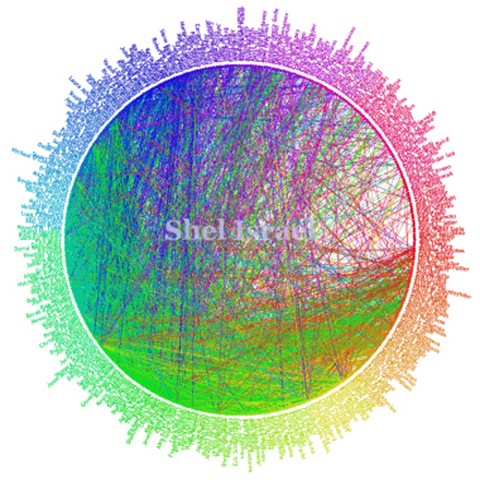
Above is Shel Isreal’s Friendwheel of his Facebook Contacts . In the interests of disclosure, I’m not on it. In fact I’m not even on Facebook. And I’m exploring why in this post.

The above picture shows a true social network, pardon the term for a minute. Most people who know Shel know others in his contact list as well.

There are a few hundred contacts here, and it is a reasonable number of people to know and be in contact with. See the difference between being like Scoble who has 5000 people who happen to read his blog and having a shortlist of  “real” people that you know personally and do business with?

If you sit down and consider this for a moment, you’ll see the logic of that statement. We all have  lists of contacts, in Outlook, Messenger, in our Mobile Phones or perhaps written in a phonebook. They are there because we know these people personally and communicate with them often.

Now I would not have the email address and phone number of my readers ( assuming I have regulars who read my blog) on my mobile in Messenger or in Outlook ( actually Google Mail, now).

Why should it be any different on FaceBook???? Why do people add contacts that they’ve never met in person?

 (And Scoble, by the very nature of his work, needs to keep a pulse on the Valley – thus his large contact list. I was just using him as an example)

Now I DO concede the point that this is exactly what happens in business – people exchange cards on a whim in the hope of acquiring business or services from someone else.

Which leads us to the next question? What do you characterize Facebook as? Is Shel’s Facebook Contacts made up mostly of froends, ore mostly of people in the same line of work ( I guess its the latter)? In other words, is Facebook a social of a business contact site?

I ask since Facebook was originally a students only site.

So why am I not on Facebook? Simple. I don’t need to be.

PS. I addition to the above, where does Facebook add value? If its business-oriented how does it do this? If its Socially-oriented, how?

iPhone Accelerometer Tricks

Another iPhone story landed in Google Reader (via TUAW):

today, we’ve got hot off the press news about what they’re up to with the iPhone’s accelerometer. Erling has found a way to pull the raw data off of the iPhone’s LIS302DL, a 3-axis accelerometer that’s currently used for noting when you’re looking at Safari vertically or horizontally. A few hackers, like the folks behind Tilt, have been able to catch the iPhone noting the change itself, but this is the first time, I believe, that we’re seeing live data come right off of the unit at a high sampling rate, enabling Erling to pull off the magic seen above.


Source code is available here.

PodTech:iPhone: What We Know, What We Don\’t Know

I Quote:

From iPhoneDevCamp, this presentation by Christopher Allen (slides available). Christopher covers the various aspects of using HTML, CSS, JavaScript, different media formats, and then the human interaction methods to keep in mind when developing for the iPhone. Also, check out the community site iPhoneWebDev.

[podtech content=http://media1.podtech.net/media/2007/08/PID_012381/Podtech_iphone_known_and_unknowns.flv&postURL=http://www.podtech.net/home/3990/iphone-what-we-know-what-we-dont-know&totalTime=1987000&breadcrumb=09db1b9d189b4fd8a8892e90837044ae]

SageTV 2.6 and Windows Home Server 2

Got my shiny new Hauppauge WinTV-NOVA-T 500 – Dual Digital Freeview TV tuner and hooked it up to the server.

Driver installation was painless. the server picked it up with no problem.

I installed the SageTV V2.2 Add In via the console. At this point, I have to say that it offers zero settings to configure either on the tab or under settings. On one had it does wonders to the confusion factor. On the other, being unable to do something as pedestrian as changing the storage location is frustrating . Since this is for WHS, you should know that the system partition is 20GB and it makes no sense to store video files there. Try a Share.

As long as you remember to download the SageTv client off the site, it works fine.

Channel set-up was a breeze. My only beef is the EPG via tvtv.co.uk. 90% of the channels don’t show up in the EPG yet for some reason. I’ll give it time to load all the channels up before emailing tech support.

To test it I had to do some acrobatics with the cable coming down from the antenna. I’ve not tested it with both tuners in action. I’m going to get the TV guys down here tomorrow to turn it into a permanent set-up with both tuners working.

The quality is amazing on the client. The user interface is well designed and unobtrusive.

Some points from a first impression.

Talking of the user interface:

  1. I wish you could expressly dock the window to the taskbar like you can do with the  video window of the Windows Media Player Toolbar.
  2. Being able to remap the channels could be a lot easier.
  3. Choosing channels could be a lot easier. Instead of giving the user an exhaustive list of every free-to-air digital channel in Europe, simply show the ones found in  the channel scan. Make the huge list an option.
  4. Configuring the screen size could be less confusing. Took me a while to realize what to do.

The whole EPG thing could be improved. Surely you could pick this information up from the Tv signals themselves? How come my set-top box does it quite easily? I’ll have a play around and see if there is that option.

I’m a wee bit confused about the license structure. In 15 days, what do I do? Do I buy a SageTV license for both Client and Server?  

And finally, when can we expect a release?

Looking ahead. I plan to get the Extenders for the Tv’s at some point. And I plan to grab another dual tuner to make sure everyone can watch what they want.

I love it when a gamble pays off big. 🙂

TV Tuner for WHS

I’ve just ordered the Hauppauge WinTV-NOVA-T 500 – Dual Digital Freeview TV tuner from amazon.co.uk and it should be here tomorrow.

I’m dying to tryout the SageTV Add-in and Placeshifter ( they are both Release Candidates, but then again, what on the server isn’t?) and will play around tomorrow (assuming Amazon’s delivery estimate is correct 🙂 ).

We Got Served says:

SageTV is designed to be your “always on” digital entertainment hub that’s accessible at home or over a broadband connection. Put any Video, Music or Photos onto your SageTV Media Server and enjoy them on any TV, PC or Mac screen.

  • Enjoy all your TV, Video, Music or Photos anytime, anywhere using SageTV Placeshifter to connect to your Windows Home Server from any broadband connection
  • Connect your TVs at home to SageTV on Windows Home Server with SageTV Media Extender
  • Handles nearly every Video, Music and Photo format
  • Works with Cable, Satellite and Broadcast TV around the world including NTSC, ATSC, PAL and DVB
  • As long as it works in the UK, I’m happy.

    Download | More Info

    WHS Add In: DHCP

    Now I’ve tried getting the built in DHCP server that is part of the underlying Windows Server 2003 working and it didn’t turn out very well.

    Now, however a new Windows Home Server Add In takes the pain out of DHCP. DHCP4WHS is great. I just spent ten minutes getting it working.

    This thing handles anything you care to throw at it: Remote Access, Remote desktop, VPN connections.

    Basically I ticked the box on the Router setup page ( I have a Linksys  W54WAG gateway/Router) for DHCP Server Relay, typed in the the static IP address I’d just set up for the server (be sure to do this first), get the nameservers from the DSL  status page and finally, amend the port forwarding on my router to get Remote Access working. The nameservers are the most important bit as you need them to get online.

    In the DCHP4WHS config page, if you do change settings, be sure to restart the service for the new settings to take effect.

    I’ll grant you that a DHCP Server isn’t very sexy… but it does have something very unique that I think is worth bragging about… as far as I can tell DHCP4WHS is the first and only DHCP server written in C# and/or for the .NET Framework.

    It is quite an achievement. I’d love to see the source.

    In the finest tradition of Windows Home Server, DHCP4WHS “just works”.

    It gets my Code2Fame vote.

    (Thanks to MS Homeserver blog and We got served for the info)

    SageTV for WHS

    If you’ve been reading my blog lately you’ll know I’m installing SageTV for WHS. The idea is to eventually have Freeview (for those outside Britain its free-to-air Digital TV) on all PC’s and Tv in the house come through WHS.

    Now the Website isn’t entirely clear on exactly how SageTv 6 integrates with WHS.

    Does it use the console? Does it run as a service (a big thing for WHS software since no-one is logged in most of the time)? How does it deal with the WHS folder structure? Does PlaceShifter integrate with the Remote Website?And a million and one other questions.

    Now I was just browsing through the feature list for SageTv and it is impressive.

    Here are my favorites:

      Multiple Tuner Support
      Record two or more shows at the same time! No limits to the number of tuners allowed. I can’t seem to find a card with more than two tuners so expandability is great.

      SageTV Studio Development Kit (learn more)
      Let’s you customize or develop new applications for SageTV . Need I say more?

      Support for multiple formats across multiple tuners (can mix MPEG-2 and MPEG-4/DivX hardware encoders). Better and better.

      Favorites ManagerTM
      Never miss your favorite shows whether it’s first runs, re-runs, or all episodes. This is good since I currently have Google Calendar remind me of shows 🙂 .

    Sounds too good to be true. I’ll let you know how it plays out when I get it. It might be soon, it might not. Stay tuned.