A little laugher before the weekend (can’t come soon enough).
According to Engadget, this was done by Microsoft. Glad to see other ways Microsoft is spending some of that $44 Billion.
Random Technology Musings

A little laugher before the weekend (can’t come soon enough).
According to Engadget, this was done by Microsoft. Glad to see other ways Microsoft is spending some of that $44 Billion.
After all the hype, I’m on FriendFeed.
Finally. In addition to my blog posts showing up there, I’m sharing my Link Blog and my SmugMug Photostream.
Here’s my page and the feed is in an unassuming text label under Feeds in the column to your right. I’m going to try find or make a proper label for it, since it looks out of place at the moment.
It will be interesting to see which feed people prefer, the blogs’ feed or the FreindFeed one.
I’ve been looking for quotes to post here for a while. Until I read Scott Adams’ blog post:
Talking of the lawsuit to stop the Large Hadron Collider:
If the lawsuit succeeds, imagine trying to get another job with that project failure on your resume.
Interviewer: “So, you spent $8 billion dollars trying to build a machine that would either discover something cool or destroy the universe. Is it fair to say you are not a people person?”
I think its becoming a tradition here to list some of the funnier April Fools Day pranks:
More Google pranks here.
TUAW has a round up of the Apple Pranks.
Three from Sun Microsystems:
Literally:

Windows Server Longhorn Business Edition??????
Seriously, what’s up ?????
As more and more Windows Home Server Add-Ons are introduced, WHS becomes more and more like an appliance than a piece of software (and hardware).
More and more Add-ons mean that we ask more and more of our systems. These demands mean that finite resources have to allocated and shared with the WHS software itself.
DEMigrator.exe comes to mind ( the magic behind folder duplication). Since DeMigrator does not actually have a front end ( short of turning off folder duplication), it is impossible to pause or stop it when its running in favour of something more urgent. Granted we could change our backup window, but this is not always convenient or possible.
What WHS needs is some way of managing resources on a much more granular level than process priorities. By that I mean that WHS makes a logical guess as to what process(es) need to run now and what processes are less immediate.
So if I use SageTV to record show x at time y and a defrag ( or other processor intensive program) is scheduled to run at the same time, we need resource deconfliction to kick in and sort it out. We can do this in one of two ways: either throttle back the proccessor intensive process or re schedule it ( if the drive isn’t very fragmented a missed defrag pass wont make much of a difference).
Naturally, we can’t expect this souped up task scheduler to be able to handle every occurrence of every program. this means that WHS would simply notify the offending process(es) of the situation and it would be up to the program to implement a responsible and reasonable strategy to handle that.
If you’ve got a high end system running WHS, this discussion isn’t very dramatic. But between backups, defrags, virus scans, DeMigrator, SageTV and others ad nauseam ( even automatic Windows Update needs to be able to safely restart) jockeying for resources, something needs to manage this safely and well.
Essentially, this is bringing WHS closer to the headless system originally envisioned. It would save me a lot of Remoteing in every day.
Before we finish, let take a look at the specs for the WHS systems commercially available from HP, etc to get an idea of exactly what resources are available.
The Microsoft minimum spec is 1Ghz and 512Mb RAM and 1x 70Gb drive.
The recommended spec is 64-bit Compatible Intel Pentium 4, AMD x64 or newer with 512Mb Ram and 2x hard drives with a 300GB primary disk.
| CPU | RAM | Hard Drive | |
| HP Media Smart | AMD 1.8 GHZ 64-bit Sempron 3400+ processor | 512Mb | 2x 500Gb |
| Norco DS-520 | Intel Celeron M 1GHz | 1Gb | 1x 250Gb |
| Piranha Home Server | Intel Celeron 430 (1.8GHz, 512KB, Conroe) | 1GB | 2x250Gb |
| T2-WHS-A3 Harmony Home Server | Intel Celeron 220 1.2GHz | 512Mb (1Gb Optional) | 1 x 500Gb (1Tb/2Tb Optional) |
| T7-HSA Harmony Home Server | Via C7M “Esther” 1.5Ghz | 512Mb (1Gb Optional) | 1 x 500Gb (1Tb Optional) |
| My own homebuilt system (Dell Poweredge SC440) | Intel Celeron D 2.8Ghz | 2GB | 1x160Gb 1x400Gb 2x750Gb |
I think this is a pretty representative sample of the entire range. You can get the reviews on these servers and others from We Got Served Hardware page.
NB. The extra possibilities of multi-core 64 bit machines allowing true concurrent execution are mind boggling.
As I wrote here last week, getting Visual Studio 2008 installed was a bit of a problem for me on my main Desktop PC.
And I couldn’t find a fix anywhere. So since the installation was successful on my laptop ( they are both nearly identical systems) I set about trying to find some difference between them.
I came up with the fact that I’d had Visual Studio 2008 Visual Web Designer Express installed and had uninstalled it before my Visual Studio 2008 Pro install.
So in the finest tradition of Voodoo Troubleshooting I did the following:
I’m not quite sure why this works. I put forward the idea that it fixes the registry or the .Net Install ( see my earlier post for details).
Happy Coding 🙂 !
UPDATE: I found a fix. See here.
Right. Let get this straight. I’m running Vista Business with Visual Studio 2005 Standard installed (and All the extras – SQL Server etc).
The short version is that Visual Studio 2008 Professional refuses to install itself. It installed .Net 3.5, Document Explorer 2008 and the Web Authoring Component and then quit at some point while installing Visual Studio itself.
Heres the error log:
Microsoft Visual Studio 2008 Professional Edition – ENU: [2] ERROR:Error 1935.An error occurred during the installation of assembly ‘Microsoft.VC90.DebugCRT,version=”9.0.21022.8″,publicKeyToken= “1fc8b3b9a1e18e3b”,processorArchitecture=”x86″,type=”win32″‘. Please refer to Help and Support for more information. HRESULT: 0x80070BC9.
I’ve no idea what is going on. If you Google search the Error Code you get this error for VS2005 (or SP1), .Net 2 or SQL Server. Searching by HRESULT points to this MSDN Forum where the discussion is about a VS2008 Compile problem.
Now here’s the thing. It installs perfectly on my laptop (also running Vista Business with Visual Studio 2005 installed with all the bells and whistles). So the download ( and no, its a perfectly legal copy) is definitely not corrupted.
HELP!!!!!
I just upgraded my main PC from XP to Vista Business. And stuck a new graphics card in.
Before we discuss the Windows Experience Index, the only down side of the upgrade is that there are no Vista drivers for the front ports ( USB, SD, etc) or the built in sound card from Compaq. None. Their driver downloads page for the model ( SR1629 UK) essentially says “best of luck” for those upgrading to Vista.
In fact, I suspect that the model number of my PC is different to that on the page as the picture does not show the front card reader and the drivers don’t show up for it. Any Suggestions???
This is extremely inconvenient, as you might imagine.I’ve lost 3 USB ports and a 9-in one card reader. The sound issue was fixed by buying a cheap SoundBlaster Creative card.
I bought a Radeon HD 3650 PCI- Express card. 512MB of GDDR3 RAM (that has a 1.73GHZ clock). A 790Mhz engine clock. Crossfire X support as well as full HD. The graphics that come out of this thing are amazing.
I bought it mainly to play Flight Simulator X on it and it rocks ( though I’m still adjusting the settings to get the best combination of graphics and speed/playability).
Here’s the System information page with the Windows Experience Index:
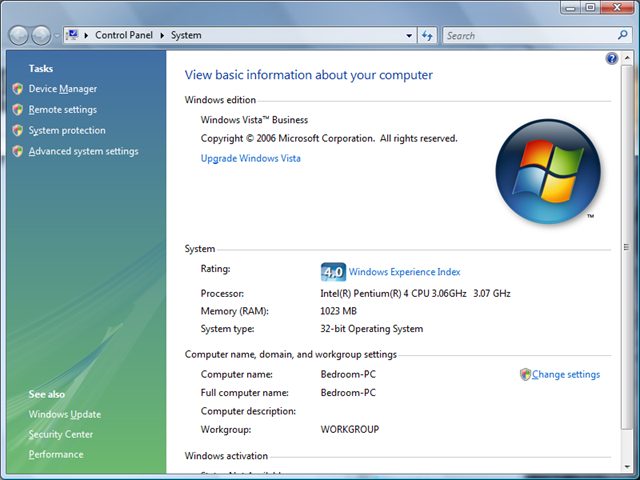
And here’s the breakdown:
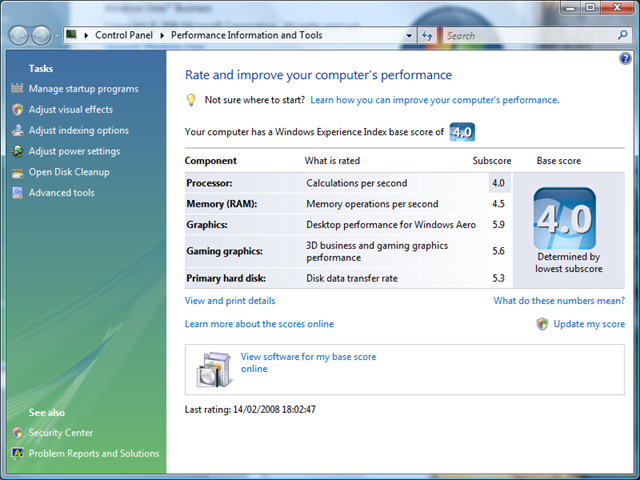
I must say I was expecting a dramatic improvement, but not by THAT much. Can’t remember what the original score was before I put the card in, but it was pretty dramatic.
There is a pretty in-depth discussion of the Index on the Vista Team blog here.
Moving on.
My Windows Home Server has been screaming for the last week that the USB drive had failed ( its connected and turned on and has been tried on multiple USB ports on multiple PCs). I’m not sure precisely what happened but I’m a hard drive short and have 200Gbs of space left.
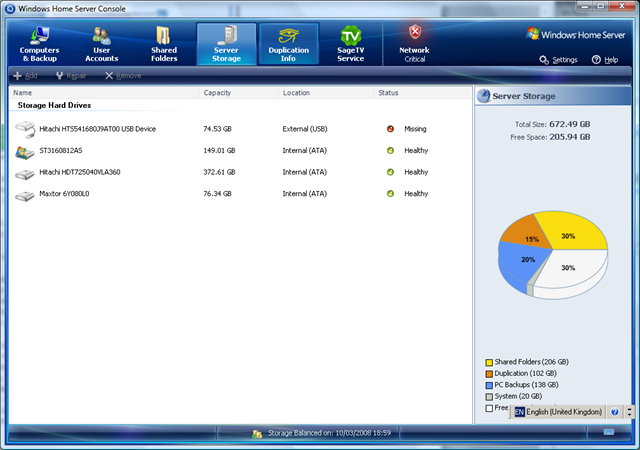
So I’ve ordered two Samsung SpinPoint F1 750GB SATA-II drives. One to replace the failed USB hard drive and the other to replace the aging 80Gb IDE drive. Since there is the hard drive replication feature, I’ve gone down the path of more drives rather than higher drive capacity. This should take my total drive capacity to about 2 TB, which is plenty. I go through hard drive space rather fast, mainly cause I use SageTv to record Tv and virtual server to run the occasional VM ( I have a 44 GB VM, to give you an idea of size).
I got all this great hardware from a UK company called Overclockers UK. Great customer service. They have no problem dealing with returned items (I had to return a AGP card because my system was PCI-E). They are quite reasonably priced and have some really amazing specials quite often.
My hard drives were shipped 40 minutes after my confirmation arrived in my inbox. And that really is amazing service. If i need hard ware, they’re my first port of call. Well done guys!!
Now that’s the question I asked myself after reading this fascinating article about DNA as a programing language and the cells as the computers.
[The Source code] Is here. This not a joke. We can wonder about the license though. Maybe we should ask the walking product of this source: Craig Venter. The source can be viewed via a wonderful set of perl scripts called ‘Ensembl‘. The human genome is about 3 gigabases long, which boils down to 750 megabytes. Depressingly enough, this is only 2.8 Mozilla browsers.
DNA is not like C source but more like byte-compiled code for a virtual machine called ‘the nucleus’. It is very doubtful that there is a source to this byte compilation – what you see is all you get.
And people wonder about the value of reading huge numbers of feeds….
Via Scott Rosenburg (Of Dreaming in Code fame).
 Random Musings
You must be logged in to post a comment.