Apple Tv – How It Fits In…..

So i got me an Apple Tv last week, more on impulse than as part of any rational thought, as such things go.  i was planning on getting one, but only later this summer.

But such is life….

So its sitting there on my Tv cupboard, replacing the DVD player that does not work any way…. surrounded by my impressive collection of DVDs. Which do me no good sitting on the shelf instead of on my Apple Tv hard drive….

The solution to this is, of course to back up your DVDs to disk. I use DVDShrink 3.2 (the last version ever released), or DVD Decryptor. both of which leave you with a folder full of .vob files ( usually  a VIDEO_TS folder).  This will strip copy protection from the files.

These files do us no good. Apple Tv will not take .vob files. But, and I must admit my irritation here, Windows Media Center does ( serves me right for being a turncoat 🙂 ).

So the next step is to use Handbrake ( for Mac and Windows) to take your backed up files and turn them into Apple Tv readable m4v or mp4 files. These files can be read across iTunes, Apple Tv, and your video capable iPods and iPhones.

Now this conversion process is eyewateringly long. I’ve resurrected an old laptop ( Intel Celeron M 1.4 ghz, 256Mb RAM). The average time is about 10 hours – at 4.3 frames per second. My 3ghz Pentium 4 with 2Gb RAM is actually only slightly faster, confusingly enough. in any case, i need the desktop and no the laptop, so the old and busted laptop is doing the conversions.

The 10 hours conversion does not bother me much. I set it up to go in the morning, and its usually almost done my the time I’m back home in the evening.

All this media is being stored on my Windows Home Server, with a normal install of iTunes being the server. I’m not sure if Firefly Media Server will work with Apple TV, but if it is, I’ll install that instead.

Finally, I use MetaX 1.0 for Windows (theres a Mac version, too) to add in metadata – pic, sypnosis, direcots, actor, etc…. This is amazingly useful and saved me loads of time….

Now my music library is full of duplicates (my fault for leaving the “Copy to iTunes library” option on when i import stuff), So I’m slowly going through it and deleting the duplicates (and saving space at the same time).

My Photos are spread across a hundred folders, so i have to get some sort of organisation going so i can sync them to Apple Tv and show them off on my Tv 🙂 .

I have SageTv running on the same server. Their conversion process for Apple Tv takes just as long and won’t work – sigh. If I could just get Sage to save the files in m4v format, i could sync my recorded tv directly to my apple Tv without any (hours long) conversion in between.

Update 14-10-09: The latest version of SageTv does indeed convert to m4v perfectly. Works wonders, but the time is still rather long. I reccomend turning off everything, defrags, AV runs (and temporarily, backups) if you have a long queue of files to convert. Right now I have 16 files to convert all of which are about 2- 3 hours long. Usually two a day. So for this week, I have turned off the defrag passes. SageTv actuall scales its CPU usage remarkabely well in these situations.

If i could, i’d have uploaded everything to EC2 for encoding 🙂

Thanks to the guys over on Friendfeed for help with this.

Dvd backup software thread: here.

Metadata thread: here.

Designing a new Blog Header

So I’m designing a new blog, as per my previous post.

I’m NOT a graphic designer. But I am a photographer.  And I get the fact that the design of the blog has got be linked to the content.  My point being that a landscape or a nature scène looks out of place when you’re discussing the finer points of programming languages or social networks.

On the other hand, you can’t always predict what you’re going to blog about ( at least in my case), so you want to be general in some way.

If you’re following me on Twitter or Friendfeed, you’ll see that I’ve been posting alot of the stuff I’ve found on web design in general.

So, brimming with inspiration, I’ve gone off and trawled through my photo archives for something relevant.

So here are a few that I’m thinking of using in a big way,  as the header, footer, or both (i.e. cutting the picture in half):

Engineering:


Nasa:

Bright Spark:

All the images you see here are on Smugmug.

Let me know what you think.

Blogging: I need my Mojo back


Blogs still have a very important place in the on going conversation. There is no medium quite like it, not even Friendfeed. Like books, blogs are the long form, the canvas on which we write our longer thoughts. Whether we use it for venting or ranting, commenting or telling or just plain writing, blogs are the corner stone of the online presence.

The one blogging tip I’ve consistently found is the “stick to it” rule: find your subject and stick to it. Which, in all honesty is not something I’ve done very well with this blog. There is so much to talk about and comment on and just plain only chat about that it can be easy to lose your focus :).

This is partly due to the fact that I only joined Twitter and Friendfeed recently, both of which are better for the kind of wide ranging discussion i enjoy.

And its also to do with the fact that, originally, this blog was set up at the drop of a hat, without any thought as to where it would go and what I would be doing online. It was almost an experiment with this newfangled thing that had come along. The whole idea was to witness the internet from the driving seat, rather than from the RSS feeds. This was at the dawn the of the social networking age, before Twitter and Facebook. Before a lot of stuff.

But I digress.

So what is my focus?? All things technology related. But as you can see, everyone else covers this far better than I ever could. Politics is too much of a heated subject for me blog about. Photography, one of my new passions in life, and programming (the passion), and music (the classical kind) and books (I joined Goodreads the other day).

My online presence at the moment is spread throughout Twitter, Freindfeed, Delicious and Smugmug. I’m seeing more and more people moving to bring these strands together in one site. This is perfectly logical and its the right thing to do.

A new site, a new blog, a new platform seems to be what I need. Sometimes I think setting up a WordPress blog is a little too easy. When you put the time and effort into the creation of something, you regard it totally differently.

So that what I’m going to do – set up a new site, part of which will include my blog.  And it’ll be me on the web, a personal presence tying together all of these desperate strands. Kind of like Austin’s Jet:

So I’m on the lookout for a new platform on which to run it. .Net is the preferred option, mainly because I can code it. I’ve looked at Oxite closely and the more I play with it the more I like it.

Why the effort?? You see, I enjoy writing. I really do. I don’t have English teachers after me for essays, or books to write. So writing a blog is the next best thing (maybe THE best). There really isn’t any other medium like it.

Now this particular blog will remain. No doubt I will find some use for it, but all that info is staying on line 🙂

I will continue posting here till things are sorted out, its probably some time away in any case.

Apple and Steve Jobs

So its all over the internet. Its covered both my FriendFeed and Twiter streams. Scoble already has a post out.

TechCrunch is on it.

Engadget is on it.

Dave Winer said it for all of us:

Dave Winerdavewiner steve jobs steve jobs steve jobs steve jobs steve jobs steve jobs steve jobs steve jobs steve jobs steve jobs steve jobs steve jobs 29 minutes ago from web

Steve Jobs is stepping down. Albeit for 5 months.

On the one hand since something changed between the time he issued THAT press release, it is a course for concern. Especially worrying is that according to the BBC, his health issues are more serious than first imagined.

On the other hand, my non-tech-savvy mother got an iPhone today. How is that related? Apple does not stop making money, selling iPhone, Macs or Apple Tv’s.Apple is more than Steve Jobs. Just because Steve Jobs is not at the helm, does NOT mean anything will interrupt apples string of successes. Since Jobs took Apple over, he has imbued it with his vison, his persona, his drive, his ambition. It has worked for Apple and will continue working.

Work is the largest obstacle to recovery. I know that for experience. So i applaud Steve for taking the time off to recover fully and completely. I send him and his family my good wishes.

Hopefully, the Apple faithful will see him once again in June.

Back and ready to rock

So I’m back from holiday (Florida – no ride queues and was great).

And I’m raring to go .

To start the year off, WHS4Smugmug development will resume ( after a year of being busy and feeling guilty). There’s a great series of posts on Add-In development on the tentacleBlog:

And I’ll be using them to bootstrap development and hopefully get moving.

One area I’m worries about is the file/folder structure that it’ll pull the photos from and send them to Smugmug.

So I’ll crowdsource this problem. Please leave a comment on how you organise your photo folder. Thanks.

This’ll help me with the 8000 photos I took in Florida.

Bad Design, Illustrated

image

So here I am. Sick as a dog. And I need to renew my tvtv subscription. Which mean I need to re-select my device (why I need to do this in the first place is a mystery to me).

So I get to the above screen. What does it say? Read it: Select Device Password. Which leaves me wondering.

Call it stupid ( or not, depending on you point of view – but remember that this is seen through the fog of a muddled brain), but I check all my instruction manuals in vain. I spent a few hours scouring various forums. Only then did it dawn on me that since there was nothing on this mythical device password, there must be none.

So I went back and checked ever so carefully the help section of TVTV’s website for the 21st time. And there it was “Please re-enter your password for security reasons”. Since this is not part of the shopping bit, I can’t imagine why all the security.

My point being that a little clarity on the above page would have saved me loads of time.

In 20/20 – hindsight, the page does make some sort of sense. “Select” is never used in conjunction with a textbox. But the style of both the headings (since they are indeed supposed to be separate) is the same – font, weight, colour, size. And they are right underneath the other, as if following on. Separation of these two headings in some way – certainly i terms of style or better yet, in spacing – would clear any confusion.

“Please retype your password” makes sense in the light of know that its your password they want. But given the design miscues above, looked out of place and perhaps referred to when I’d actually have to retype this mythical device password .

There is no obvious help button or icon, or even tooltip that is visible on this form – bad practice in any situation. A tooltip/label saying “Please enter you TVTV password here” would do wonders. I’ve seen websites that actively display help in a side bar, explaining the purpose of each and every form field. A “what does this do” explanation never hurts either.

Even when one is confronted with readily intuitive fields such as credit/debit card forms online, help makes the process a whole lot less daunting ( one is after all, dealing with real money. Making mistakes is not the way forward).

The point is that as winforms, webforms, WPF, Silverlight –developers and UI designers, making our users happy is the number one priority. That means designing good, intuitive UI’s and helping them to use it, too.

I’ve had my share or websites that the thought of using them gets me angry. There are others that I think are a little too liberal with their help information, coddling their users in wool. But I’ve never ever had an issue with those websites, ever.

The iPhone is, I think, the canonical expression of a good UI. My very tech-limited mother likes mine so much that she is getting one herself ( she’s had her current phone for two years and still hasn’t figured out how to text/SMS, yet has almost total command of the iPhone). Its a combination of UI touch screen that makes the difference. touching, pointing, dragging, pinching. These are all actions we use naturally every day – no mice to move and click, no keys to press. Its the intuitiveness of the whole experience that makes it so successful as a UI.

So while we may still depend on mice and keyboards, intuitiveness in our UI is something that our users will be grateful for.

iPhone UI Rant

I present to you my dear reader the first in an infinite series of posts in which I rant.

Now my iPhone ( which I got about 4 weeks ago) is great. I love it.

But every now an against there are a few things that crop up and bite me.

Now I’m a big believer in the UI. the UI makes or breaks a program or device. And the Ui needs to steer a fine line between restricting the options avaliable and leaving its users howling. Or opening too many options that can end up breaking the program (one cannot know the precise combination of large numbers of inputs an their effects in a large number of different situations).

So I understand that. But I’m asking for Apple to enable a few more options in the settings

  • Apple: the battery on your device sucks. Unless you turn off 3G, you battery life goes down the toilet. So heres what I’m asking you to do ( since this is your problem in the first place). Allow me to toggle a setting such that 3G is only turned on for Safari or other internet applications and turned off when I quit. Do the same with Wi-Fi. And since there is no MMS or video calling, no one is gonna need it anyway for calling and texts anyway.
  • Your keyboard sucks too. But your software dosen’t. I’ve even taken notes for a two hour lecture on my iPhone and its worked out well enough. Just let me have pervasive tilting so that I can type on the larger keys.
  • Mobile Safari crashes on me with astounding regularity. When an app crashes, at least do it gracefully. A black screen or the home screen does not cut it. Do something like your arch rivals in Redmond do and let your users know that you have collected the error data so  that you can work on it. Its amazingly calming (the flow of updates on the first Tuesday of every month provides that psychic calm to Jerry Sienfeld). And offer to restart the app too. Since you don’t get crashes on OSX very often, we’ll give you some time to get it right.
  • The appearance of an unified mailbox would be nice. Its a pain having to go all the way back to the accounts tab to swap accounts.
  • Do not tell me that syncing with a new exchange server wipes my current calendar and contacts. Seriously Apple this is a major mistake. And has multiple level of fail. This is 2008 and people are going to have more than one calender. Get used to it. And people have hundreds of contacts. Who is going to take responsibility if they mysteriously disappear?
  • If a Youtube video is unavailable tell me, don’t take me to the Youtube mobile search page. Is that so difficult?

Now don’t get me wrong, the UI is brilliant. It answers all my other gripes about other phones.

Even my mother (who would have been frightened of a Mechanical Turk) can use it. She required no instruction whatsoever and is as happy as a clam using it.

Apple, history has handed you on a golden platter the chance to completely redefine what people do with handheld devices forever.

Use it.

Writers Block

Critics search for ages for the wrong word, which, to give them credit, they eventually find.
  – Peter Ustinov

Right. There is no denying it. I am suffering through a period of writers block.

Granted, blogging, tech news, commentary and open source software aren’t my main priorities in life.

I’m even having trouble fitting in the photography and the photo editing.

So what’s up man??? I’m not going into it ( I have no wish for things to pop up in Google searches for the rest of eternity), but suffice it to say that its easier being lazy than getting on with it, at the moment.

The 7 habits ( which I really think it is a great book) don’t get followed religiously. However, the 7th habit itself, sharpen the saw says the essentially we need to look back at times and get our heads right, the previous 6 habits right before we can more forward. At least that is my interpretation of it. I’m a great fan of the notion that you have to win the private battle before you can tackle the public one. This acknowledges that fact that the public and private can be very different sometimes. And the fact that we can retreat into our shells sometimes.

So while I’ve absolutely no intention of giving up blogging, FriendFeed, my RSS feeds, I’m also not declaring a hiatus. I’m just saying that posts may not come thick and fast, but they’ll come.

I have ideas, I have things I’d like to do. But just can’t get round to them.

So. Who has tips for getting things jumpstarted?

A Word of Caution

Since the quake in California,  old Vimeo and Youtube videos that people have favourite have been showing up in FriendFeed. Current thinking has it that the data must have been destroyed and recreated from backups.

Some of them are, NSFW, shall we say (I’m putting it very, very delicately). There is even one particular user that has a lot of these videos showing up in his stream (and I’m not linking to them – I’m keeping this blog respectable).

So given the current employers habit of Googling prospective hires, it might be safer to be careful what we add to our online personas.

Just saying.

Hard Drive Troubles

image

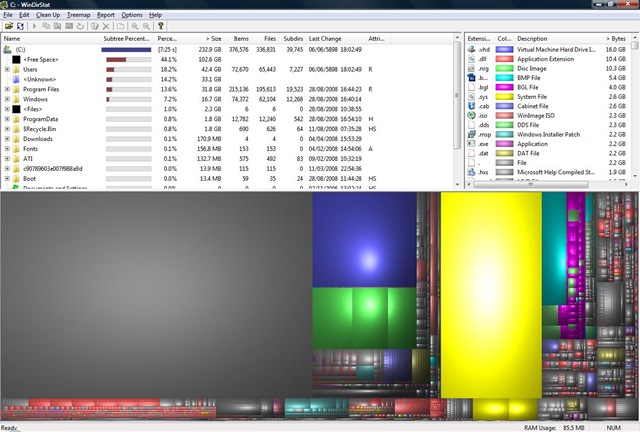
This picture was taken using WinDirStat to image the drive. Great utility, by the way. Its part of my Software Keychain now.

See that yellow area over there? Its 3.5Gbs of space that are used, but not accessible via Exploder and thus the Windows API.

Before you ask, I already tried RootkitRevealer from SysInternals, but it doesn’t work on Vista.

It was 63Gbs yesterday. Here’s what I did:

Then I decided that if I restore from a Windows Home Server backup, the unknown space shouldn’t be there as its effectively invisible to the Backup service at the time of making a backup.

Which I did. After booting up, it didn’t work.

However, this morning chkdsk started as part of the boot sequence, no idea why. And the hole in my hard drive is gone  reduced.

Whew. I was contemplating a complete rebuild of my laptop.

Out of curiosity I ran WinDirStat on my Desktop.

Here’s what I got:

desktopwindirstat

Again, there’s a 30Gb hole in the hard drive.

I ran chkdsk.exe and got a slightly tidier picture, but with the 30Gb hole still there.

Looks like I’m going to have to restore it from WHS as well.