Building a Feed Reader on Windows Azure – Screencast Part 1

As I announced last month, I’ll be screen casting my efforts on the Windows Azure Feed reader.

Well, a couple of weeks ago, I just went ahead and did the first episode. The delay between recording it and posting is due to a weeks holiday and a further week and a half spent offline due to my ISP.

I’ve open sourced the code to http://windowsazurefeeds.codeplex.com.

In this episode I cover:

  • the data access layer
  • associated helper code
  • I add a skeleton Feed class
  • I add all the Windows Azure Roles that we’ll be needing

I’ve tried not only to explain what I’m doing, but also why I’ve done things this way – with a view to how it will affect things down the road.

So here is the screencast:

Next time we’ll begin integrating things with our worker and web roles. We’ll be working with blobs and queues. And we’ll start chewing through some live data.

I’ll try keeping to a weekly schedule, but my schedule of late is anything but regular and predictable.

Enjoy.

Oil Spills Live Feeds App 1.4 – Alpha

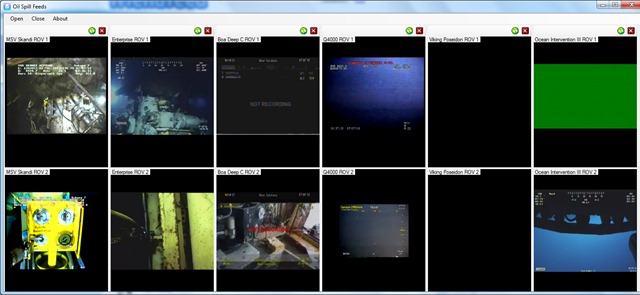
Just pushed out a new version of the application. I added the live feeds from the Ocean Intervention II and Viking Poseidon.

So there are a total of 12 feeds available forming 6 panels:

SpillFeeds6

As usual you can add and remove panels as you wish:

image


This is an alpha release, so it still needs work.


You can download it from here: http://oilslickfeeds.codeplex.com/releases/view/48477

I’ll let you know when a more polished build is done.

Awesome code is awesome (LINQ plus Lambdas edition)

While going through my feeds this evening, I found this awesome article from LukeH. He built a raytracer using nothing but C# LINQ to Objects and Lambdas.

While its clear abuse of the syntax (I can imagine my SQL-pure professors having a heart attack at seeing their beloved syntax used this way), it is freaking cool. Head over to read the article and try parsing that monster LINQ statement (I’ll not steal his thunder by posting it here).

Secondly, related to that, is a post on the recursive lambda expressions that Luke uses. I knew I should have paid more attention in maths. 🙂

As a side note, it makes more sense from a programming perspective than it does from a purely math oriented point of view. Had I written my math exam in C# lambdas, I may have got a higher mark 🙂

Both of the above posts show if code that is above and beyond what I do. I remember doing a happy dance a while back after first cutting my teeth with LINQ plus lambdas in the same statement, which now seems a bit premature 🙂

This does speak volumes about the state of C# as a language. It’s an exciting time to be a programmer. 

Screencast Plans

So, I’m prepping to make a start on the screen cast series on Building a Feedreader on Windows Azure. I thought I’d make a list of things to do both  for the screencast itself and for the code.

So this post will be updated as I think of things.

After the test I ran by doing a screencast on the Oil Spills app, I figured that I’m dispensing with the webcam overlay – its too distracting.

Also as the test showed, I’m gonna have to deal with frequent interruptions – for drinking water, for screwing up the explanation of something etc.  So I’m gonna have to record each part in a number of separate chuncks and join them together with Windows Live Movie Maker.

Also, I decided that its best not to start from scratch. I’m gonna have some of the code already written, namely the data access layer for Windows Azure Tables. Two reasons for this. One I have to make adjustments of the previous version of DAL. Two it’s practically boilerplate code and I don’t want to bore you.

After the final commit for each episode, I’ll post the link to the changeset, so you can download the code.

Finally, as we get later into the series (even the earth took 7 days to create), I may do an intro to recap the previous week using the webcam.

Now I do want to add one new feature for sure – and thats shared items, as Google Reader does. This will be entirely straightforward. items will be added to a RSS feed of shared items from that user. On request, i just read the blob and return the contents as an RSS file.

Now one thing is for certain – I’m definitely doing to do some things wrong in my code. So please be nice and pointed out. :)  Or, even better, submit a diff file correcting it 🙂

Thoughts on Windows Azure Storage

I’m sitting here planning what to do with the re-write of the Feedreader I wrote for university. Naturally, the storage solution is always going to be a contentious issue. The NoSql versus SQl debate plays a lot into it.

But, for the most part, i used Windows Azure tables and blobs for its simplicity over SQL Azure. In saying that, SQL is not my favourite thing in the world, so make of that what you will. But also, for a demonstrator application, the use of something completely new played in my hands very well.

So the re-write is also meant to be a demonstrator application. so the Windows Azure storage is staying.

But, not so fast. because Windows Azure Storage  needs something. The way I used Tables and Blobs essentially was as a poor mans object database. Thus meant that there was a lot of leg work involved in this, not to mention tedious plumbing code. The fact is, I think that the is the most logical use case for Windows Azure Storage – where in metadata is stored in the tables and the object themselves are in the blobs.

What I would like to be added, then, is the ability to formalize this relationship in code. Some way of saying “hey, this value in this TableRow actually points to a blob in this container”. So I can call “getBlob()”, or something on a Row an get the blob back. Now, to be clear, I don’t mean this to be a foreign key relationship. I don’t want to cascade updates and deletes. And i certainly don’t want my hands tied by making the Blob Attribute column (or whatever) mandatory.

Now, this could be added right now. And in fact am considering doing that. But support for this in the Storage Client library would be nice. But weather backend support is needed, or in fact a good idea, is another question entirely. The implications of making such a fundamental change on the back end. For example, say you’ve exposed a table via OData. How do you expose the blob as well? And given the nature of the use case, the fact that it is needed on a table by table basis makes it much easier to limit any such functionality to the Tools library only.

I can hear you asking yourself why I’m asking for support in the Storage Client library if I can gin up and duct tape together some Extension Methods? I’m a big proponent of the idea that anything that we use in intact with software, be that actual applications or libraries we use in our code, has a Natural user interface. Think of it, the API methods that are exposed for us as developers to use are in fact a User Interface. so I’m asking for a better user interface that supports this functionality without me having to do the legwork for it. In so delivering support, it is perfectly possible, indeed likely, that the library code that Microsoft ships will be more efficient than whatever code I can write.

My final report on the project did call out VS Windows Azure Tools, mainly for not making my life easier. So I’m looking forward to the new version (1.3) and seeing how it goes, particularly with regard to storage.

Now performance-wise, the version I wrote last wasn’t exactly fast at retrieving data. I suspect that this was due to a) my own code in-efficiencies and b) the fact that my data wasn’t optimally (obviously) normalized. Its also probable that better use of MVC viewdata (actually, I think that should be “better use of MVC, period”) and caching will improve things a lot as well.

Oil Spill Live Feeds App 1.3 & Screencast

This is my attempt to kill 2 birds with one stone.

So, item number one is a new version of the Oil Spills application. New features added are:

  • ability to add and remove panels
  • ability to refresh feeds that have gone down
  • all panels now have the same size – the application will adjust this based on the number of panels and the size of the form
  • added some application icons

You can get the new release here: http://oilslickfeeds.codeplex.com/releases/view/47469

This may seem like a little, but its really a total re-write.

Being able to remove panels that you do not want to watch makes the application more memory efficient. Though there is more work that can be done in this area, there is only so much you can do when streaming 8 live feeds.

Item number 2 is the fact that I did a short, 6 minute screen cast discussing the innards of the application. Now, it may seem silly to do a screencast for something so trivial, but I wanted some practice. It turns out that its not as easy as it sounds. So this video is my 4th attempt (which I’m still not 100% happy with, mainly because of the overlay).

I did this with Expression Encoder 3 Screen Capture. I usually use Community Clips for this sort of stuff. But, its not a half bad screen capture program. Expression Encoder Screen capture will let you add an overlay from an external camera, in this case, my laptops integrated webcam. I’m not too sure about this for future screencasts – so do let me know what you think.

So here it is:

My RSSCloud Server: Thinking of doing some screencasts.

This year was my last at Uni ( actually, i still have an exam to write, so the past tense isn’t accurate). As is typical with Honours year undergraduates, a final year project was set.

If you are regular reader of this blog, you’ll probably know that what i picked was a RSSCloud server running on Windows Azure. However, as they say on the home shopping networks, THERES MORE! My project needed a little more body to it. So I added an online Feedreader, in other words a poor (dirt-simple) imitation of Google Reader.

Now, this app uses a number of technologies for which it would be a pretty cool demo project. Windows Azure itself (obviously), Windows Azure Tables and Blobs, LINQ, WCF, MVC2 and so on. This includes it being a demonstrator of the RSSCLoud specification itself.

Although its an academic submission, my lecturers are fine with me opensourceing it.

Given the rise of .Net 4, and the experience points gained writing the first version, I feel that everyone would be better served with a rewrite. Not to mention the fact that It’ll give me a chance to use the new Windows Azure Tools for Visual Studio.

As I re-write it, I think a screencast series is in order. All the code will be checked in to codeplex. This’ll give everyone a chance to double check my logic (particularly interested in what Dave Winer thinks of my implementation of RSSCloud).

So, firstly, What do you think?

And secondly, anyone know a good hosting provider? I don’t know about Youtube. But Vimeo looks pretty good. If their limit is 500Gbs/per week upload space, it’ll give me chance to do one video each week, more or less.

I have all the software required to pull this off. So thats not a problem. I actually did a screencast of a live coding session in class for one of my lectures (writing an interpreter turns out to be pretty fun, actually).

i think this would be a pretty good contribution to the community as a whole.

Quotes of the the Day

The first comes from David Weiss’s blog:

"Engineering is the art of modelling materials we do not wholly understand, into shapes we cannot precisely analyze so as to withstand forces we cannot properly assess, in such a way that the public has no reason to suspect the extent of our ignorance."

– Dr. AR Dykes, British Institution of Structural Engineers, 1976.

To echo what David said: If this doesn’t accurately describe software engineering, I don’t know what does.


The second comes from Jeff Atwood’s post on Coding Horror: The Vast And Endless Sea:

If you want to build a ship, don’t drum up the men to gather wood, divide the work and give orders. Instead, teach them to yearn for the vast and endless sea.
– Antoine de Saint Exupéry

Seriously I’d go and read the whole post. If I were teaching Introduction to Programming, this is the sort of quote I’d use on slide number one. Since thats what I’d be doing.

Running Windows Communication Foundation on Windows Azure

In a perfect world, these two Microsoft products would Just Work. Unfortunately, it does not quite work that way in practice.

In general, WCF can be run in a number of ways.

  • The First is to use IIS to host your service for you. IIS will take care of port mapping between internal and external ports.
  • The Second is to self host. This means that your process will create a ServiceHost, passing in the appropriate class. Your service is responsible for error handling and termination of the WCF service. The service class itself can contain the Service behaviour attributes or you can stick them in the app.config file.  This also means that you have to ensure that the WCF service is listening  on the correct port when you create it.

In Windows Azure terms, the first method would be a Web role, and the second method would be a worker role.

It should be noted that all of the above methods and code patterns are perfectly legitimate ways to create and host a WCF service. The question here is, which of these ways will run on Windows Azure.

Programming for Windows Azure is generally an easy thing so long as your application start up code is correct. If there are any exceptions in your start up code, the role will cycle between Initializing, Busy and Stopping. Its enough to drive you mad. Therefore, if you choose to self host, you need to be sure that your worker role code runs perfectly.

For all your Windows Azure applications its also a good idea to create a log table using Windows Azure tables to assist you in debugging your service.

Now, before you begin any WCF Azure work, you need to install a patch. WCF can exhibit some strange behaviour when deployed behind a load balancer.Since all Windows Azure service instances are behind a LB by default, we need to install this patch. This patch is also installed in the cloud.

You can find the patch, as well a thorough run down of all the WCF issues in Azure here. While I’m not attempting to tackle all of the problems, and indeed the solutions to them, i do aim to get a basic service working with as little fuss as possible.

IIS Hosting

It must be said that i did try all sorts of settings in the config file. It turns out that the one with almost no actual settings is the one that works. basically this forces us to rely on IIS to do the configurations for us. On one hand this is a good thing, saving us the hassle. On the other, there is some loss of control that the programmer in me does not like.

Firstly, lets look at the config file. This section is vanilla. And basically what you’ll get when you add the WCF Service Web Role via the Add New Role dialog.

<system.serviceModel>
<services>
<service name="WCFServiceWebRole1.Service1" behaviorConfiguration="WCFServiceWebRole1.Service1Behavior">
<!-- Service Endpoints -->
<endpoint address="" binding="basicHttpBinding" contract="WCFServiceWebRole1.Service1">

</endpoint>
<endpoint address="mex" binding="mexHttpBinding" contract="IMetadataExchange"/>
</service>
</services>
<behaviors>
<serviceBehaviors>
<behavior name="WCFServiceWebRole1.Service1Behavior">
<!-- To avoid disclosing metadata information, set the value below to false and remove the metadata endpoint above before deployment -->
<serviceMetadata httpGetEnabled="true"/>
<!-- To receive exception details in faults for debugging purposes, set the value below to true.  Set to false before deployment to avoid disclosing exception information -->
<serviceDebug includeExceptionDetailInFaults="false"/>
</behavior>
</serviceBehaviors>
</behaviors>
</system.serviceModel>

If you deploy this file to the cloud, the role will initialise and start up correctly. However, at this point, the service is not aware of anything outwith the load balancer. In fact, if you deploy the WCF web role template to the cloud it will start up and run perfectly, albeit only behind the LB.

Now for the actual service code.  This code is actually from a REST service I wrote. It basically provides a interface for the RSSCloud specification (sorry Dave). So we can talk to the RSS Cloud server using HTTP Post, REST and any WSDL client.

[ServiceContract]
[AspNetCompatibilityRequirements(RequirementsMode = AspNetCompatibilityRequirementsMode.Allowed)]
[ServiceBehavior(InstanceContextMode = InstanceContextMode.PerCall)]
public class Service1
{

[WebInvoke(Method = "POST", UriTemplate = "pleasenotify/notifyProcedure/{notifyprocedure}/port/{port}/protocol/{protocol}/domain/{domain}/url/{url}"), OperationContract]
String RequestNotification(string notifyprocedure, int port, string path, string protocol, string domain, string url)
{
// this change to the storage model is intended to make scaleing easier.
// the  subscribers will be stored perblog in individual blobs
// the table will store the blogids, the blogurls and the last modified date of the blob file.
DateTime Timestamp = DateTime.Now;
XmlDocument thedoc = new XmlDocument();

string name = BlobNameServices.generateBlobName(url);

if (name == null)
{
name = BlobNameServices.CreateBlobEntry(url, source);
}
// Set the metadata into the blob

string hash = Utils.HashToBase64(domain + path + port + protocol + url);

insertTable(name, hash, notifyprocedure, port, path, protocol, domain, url);

requestqueue.AddMessage(new CloudQueueMessage(name));

return "reply";
}

[WebInvoke(Method = "POST", UriTemplate = "recivenotify/url/{url}"), OperationContract]
String RecieveNotification(string url)
{
recieverqueue.AddMessage(new CloudQueueMessage(url));

return "Recieved";
}

[WebInvoke(Method = "POST", UriTemplate = "ping/url/{value}"), OperationContract]
String Ping(string value)
{
char[] chars = value.ToCharArray();

//we have a potential inconsistancy here - the url is passed as an arguement,
//whereas for notifications the blog id is passed as an argument

pingqueue.AddMessage(new CloudQueueMessage(value));

String result = "You said: " + value;

return result;
}

}

I arrived at this code by taking the vanilla WCF webrole and combining it with the WCF REST template and replacing the template code with my own code

Amazingly enough, it will work. Up to a point though. When you hit the svc file, it points you to a WSDL BEHIND the load balancer, using the local instances’  address. Obviously, we can’t get to it. So, we have to modify our WSDL very slightly to take advantage of the patch mentioned above.

<behaviors>
<serviceBehaviors>
<behavior name="WCFServiceWebRole1.Service1Behavior">
<!-- To avoid disclosing metadata information, set the value below to false and remove the metadata endpoint above before deployment -->
<serviceMetadata httpGetEnabled="true"/>
<!-- To receive exception details in faults for debugging purposes, set the value below to true.  Set to false before deployment to avoid disclosing exception information -->
<serviceDebug includeExceptionDetailInFaults="false"/>
<useRequestHeadersForMetadataAddress>
<defaultPorts>
<add scheme="http" port="8080" />
</defaultPorts>
</useRequestHeadersForMetadataAddress>
</behavior>
</serviceBehaviors>
</behaviors>
<pre>

If you hit the service now, the WSDL file is now pointing to the correct address and you can get to it. So any WSDL client can now talk to your service.

You want to make sure that the port selected in in the webrole settings matches the port you have in the Request headers section. Whether that is port 80 or something else. If you have an HTTPS end point, you need to add it as well to get it to work.

Self Hosting

Now, I’ve tried self hosting. This is the idea.

string port="";
try
{
port = RoleEnvironment.CurrentRoleInstance.InstanceEndpoints["WCFEndpoint"].IPEndpoint.Port.ToString();
}
catch
{
port = "8000";
}
try
{
using (ServiceHost svcHost = new ServiceHost(typeof(RssNotifyService), new Uri(http://northwind.cloudapp.net: + port)))
{

svcHost.Open();
while (true)
{
//do somthing
}
svcHost.Close();
}
}
catch(Exception ex)
{
CloudStorageAccount acc = CloudStorageAccount.FromConfigurationSetting("DataConnectionString");
LogDataSource log = new LogDataSource(acc);
log.Insert("WCF",ex.Message,"Error",DateTime.Now);

}

For this to work you need to have a HTTP in port set in your web role settings. In this case it was port 8000.

While the above will work in the development fabric, it won’t  in the cloud. But it demonstrates the idea.

At the end of the day, there is not very much to set up if you are writing a new WCF service with minimal custom configuration.

So, install the patch and watch that config file.

PS. Many thanks to Steve Marx ( Windows Azure Program Manager) for his help with this.