Windows Azure Feed Reader Episode 3

Sorry for the lateness of this posting. Real life keeps getting in the way.

This weeks episode is a bit of a departure from the previous two episodes. The original recording I did on Friday had absolutely no sound. So, instead of re-doing everything. I give you a deep walkthrough of the code. Be as that may, I did condense an hours worth of coding into a 20 minute segment – which is probably a good thing.

As I mentioned last week, this week we get our code to actually do stuff – like downloading, parsing and displaying a feed in the MVCFrontEnd.

We get some housekeeping done as well – I re-wrote the OPML reader using LINQ and Extension Methods. We’ll test this next week.

The final 20 minutes, or so is a fine demonstration of voodoo troubleshooting ( i.e. Hit run and see what breaks) but we get Scott Hanselmans feed parsed and displayed. The View needs a bit of touching up to display the feed better, but be as that may, it works.

Since we get a lot done this week, its rather longer – 1 hour and 9 minutes. I could probably edit out all the pregnant pauses. 🙂

Here’s the show:

Success! My 2nd HD attempt uploaded last night. Click here to see the HD on vimeo.com. Enjoy.

Remember, the code lives at http://windowsazurefeeds.codeplex.com

Warning: Contains Programmer Humor. Handle with care.

Rob Conery has a hilarious post up entitled: Restraining Order Granted for Microsoft’s C-Sharp Compiler

A taster:

A judge from Microsoft’s .NET County submitted a 00110101 year restraining order on Friday against Microsoft’s C-Sharp development community. The stay-away order bans Microsoft developers from using the compiler’s services as a development tool, forcing them to find other means to support their claims they "they are done" with features they are developing.

Highly recommended that you read the rest of it.

Thanks for the laugh Rob.

Windows Azure Feed Reader, Episode 2

A few days late (meant to have this up on Tuesday). Sorry. But here is part 2 of my Series on building a Feed Reader for the windows Azure platform.

If you remember, last week we covered the basics and we ended  by saying that this week’s episode would be working with Windows Azure proper.

Well this week we cover the following:

  • Webroles (continued)
  • CloudQueueClient
  • CloudQueue
  • CloudBlobClient
  • CloudBlobContainer
  • CloudBlob
  • Windows Azure tables
  • LINQ (no PLINQ yet)
  • Lambdas (the very basics)
  • Extension Methods

Now, I did do some unplanned stuff this week. I abstracted away all the storage logic into its own worker class. I originally planned to have this in Fetchfeed itself. This actually makes more sense than my original plan.

I’ve added Name services classes for Containers and Queues as well, just so each class lives in its own file.

Like last weeks, this episode is warts and all. I’m slowly getting the hang of this screencasting thing, so I’ll be getting better as time goes on I’m sure. Its forcing me to think things through a little more thoroughly as well.

Enjoy:

Next week we’ll start looking at the MVC project and hopefully get it to display a few feeds for us. We might even try get the OPML reader up to scratch as well.

PS. This weeks show is higher res than the last time. let me know if its better.

Building a Feed Reader on Windows Azure – Screencast Part 1

As I announced last month, I’ll be screen casting my efforts on the Windows Azure Feed reader.

Well, a couple of weeks ago, I just went ahead and did the first episode. The delay between recording it and posting is due to a weeks holiday and a further week and a half spent offline due to my ISP.

I’ve open sourced the code to http://windowsazurefeeds.codeplex.com.

In this episode I cover:

  • the data access layer
  • associated helper code
  • I add a skeleton Feed class
  • I add all the Windows Azure Roles that we’ll be needing

I’ve tried not only to explain what I’m doing, but also why I’ve done things this way – with a view to how it will affect things down the road.

So here is the screencast:

Next time we’ll begin integrating things with our worker and web roles. We’ll be working with blobs and queues. And we’ll start chewing through some live data.

I’ll try keeping to a weekly schedule, but my schedule of late is anything but regular and predictable.

Enjoy.

WHS – Setting up a VPN server

I’m away on holiday next week and thought, like any good geek, I’d set up a VPN connection to my Windows Home Server.

The thing is that there are Add-Ins that will set up a VPN server for you.

However, by way of The MS Home Server Blog, there is a delightful little walkthrough that is remarkably simple.

This is for when the WHS console just won’t quite do it.

I configured my iPhone with the VPN details, and will probably just RDP in through it. I setup the laptop with it as well – so being able to work remotely now makes this little holiday a little less likely to be relaxing 🙂

I’ll let you know how it goes.

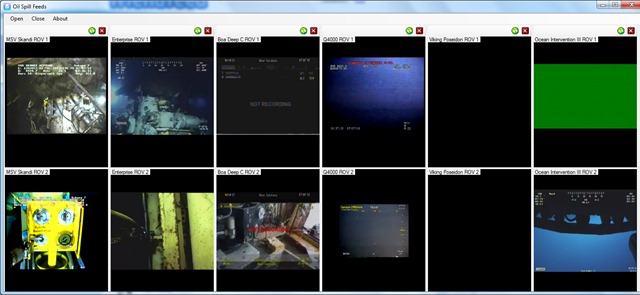
Oil Spills Live Feeds App 1.4 – Alpha

Just pushed out a new version of the application. I added the live feeds from the Ocean Intervention II and Viking Poseidon.

So there are a total of 12 feeds available forming 6 panels:

SpillFeeds6

As usual you can add and remove panels as you wish:

image


This is an alpha release, so it still needs work.


You can download it from here: http://oilslickfeeds.codeplex.com/releases/view/48477

I’ll let you know when a more polished build is done.

Awesome code is awesome (LINQ plus Lambdas edition)

While going through my feeds this evening, I found this awesome article from LukeH. He built a raytracer using nothing but C# LINQ to Objects and Lambdas.

While its clear abuse of the syntax (I can imagine my SQL-pure professors having a heart attack at seeing their beloved syntax used this way), it is freaking cool. Head over to read the article and try parsing that monster LINQ statement (I’ll not steal his thunder by posting it here).

Secondly, related to that, is a post on the recursive lambda expressions that Luke uses. I knew I should have paid more attention in maths. 🙂

As a side note, it makes more sense from a programming perspective than it does from a purely math oriented point of view. Had I written my math exam in C# lambdas, I may have got a higher mark 🙂

Both of the above posts show if code that is above and beyond what I do. I remember doing a happy dance a while back after first cutting my teeth with LINQ plus lambdas in the same statement, which now seems a bit premature 🙂

This does speak volumes about the state of C# as a language. It’s an exciting time to be a programmer. 

Thoughts on Windows Azure Storage

I’m sitting here planning what to do with the re-write of the Feedreader I wrote for university. Naturally, the storage solution is always going to be a contentious issue. The NoSql versus SQl debate plays a lot into it.

But, for the most part, i used Windows Azure tables and blobs for its simplicity over SQL Azure. In saying that, SQL is not my favourite thing in the world, so make of that what you will. But also, for a demonstrator application, the use of something completely new played in my hands very well.

So the re-write is also meant to be a demonstrator application. so the Windows Azure storage is staying.

But, not so fast. because Windows Azure Storage  needs something. The way I used Tables and Blobs essentially was as a poor mans object database. Thus meant that there was a lot of leg work involved in this, not to mention tedious plumbing code. The fact is, I think that the is the most logical use case for Windows Azure Storage – where in metadata is stored in the tables and the object themselves are in the blobs.

What I would like to be added, then, is the ability to formalize this relationship in code. Some way of saying “hey, this value in this TableRow actually points to a blob in this container”. So I can call “getBlob()”, or something on a Row an get the blob back. Now, to be clear, I don’t mean this to be a foreign key relationship. I don’t want to cascade updates and deletes. And i certainly don’t want my hands tied by making the Blob Attribute column (or whatever) mandatory.

Now, this could be added right now. And in fact am considering doing that. But support for this in the Storage Client library would be nice. But weather backend support is needed, or in fact a good idea, is another question entirely. The implications of making such a fundamental change on the back end. For example, say you’ve exposed a table via OData. How do you expose the blob as well? And given the nature of the use case, the fact that it is needed on a table by table basis makes it much easier to limit any such functionality to the Tools library only.

I can hear you asking yourself why I’m asking for support in the Storage Client library if I can gin up and duct tape together some Extension Methods? I’m a big proponent of the idea that anything that we use in intact with software, be that actual applications or libraries we use in our code, has a Natural user interface. Think of it, the API methods that are exposed for us as developers to use are in fact a User Interface. so I’m asking for a better user interface that supports this functionality without me having to do the legwork for it. In so delivering support, it is perfectly possible, indeed likely, that the library code that Microsoft ships will be more efficient than whatever code I can write.

My final report on the project did call out VS Windows Azure Tools, mainly for not making my life easier. So I’m looking forward to the new version (1.3) and seeing how it goes, particularly with regard to storage.

Now performance-wise, the version I wrote last wasn’t exactly fast at retrieving data. I suspect that this was due to a) my own code in-efficiencies and b) the fact that my data wasn’t optimally (obviously) normalized. Its also probable that better use of MVC viewdata (actually, I think that should be “better use of MVC, period”) and caching will improve things a lot as well.