WCF Client Server Chat– No new development. However, I do think that I’ll have a ready to run version to post. No timing on this. But since this is apparently the most popular project here, I’m feeling the pressure.
RSSCloudNotify. Yes, there is a bug in the code. Sometimes it makes it through to the server and sometimes not. This project is in active development, it being a part of my honours year project for uni. The current build was a quick test project to get an idea of the scale of the task. So it WILL be re-written properly leveraging the full ASP.Net stack.
WHS2Smugmug. This is also under active development, albeit with a hiatus while I complete my last few months at uni. I have definitely not forgotten about this. Currently, its awaiting testing and revising before releasing a beta. (Don’t forget to follow the project on twitter @whs2smugmug)
FFNotify – No new development for awhile. But I do plan to fix the bugs in the current revision. Freindfeed is pretty snappy importing blogs now, so this is not exactly high priority (if you feel different, give me a shout).
Naturally, all the above fixes etc (save for RSSCloudNotify) are subject to how things go at uni. Indeed, some of the stuff I will be writing for my honours year project directly translate back to these projects.
These are all projects that I care deeply about. And are projects that I stated to solve my own problems. Unfortunately there are only so many hours in the day 🙂
Now, I don’t know why i waited so long to install this iPhone app, but this app is seriously cool.
What better time to try this than on holiday (in the Dominican Republic, no less)?? (more on the holiday in another post)
So, here are the pics:
(click to see the source pic)
Worked fairly well. Its not foolproof and you will see some ghosting where the images have not lines up completely. I may redo the pano’s with Photoshop and do a comparison.
Movement does tend to screw things up, but not always.
Taking those pano’s of the beach proves to be a tad difficult. If the sky is completely blue, there’s not much to differentiate one pic from another.
This is just another of example of the iPhone continuing to surprise.
So before I join the AutoStitch praising echo chamber, I’ll leave it here.
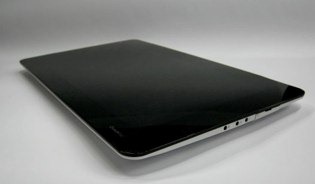
The internet is awash with the news that the CrunchPad is dead. More accurately, dead on arrival.
I won’t regurgitate all the original details, which you can find here.
This morning (or this afternoon, depending where you are), Mike posted an update.
The letters attached make for interesting reading (even if they are long on legalese).
Originally I wrote a couple of long paragraphs before confusing even myself. But I’ll quote Mike:
There is just no way to argue that TechCrunch is not the joint owner of all intellectual property of the CrunchPad, and outright owner of the CrunchPad trademark. The CEO of Fusion Garage has spent nearly six months this year working from Silicon Valley and our offices. Most of the Fusion Garage team has spent the last three months here working with our team on the project. And our key team members have spent time in Singapore working directly on the hardware and software that powers the device. Fusion Garage emails and their own blog, before it was deleted, acknowledge this. We have also spent considerable amounts of money creating the device, paying the vendor and other bills that Fusion Garage wasn’t able to.
What’s even more absurd is the idea that we somehow knew about Fusion Garage’s intentions to break off the partnership before a couple of days prior to the device launching. Until November 17 we had every reason to believe that Fusion Garage was our trusted ally in creating the CrunchPad. We received nearly daily emails confirming that everything was on track. Raising funding for the project was a goal but wouldn’t have been necessary for some time; besides, we had U.S. investors lined up and ready to put money into the venture. Fusion Garage admitted to us on November 18 that the news of them pulling out of the partnership was “out of the blue.”
There is quite simply no way we will allow this company to move forward on this project. The extent of their fraud is only now becoming clear to me. The audacity of their scheme is staggering. We believe that they engaged with us until the last possible moment to get press attention and access to our development resources and cash, and then walk away hoping that we’d do nothing.
Other Options
Disclaimer: What I’m about to do here is be incredibly naive and view the world for a moment the way a programmer does: neat, ordered and sensible.
I wonder what solutions there are to this mess (besides legal proceedings). One is to throw money at the problem. And no, I’m not suggesting mike buys the company, or the rights.
Its interesting that Mike planned to have ChromeOS running on the CrunchPad at the launch. Although the CrunchPad predates the relase of ChromeOS, it is the the very epitome of the types of devices the creators of ChromeOS envisioned running ChromeOS on.
So I think that Google, indirectly, has a stake in the success of the CrunchPad.
So, and this may seem un-orthodox, but I suggest that Google should buy out FG. Google has the money, after all.
It’s a win-win for everyone involved. Mike gets on with his Crunchpad. Google gets a posterchild for its ChromeOS (plus being able to contribute significantly to the device software to make sure the Google Experience is up to standard).
ChromiumOS is opensource. The crunchpad started out is short life as an opensourced, crowdsourced project. I can’t imagine a better match.
There is a market.
There is a market for that device, even with the iTablet looming on the horizon. I.e, Me. I’m sitting on my couch right now as I type this. A CrunchPad would be much easier than my Dell Laptop.
Knowing Apple, the iTablet will be expensive (even if its a contract device). The CrunchPad will be far cheaper (between $300 to $400 as far as i know).
Besides the price issue (and the little matter of a global recession), rumour, as well as logic has it that that Apple will impose an App Approval Process for the iTablet. And an App Store. The pros and cons of a such a move are for another post when we have more substantial information.
This stands in stark contrast with the CrunchPad
Mike says that the CrunchPad can be hacked to run Windows 7 (that would be awesome) and ChromeOS (and by extension any Linux based OS including Android).
(Actually I think Mike should have a version with no OS preloaded)
I’d much rather buy a Crunchpad I can write my own apps for. And before anyone accuses me of hypocrisy (since I like the App Store), I will not tolerate an App Store for anything approaching a work machine.
And after all the problems developers are having with the App Store, I have no intention of writing Apps for the iPhone (Apple does have the chance to change this, mind you).
Not being able to write apps for my iPhone frustrates me to no end. There are too many roadblocks.
However, with the promise of the CrunchPad, I drool at the App possibilities. Being a totally open platform, the possibilities are endless. Whether one uses ChromeOS ( more properly, ChromiumOS), Linux or Windows 7, the underlying hardware will be exposed for the developer to use.
Public Opinion is heavily in favour of the CrunchPad. Public Opinion is squarely behind Mike Arrington (yes, this includes me).
I bought Night at the Museum 2 last night purely to test iTunes Extras.
Naturally, since we’ve had these special features on DVD’s since, well, forever, it wasn’t the most mind blowing experience in the world.
I have to say I have seen some DVD menu’s that look, frankly, a lot better. But I suspect that it will improve as publishers get to grips with the full capability of the format.
It’s worth noting that iTunes Extras is actually 2 files. The movie itself and the Extras. For a moment I’d though I bought the movie twice. But rest easy.
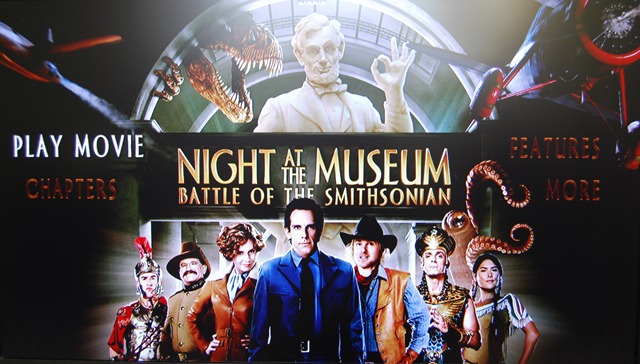
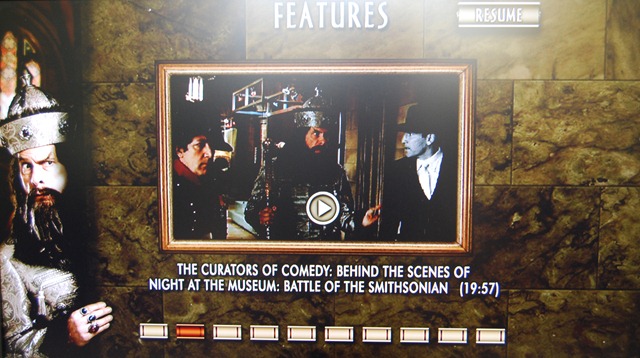
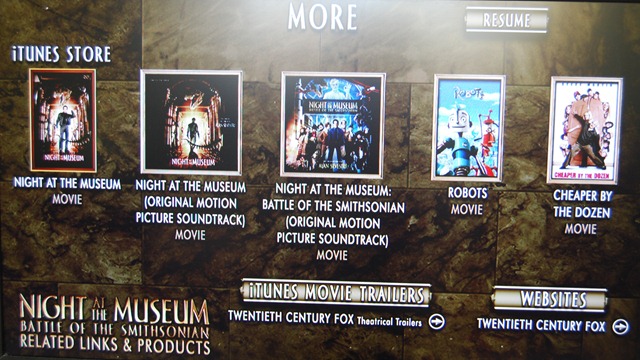
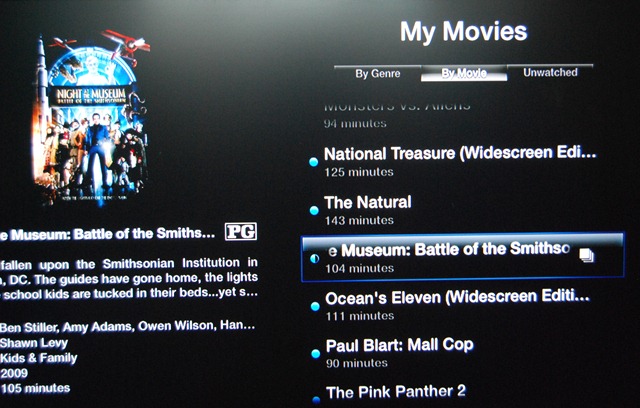
Here are pictures from my Apple TV.
As you can see, its not strikingly different from a DVD menu.
Again, not a new feature. Nothing noteworthy here, move along.
One nice feature is the above menu, allowing you to go to the extra Screen instead of playing the movie.
I must say, it is nice to have special features without having to get the DVD. I hope more and more movie get this, and not just the new releases (Though I did notice that the original The Wizard of Oz movie has Extras – see last picture). I suppose that this is one area where Apple’s grab for the living room puts it in sharp contrast to Windows Media Centre. I don’t think WMC will do the special features if you copy and paste the Video_Ts folder.
This is also interesting: a shameless attempt to sell us more stuff. A link to iTunes movie trailers and a link to Twentieth Century Fox. It would be cool if this were updated on a regular basis with other stuff. It would be a good place to put special offers. Such as 50% off the soundtrack because you bought the movie (so you have you buy the movie and get the soundtrack from this screen).
The movies with Extra have this little icon next to them to distinguish them from the rest of the “ordinary” movies:
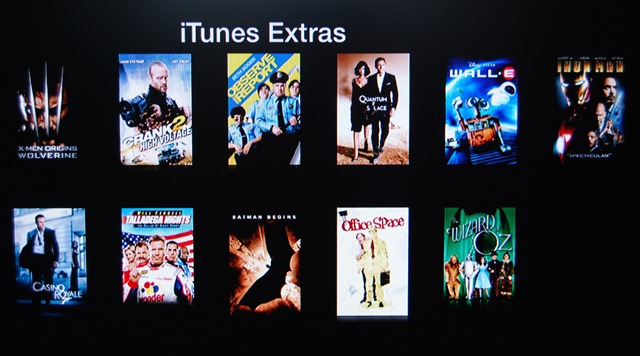
Finally, here are the available movies with iTunes Extras:
I have two of those movies: Walle-e and Iron Man, both bought from iTunes when they were released. But iTunes Extras weren’t available then. A Endgaget post seemed to suggest that only if you already bought these with Extras could you re-download them to work with Apple Tv 3.0.2. So I’m not sure hat the deal is. It would be very sad if i could not get Extras for them.
Finally, it would be interesting if someone figured out how to translate from DVD menus to iTunes Extras.
PS And yes, some pictures are not properly centred and are thus utter crap. Sue me. 🙂
Apple’s draconian App store approval process (more like rejection process, currently) needs a share up. Here are a few suggestions to stream line the process.
Reviewers need to have accountability. We have heard of one reviewer accepting and app, but another reviewer rejecting it. Reviewers need to manage an account made up of a number of apps, ensuring that one reviewer handles an app throughout its lifecycle on the store.
There should be two kinds of updates – bug fixes that need to be pushed out STAT and upgrades that add features. Splitting updates up like this is the equivalent of adding a car pool lane. Bug fixes go out immediately, but new features are still reviewed.
This has been suggested before, but I’ll say it again: trusted developers should be given carte blanche.
Managing 100k apps on the store is NOT easy. Apple’s tenacious grip on every single app is unsustainable. It has to give up some of that top make the app store work.
To be clear, I love the app store. I trust Apple that the apps I install aren’t going to brick my phone. Or that hidden features are going to leave me embarrassed when others borrow the phone. That Apps will be well designed and though out.
Apple is trying to preserve the design aesthetic and vision that Steve Jobs had. That is why originally Apple pushed developers to build web apps. And indeed, there are still some web apps around that I use frequently. The Google Reader iPhone page, the Friendfeed iPhone page, etc. Apple never intended that this be the case. The App store mess marrs the otherwise pristine reputation of the iPhone. It is a perpetual thorn in Steve Jobs’ side.
Now that the kindle is finally coming to the UK, my opinions of it are a bit more pointed.
First, I have a huge library of books The one drawback of this is that it takes up large volumes of space. So the kindle does have one major advantage for me personally. And i don’t have any problem with dead-tree printing. The downside is that none of those books are going to be on my new kindle.
Second, Josh Chandler’s post specifically highlights the use of the Kindle in collage and universities. This was a major selling point of the Kindle, and later of the Kindle DX. Being a programmer, the DX is my only option if i want it for textbooks. And the DX is expensive (if I’m only buying a few textbooks, I’m better of buying the dead-tree versions). Aside: a Zune-like subscription service would be much better.
Third, the kindle has Newspapers and blogs, plus any PDF you care to email to it. This has obvious advantages. I enjoy reading the paper every now and again. And i have a few e-books that i could see myself emailing to the kindle. Nasa, for example has a great library of Histories that are available on the web for free. Those that aren’t in PDF, I point acrobat at the address and acrobat downloads them. There’s my e-book. So again, another use I have for the kindle.
Forth. How does the Kindle handle PDF DRM on my existing e-books?? I already have a few technical books in PDF that I bought. Will i be able to use them on a Kindle??
Now the PDF standard is actually capable of far more that most people actually use it for. PDF is built for this kind of digital textbook use case. Its annotation tools, for example are second to none.
Does the kindle use this format?? No. Does it use the openPub standard that Google’s e-books are available in?? No. (as a programmer this offends me greatly). As a result, all the hype about the DX being used at Princeton etc actually has come to nought. Students rarely use it. Why?? Annotation. Remember I can WRITE, CIRCLE, HIGHLIGHT, DOODLE (and so on) on a dead-tree book.
The Kindle could do much more as a digital text book. Remember the Apple iTablet is a-coming and ,as things stand right now, given the choice between a dedicated dead-tree replacement, and a fully fledged computer/personal media player that also is a dead tree replacement and does everything the Kindle does, better, you know where I’d be going.
Coincidentally, me and my fellow students are picking honours year projects. One suggestion I made was to take the diagrams and so on from the smartBoards (they must have an API, surely), and merge them with the PDF version of the notes. (PDF has an API). Seriously, how great would that be?? Currently I draw all that stuff on my laptop (Kudos to which ever genius laid out the Ribbon in Word 2007, BTW). So what my lecturer is doing on the board magically appears on my PDF. Tie that with a kindle and you have instant student heaven/nirvana.
If Amazon is serious about the ability of the Kindle to make a splash in the student market, these are the kinds of things it needs to be thinking about. Apple is so successful with its products because they make them indispensible. Amazon needs to do stuff like that to make the kindle indispensible for the serious student.
So it has the POTENTIAL to be the perfect digital textbook.
Those of you who follow my twitter stream would have seen the above tweet a few hours back.
I’ve been finalizing what I’ll be doing for my honours year project (Computer Science) and that’s what the tweet is referring to.
I’m penning this post because it comes down to one thing: knowledge.
I took up RSS reading about 5 years ago and never looked back. Over that time I’ve spent countless hours read blogs covering every corner of the tech world. If i hadn’t spend that time, I would not have the foggiest idea what to do for my project.
While all my fellow students are sitting there going “aw shucks” (or, in the funnier version “eh, whats up doc??” 🙂 ), I’m planning in detail.
So I’d like to thank everyone of the authors of the blogs I follow for their time, dedication and inspiration. It would be impossible to name them all here.
More recently, twitter has become a valuable resource in connecting with other devs and getting questions answered. Those devs I correspond with regularly, you know who you are. And I thank you.
As academic restrictions permit, I may or may not be able to share project details.
In the mean time, back to work.
PS. For those of you following my work on whs2smugmug, I will do what I can in between. Note I have set up a twitter feed (whs2smugmug) and a friendfeed stream (here)
Apple’s rejection out-of-hand of the Google Voice App has the interwebs all a flutter with rumours and speculation, not to mention fury as well.
Although I’m in the Uk and therefore locked out of a GV account until its released here, I’m looking forward to using it soon. Its no accident that I’m especially looking forward to using it with my iPhone, or i was in any case.
The reason why this is causing such an uproar is that the target market for GV users just happens to overlap rather significantly with that of the iPhone.
The fact is though, Google Apps for Business does not get enough attention these days. In fact, there has been a spate of articles on how Google Apps for Domain falls down when it comes to being a valid option for businesses. My hope is that Google integrates GV into the suite, giving clear value and functionality for the business user (read: me).
I envision a number of use cases where this could work.
Imagine, via GV, a Google Wave, document, spreadsheet or presentation open magically when you answer the call. Not only are you talking to the person, you can collaborate in real time)especially rue of Google Wave).
Google Contacts will give caller identity a whole new meaning, even if the callers aren’t already in our address book.
In fact, Since this is really a domain oriented service, imagine being able to ring contact.yourdomain.com and getting through to reception????
The fact is that Google is positioning Google Apps for Domain to be its integrated business offering.
Microsoft has Office Communication server, which requires built in telephone networks. But has none of the integration opportunities that Google Apps for Domain has.
In fact, it would be worth the money.
If true, the fact is that Apple is obstructing Google’s business plans. No wonder the FCC and the net-neutrality lobby is up in arms.
And if this eWeek article has any truth to it, its because Apple wants to built a similar service for Mobile Me. Its not too far fetched to imagine, and makes logical sense.
Depending on Apples implementation of it (keeping 9n mind the debut of Mobile Me), it may just tempt people away from Google Apps for Domain with GV.
But apple, seriously, if you are going to start acting like this to pre-empt the competition, remember one thing: Out-Innovate Google and you’ve won. It would be a shame for Apple to start acting like Microsoft in the 1990’s.
And what if it was AT&T???? that i can’t answer. But AT&T’s reputation is so battered and bruised with iPhone users, that they may all jump ship to Android and Pre. And even more are going to be jailbreaking to get the app.
This is a state of affairs that benefits no one.
See. I like my iPhone. A lot. Every day I discover some new feature or app that makes it even better. When el Jobso gave his blessing to this device, you can see why. And they have thrown that all away with this one stupid decision.
So i got me an Apple Tv last week, more on impulse than as part of any rational thought, as such things go. i was planning on getting one, but only later this summer.
But such is life….
So its sitting there on my Tv cupboard, replacing the DVD player that does not work any way…. surrounded by my impressive collection of DVDs. Which do me no good sitting on the shelf instead of on my Apple Tv hard drive….
The solution to this is, of course to back up your DVDs to disk. I use DVDShrink 3.2 (the last version ever released), or DVD Decryptor. both of which leave you with a folder full of .vob files ( usually a VIDEO_TS folder). This will strip copy protection from the files.
These files do us no good. Apple Tv will not take .vob files. But, and I must admit my irritation here, Windows Media Center does ( serves me right for being a turncoat 🙂 ).
So the next step is to use Handbrake ( for Mac and Windows) to take your backed up files and turn them into Apple Tv readable m4v or mp4 files. These files can be read across iTunes, Apple Tv, and your video capable iPods and iPhones.
Now this conversion process is eyewateringly long. I’ve resurrected an old laptop ( Intel Celeron M 1.4 ghz, 256Mb RAM). The average time is about 10 hours – at 4.3 frames per second. My 3ghz Pentium 4 with 2Gb RAM is actually only slightly faster, confusingly enough. in any case, i need the desktop and no the laptop, so the old and busted laptop is doing the conversions.
The 10 hours conversion does not bother me much. I set it up to go in the morning, and its usually almost done my the time I’m back home in the evening.
All this media is being stored on my Windows Home Server, with a normal install of iTunes being the server. I’m not sure if Firefly Media Server will work with Apple TV, but if it is, I’ll install that instead.
Finally, I use MetaX 1.0 for Windows (theres a Mac version, too) to add in metadata – pic, sypnosis, direcots, actor, etc…. This is amazingly useful and saved me loads of time….
Now my music library is full of duplicates (my fault for leaving the “Copy to iTunes library” option on when i import stuff), So I’m slowly going through it and deleting the duplicates (and saving space at the same time).
My Photos are spread across a hundred folders, so i have to get some sort of organisation going so i can sync them to Apple Tv and show them off on my Tv 🙂 .
I have SageTv running on the same server. Their conversion process for Apple Tv takes just as long and won’t work – sigh. If I could just get Sage to save the files in m4v format, i could sync my recorded tv directly to my apple Tv without any (hours long) conversion in between.
Update 14-10-09: The latest version of SageTv does indeed convert to m4v perfectly. Works wonders, but the time is still rather long. I reccomend turning off everything, defrags, AV runs (and temporarily, backups) if you have a long queue of files to convert. Right now I have 16 files to convert all of which are about 2- 3 hours long. Usually two a day. So for this week, I have turned off the defrag passes. SageTv actuall scales its CPU usage remarkabely well in these situations.
If i could, i’d have uploaded everything to EC2 for encoding 🙂
Thanks to the guys over on Friendfeed for help with this.













 Random Musings
You must be logged in to post a comment.