Sitemaps in ASP.Net MVC: Icing on the Cake

This is short simple and sweet (forgive the pun).  The reason why i say that is that you have two options when doing a sitemap in MVC (actually, you have more, but whatever).

The first is using a Library. There’s a MVC Sitemap provider on Codeplex that you can download and install. It involves some XML configuration and attributes on all the actions you want to include in your sitemap.

The fact is, I don’t have time to fiddle around with configurations. I just want a simple sitemap file with a handful of products, categories and one or two other links. If the site was larger and more complex I might consider it.

So, we come to the second, DIY way. Now, this is not entirely my idea. I just repurposed it to pull the correct URL parameters out of the db. The original code is found on Codeplex.

Firstly, we have to register a new route to www.example.com/sitemap.xml. Go to Global.asax and put the following in your RegisterRoutes() method. I put mine after the call to IgnoreRoute.

routes.MapRoute("Sitemap", "sitemap.xml", new { controller = "Home", action = "Sitemap", id = UrlParameter.Optional });

Now, you can use any default routing you want with this. As you can see above, the route is pointing to the Sitemap action of the Home controller.

Then we have to actually populate our Action with some code.

  protected string GetUrl(object routeValues)
        {
            RouteValueDictionary values = new RouteValueDictionary(routeValues);
            RequestContext context = new RequestContext(HttpContext, RouteData);

            string url = RouteTable.Routes.GetVirtualPath(context, values).VirtualPath;

            return new Uri(Request.Url, url).AbsoluteUri;
        }
        [OutputCache (Duration=3600)]
        public ContentResult Sitemap()
        {
            var categories = storeDB.Categories.Include("Products").Where(g => g.Id != 8); //some filtering of categories
            XNamespace xmlns = "http://www.sitemaps.org/schemas/sitemap/0.9";
            XElement root = new XElement(xmlns + "urlset");

            List<string> urlList = new List<string>();
            urlList.Add(GetUrl(new { controller = "Home", action = "Index" }));
            urlList.Add(GetUrl(new { controller = "Home", action = "Terms" }));
            urlList.Add(GetUrl(new { controller = "Home", action = "ShippingFAQ" }));
            urlList.Add(GetUrl(new { controller = "Home", action = "Testimonials" }));
            foreach (var item in categories)
            {
                urlList.Add(string.Format("{0}?{1}={2}",GetUrl(new { controller = "Store", action = "BrowseProducts"}),"category",item.Name));

                foreach (var product in item.Products)
                {
                    urlList.Add(string.Format("{0}/{1}", GetUrl(new { controller = "Store", action = "ProductDetails" }), product.Id));
                }
            }

            foreach (var item in urlList)
            {
                root.Add(
                new XElement("url", 
                new XElement("loc", item), 
                new XElement("changefreq", "daily")));
            }

            using (MemoryStream ms = new MemoryStream())
            {
                using (StreamWriter writer = new StreamWriter(ms, Encoding.UTF8))
                {
                    root.Save(writer);
                }

                return Content(Encoding.UTF8.GetString(ms.ToArray()), "text/xml", Encoding.UTF8);
            }
        }

Essentially, we’re just outputting an xml file with the correct format and structure.  This gives us a file that looks like:

<?xml version="1.0" encoding="utf-8"?>

<urlset xmlns="http://www.sitemaps.org/schemas/sitemap/0.9">

  <url xmlns="">

    <loc>http://localhost:26641/</loc>

    <changefreq>daily</changefreq>

  </url>

  <url xmlns="">

    <loc>http://localhost:26641/Home/Terms</loc>

    <changefreq>daily</changefreq>

  </url>

  <url xmlns="">

    <loc>http://localhost:26641/Home/ShippingFAQ</loc>

    <changefreq>daily</changefreq>

  </url>

You get the idea.

The above code is using Entity Framework 4.1, so you can replace the line that declares  “var categories” with whatever data source you have. And you’ll have to reformat the url strings to conform to your parameter format.

Now I’m not suggesting this for any large MVC deployment. The code could get rather messy.


But for something simple, it works like a dream.

Getting your News Manually Blows: A Reply

Last night Holden Page wrote a pretty good blog post entitled: Getting Your News Manually Blows (http://pagesaresocial.com/2011/04/05/getting-your-news-manually-blows/).

It was late, so I thought I’d reply now when I’m fully awake :).

Holden’s point was that when you use a service like my6thsense that auto-curates the news and presents this to you, it’s much easier than using Twitter (and by extension Google Reader etc) to get your news. Essentially, it’s easier to have the news pushed to you rather than to have to go off and pull it from various services.

Essentially, Holden is arguing for the curation model rather than e co sunroom model. This is infect something that I’ve noticed myself. There is consistent lack of content, even using Feedly and Twitter and Friendfeed to get my news.

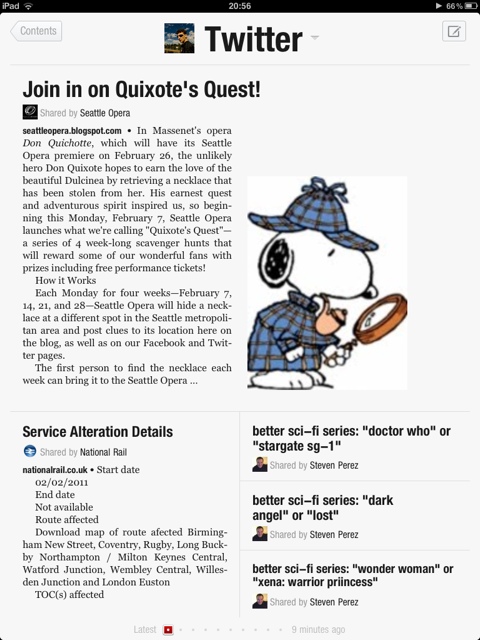
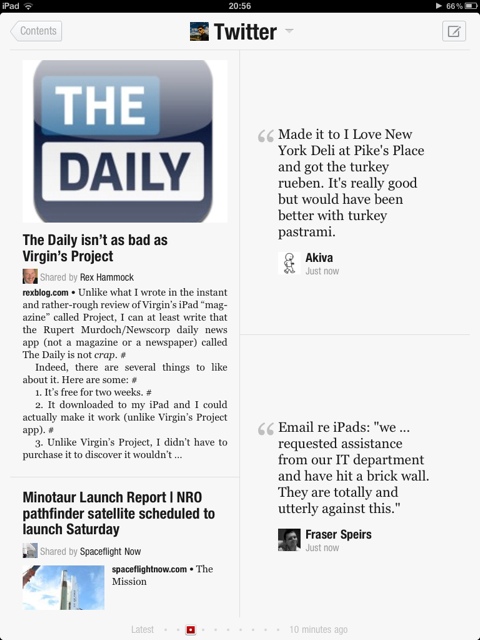
Now I got an iPad about 2 months ago. And promptly installed Flipboard. I mention this because the experience is as important, if not more so, as the content in that experience. This rapidly warmed me to the iPad as a digital newspaper, complete with page turns and layout. Now it’s blatantly obvious, but the iPads ability to BECOME the app that’s running is a singular experience. As a dead tree newspaper reader, the fuss of a broadsheet just melts away on the iPad. Turning pages on a broadsheet can be a torturous experience. Flipboard showed me how that just melts away.

Thus I went off to seek actual newspaper apps to use.

Now before you groan and call newspapers dead tree media of the past, sit down and think about it. Newspapers were the my6thsense of the dead tree media (albeit it political persuasions, rivalries and narcissistic owners took thee place of algorithms). Decades worth of experience curating the news still produces some damn fine newspapers.

That’s a fact. Take the Times of London. I’ve been a Times Reader for years, even though it is a Tory paper. The iPad apps for the Times and the Sunday Times are incredibly good. They preserve the newspaper’s look and feel whilst incorporating video and some innovative layouts. I like it so much I signed up for the monthly subscription.

Here’s the scary bit: I open up The Times app and read it before I open up Feedly. No kidding. It’s curated news that covers a wide variety of topics succinctly. It’s quick and easy to browse through.

“Hang on a minute” I hear you say, “there’s no sharing or linking or liking or anything! It’s a Walled Garden”. And that’s the truly scary part: I don’t care.

Now i’m not at all suggesting that we abandon our feed readers and start reading digital newspapers. Quite the opposite. I’m saying that if we’re looking for sources of curated news, digital newspapers had better be one of those sources. Indeed, Feedly still gets used everyday. It’s invaluable to me. (Today, for example, the Falcon 9 Heavy story is nowhere to be found in The Times).

There other good newspaper app I found was the USA Today app. It’s nice and clean, with a simple interface that focusses on content. As a bonus, you can share articles to your hearts content. Plus, it’s US centric for the Americans among us 😉

I mentioned above that looking through my feeds for good content or through Twitter and Friendfeed was/is becoming a it of a chore. I’m finding more and more time where i’m looking at absolutely nothing. I probably need to subscribe to better feeds or better people. I probably need to reorganise my feeds to better layout content, and cull the boring ones. But here’s the thing, I don’t have the time to do all that.

As Apple would say, There’s an App For That!

Using SQL Azure with ELMAH

If you don’t know what ELMAH is, stop right now and go and read about it.

ELMAH (Error Logging Modules and Handlers) is an application-wide error logging facility that is completely pluggable. It can be dynamically added to a running ASP.NET web application, or even all ASP.NET web applications on a machine, without any need for re-compilation or re-deployment.

Then go and read Scott “TheHa” Hanselman’s post on it.

There is a Nuget package for it as well, to make things really super easy.

In fact, running Nuget, setting up SQL Azure and tweaking some config settings took me all of 20 minutes. No freaking kidding. 

Now remember that this is being installed on an MVC site, so don’t let that put you off. Here we go:

Step One: Install from Nuget (making sure you have the latest build of Nuget in the process)

Step Two: Setup SQL Azure

Step Three configure web.config


And done Smile


So, lets go back and look at the details.

In step two, this is the SQL Azure script that the Migrate Assist wizard spat out:

--~Changing index [dbo].[ELMAH_Error].PK_ELMAH_Error to a clustered index.  You may want to pick a different index to cluster on.
SET ANSI_NULLS ON
SET QUOTED_IDENTIFIER ON
IF NOT EXISTS (SELECT * FROM sys.objects WHERE object_id = OBJECT_ID(N'[dbo].[ELMAH_Error]') AND type in (N'U'))
BEGIN
CREATE TABLE [dbo].[ELMAH_Error](
	[ErrorId] [uniqueidentifier] NOT NULL,
	[Application] [nvarchar](60) NOT NULL,
	[Host] [nvarchar](50) NOT NULL,
	[Type] [nvarchar](100) NOT NULL,
	[Source] [nvarchar](60) NOT NULL,
	[Message] [nvarchar](500) NOT NULL,
	[User] [nvarchar](50) NOT NULL,
	[StatusCode] [int] NOT NULL,
	[TimeUtc] [datetime] NOT NULL,
	[Sequence] [int] IDENTITY(1,1) NOT NULL,
	[AllXml] [nvarchar](max) NOT NULL,
 CONSTRAINT [PK_ELMAH_Error] PRIMARY KEY CLUSTERED 
(
	[ErrorId] ASC
)WITH (STATISTICS_NORECOMPUTE  = OFF, IGNORE_DUP_KEY = OFF)
)
END

IF NOT EXISTS (SELECT * FROM sys.indexes WHERE object_id = OBJECT_ID(N'[dbo].[ELMAH_Error]') AND name = N'IX_ELMAH_Error_App_Time_Seq')
CREATE NONCLUSTERED INDEX [IX_ELMAH_Error_App_Time_Seq] ON [dbo].[ELMAH_Error] 
(
	[Application] ASC,
	[TimeUtc] DESC,
	[Sequence] DESC
)WITH (STATISTICS_NORECOMPUTE  = OFF, IGNORE_DUP_KEY = OFF, DROP_EXISTING = OFF, ONLINE = OFF)
GO
IF NOT EXISTS (SELECT * FROM dbo.sysobjects WHERE id = OBJECT_ID(N'[DF_ELMAH_Error_ErrorId]') AND type = 'D')
BEGIN
ALTER TABLE [dbo].[ELMAH_Error] ADD  CONSTRAINT [DF_ELMAH_Error_ErrorId]  DEFAULT (newid()) FOR [ErrorId]
END

GO
SET ANSI_NULLS ON
SET QUOTED_IDENTIFIER ON
IF NOT EXISTS (SELECT * FROM sys.objects WHERE object_id = OBJECT_ID(N'[dbo].[ELMAH_GetErrorsXml]') AND type in (N'P', N'PC'))
BEGIN
EXEC dbo.sp_executesql @statement = N'
CREATE PROCEDURE [dbo].[ELMAH_GetErrorsXml]
(
    @Application NVARCHAR(60),
    @PageIndex INT = 0,
    @PageSize INT = 15,
    @TotalCount INT OUTPUT
)
AS 

    SET NOCOUNT ON

    DECLARE @FirstTimeUTC DATETIME
    DECLARE @FirstSequence INT
    DECLARE @StartRow INT
    DECLARE @StartRowIndex INT

    SELECT 
        @TotalCount = COUNT(1) 
    FROM 
        [ELMAH_Error]
    WHERE 
        [Application] = @Application

    -- Get the ID of the first error for the requested page

    SET @StartRowIndex = @PageIndex * @PageSize + 1

    IF @StartRowIndex <= @TotalCount
    BEGIN

        SET ROWCOUNT @StartRowIndex

        SELECT  
            @FirstTimeUTC = [TimeUtc],
            @FirstSequence = [Sequence]
        FROM 
            [ELMAH_Error]
        WHERE   
            [Application] = @Application
        ORDER BY 
            [TimeUtc] DESC, 
            [Sequence] DESC

    END
    ELSE
    BEGIN

        SET @PageSize = 0

    END

    -- Now set the row count to the requested page size and get
    -- all records below it for the pertaining application.

    SET ROWCOUNT @PageSize

    SELECT 
        errorId     = [ErrorId], 
        application = [Application],
        host        = [Host], 
        type        = [Type],
        source      = [Source],
        message     = [Message],
        [user]      = [User],
        statusCode  = [StatusCode], 
        time        = CONVERT(VARCHAR(50), [TimeUtc], 126) + ''Z''
    FROM 
        [ELMAH_Error] error
    WHERE
        [Application] = @Application
    AND
        [TimeUtc] <= @FirstTimeUTC
    AND 
        [Sequence] <= @FirstSequence
    ORDER BY
        [TimeUtc] DESC, 
        [Sequence] DESC
    FOR
        XML AUTO

' 
END
GO
SET ANSI_NULLS ON
SET QUOTED_IDENTIFIER ON
IF NOT EXISTS (SELECT * FROM sys.objects WHERE object_id = OBJECT_ID(N'[dbo].[ELMAH_GetErrorXml]') AND type in (N'P', N'PC'))
BEGIN
EXEC dbo.sp_executesql @statement = N'
CREATE PROCEDURE [dbo].[ELMAH_GetErrorXml]
(
    @Application NVARCHAR(60),
    @ErrorId UNIQUEIDENTIFIER
)
AS

    SET NOCOUNT ON

    SELECT 
        [AllXml]
    FROM 
        [ELMAH_Error]
    WHERE
        [ErrorId] = @ErrorId
    AND
        [Application] = @Application

' 
END
GO
SET ANSI_NULLS ON
SET QUOTED_IDENTIFIER ON
IF NOT EXISTS (SELECT * FROM sys.objects WHERE object_id = OBJECT_ID(N'[dbo].[ELMAH_LogError]') AND type in (N'P', N'PC'))
BEGIN
EXEC dbo.sp_executesql @statement = N'
CREATE PROCEDURE [dbo].[ELMAH_LogError]
(
    @ErrorId UNIQUEIDENTIFIER,
    @Application NVARCHAR(60),
    @Host NVARCHAR(30),
    @Type NVARCHAR(100),
    @Source NVARCHAR(60),
    @Message NVARCHAR(500),
    @User NVARCHAR(50),
    @AllXml NVARCHAR(MAX),
    @StatusCode INT,
    @TimeUtc DATETIME
)
AS

    SET NOCOUNT ON

    INSERT
    INTO
        [ELMAH_Error]
        (
            [ErrorId],
            [Application],
            [Host],
            [Type],
            [Source],
            [Message],
            [User],
            [AllXml],
            [StatusCode],
            [TimeUtc]
        )
    VALUES
        (
            @ErrorId,
            @Application,
            @Host,
            @Type,
            @Source,
            @Message,
            @User,
            @AllXml,
            @StatusCode,
            @TimeUtc
        )

' 
END
GO

Log in to SQL Management Studio and run that script against your chosen db and you’re good to go.


In step 3, there are 2 main things you want to do.

The first is obviously setting up ELMAH to talk to the db. We do it like so.

<elmah>
    <errorLog type="Elmah.SqlErrorLog, Elmah" connectionStringName="ConnectionStringhere" />
    <security allowRemoteAccess="yes" />
  </elmah>

And the second is securing the actual elmah.axd page.

  <location path="elmah.axd">
    <system.web>
      <authorization>
        <deny users="?"/>
        <allow roles="Administrator"/>
      </authorization>
    </system.web>
  </location>

And we’re done. Easiest thing I’ve ever done. Smile

Deploying your Database to SQL Azure (and using ASP.Net Membership with it)

Its been quite quiet around here on the blog. And the reason for that is the fact that I got asked by a Herbalife Distributor to put a little e-commerce site together (its called flying Shakes). So its been a very busy few weeks here, and hopefully as things settle down, we can get back to business as usual. I’ve badly neglected the blog and the screencast series.

I have a few instructive posts to write about this whole experience, as it presented a few unique challenges.

Now. I’m staring at the back end here since deploying the database to SQL Azure was the difficult part of deployment. The reason for this is mainly due to the ASP.Net Membership database.

But we’ll start from the beginning. Now I’m assuming here that your database is complete and ready for deployment.

Step 0: Sign up for Windows Azure (if you haven’t already) and provision a new database. Take note of the servers fully qualified DNS address and remember  your username and password. You’ll need it in a bit.

Step 1 Attach your database to to your local SQL Server. Use SQL Server  Management Studio to do that.

At this point  we have our two databases  and we need to transfer  the schema and data from one to the other. To do that, we’ll use a helpful little Codeplex project called SQL Azure Migration Wizard. Download it and unzip the files.

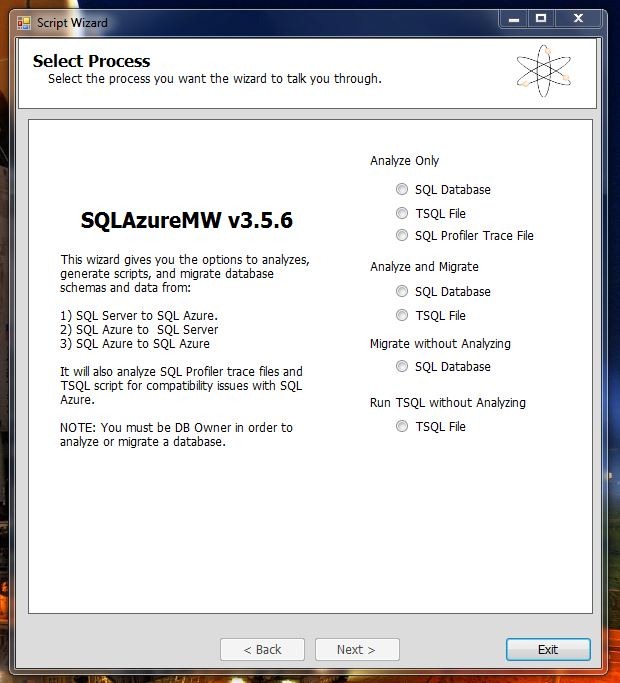
Run the exe. I chose Analyse and Migrate:

Capture


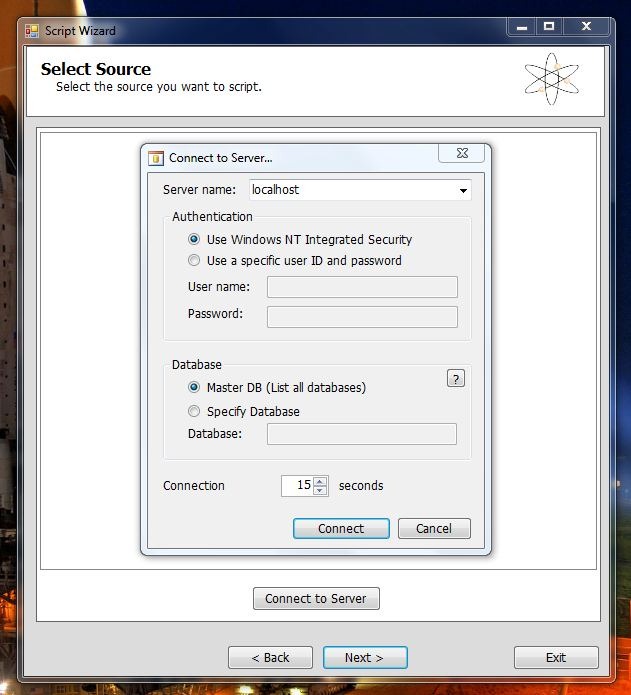
Enter your Local SQL Server details:

Capture2


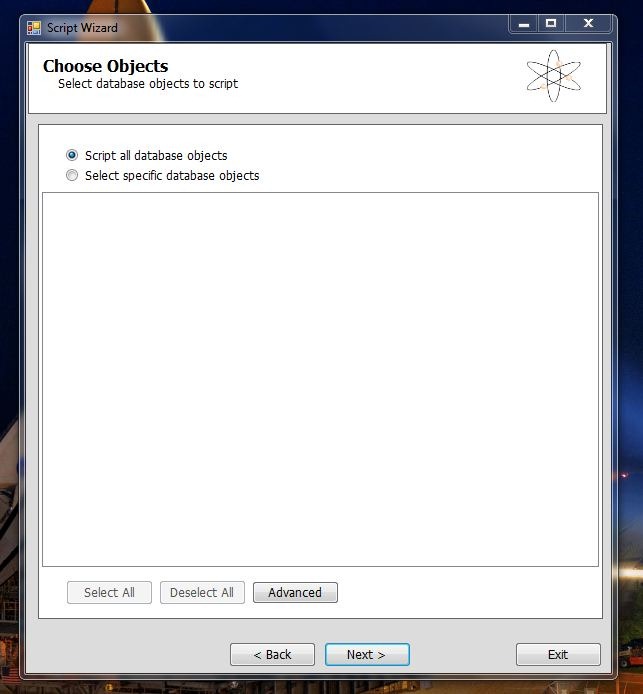
Capture3


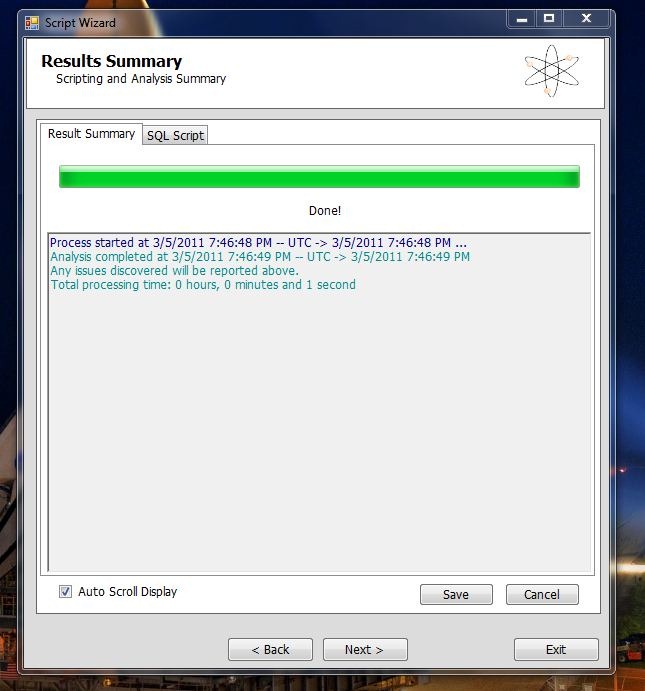
Hit Next until it asks if you’re ready to generate the SQL Scripts. This is the screen you get after its analyse the database and complied the scripts.

Capture4

Now you get the second login in screen that connects you to your newly created SQL Azure Database.

This is the crucial bit. You have to replace SERVER with your server name in both the server name box and the Username box, replacing username with your username in the process. You need to have @SERVER after your username or the connection will fail.

Capture5

Fill in the rest of your details and hit Connect. Press next and at the next screen you’ll be ready to execute the SQL scripts against your SQL Azure database.

And its that easy.

All you have to do is to go ahead and change your connection string from the local DB to the one hosted on SQL Azure.

There is one last thing to do. When you first deploy your site and try and run it against SQL Azure, it won’t work. the reason being is that you have to set a firewall rule for your SQL Azure Database by IP Address range. So you should receive an error message saying that IP address such and such is not authorised to access the database. So you just need to go ahead and set the appropriate rule in the Management Portal. You’ll need to wait a while before those settings take effect.

And you should be good to go.


The ASP.Net Membership Database

In the normal course of events, you can setup Visual Studio to run the SQL Scripts against whatever database you have specified in your connection string when you Publish your project. However, there is a big gotcha. The SQL Scripts that ship with Visual Studio will not run against SQL Azure. This is because SQL Azure is restricted.

Even if you log into your SQL Azure database using SQL Management Studio you’ll see that your options are limited as to what you can do with  the database from within SQL Management Studio. And if you try and run the scripts manually, they still wont run.

However, Microsoft has published a SQL Azure friendly set of scripts for ASP.net.

So we have two options: We can run the migrate tool again, and use the ASP.net Membership database  to transfer over Schema and Data. Or we can run the scripts against the database.

For the sake of variety, I’ll go through the scripts and run them against the database.

  1. Open SQL Management Studio and log into your SQL Azure Database.
  2. Go File-> Open and navigate to the folder the new scripts are in.
  3. Open InstallCommon.sql and run it. You must run this before running any of the others.
  4. For ASP.net Membership run the scripts for Roles, Personalisation, Profile and Membership.

At this point I need to point out that bad things will happen if you try running your website now, even if your connection string has been changed.

ASP.net will try and create a new mdf file for the membership database. You get this error:

An error occurred during the execution of the SQL file ‘InstallCommon.sql’. The SQL error number is 5123 and the SqlException message is: CREATE FILE encountered operating system error 5(failed to retrieve text for this error. Reason: 15105) while attempting to open or create the physical file ‘C:\USERS\ROBERTO\DOCUMENTS\VISUAL STUDIO 2010\PROJECTS\FLYINGSHAKESTORE\MVCMUSICSTORE\APP_DATA\ASPNETDB_TMP.MDF’. CREATE DATABASE failed. Some file names listed could not be created. Check related errors. Creating the ASPNETDB_74b63e50f61642dc8316048e24c7e499 database…

Now, the problem with all this is the machine.config file where all of these default settings actually reside. See internally, it has a LocalSQLServer connection string. And by default, the RoleManager will use it because its a default setting. Here’s what it looks like:

<connectionStrings>		
<add name="LocalSqlServer" connectionString="data source=.\SQLEXPRESS;Integrated security=SSPI;AttachDBFilename=|DataDirectory|aspnetdb.mdf;User Instance=true" providerName="System.Data.SqlClient"/>	</connectionStrings>
<system.web>		
<processModel autoConfig="true"/>	
<httpHandlers/>		
<membership>			
<providers>				
<add name="AspNetSqlMembershipProvider" type="System.Web.Security.SqlMembershipProvider, System.Web, Version=4.0.0.0, Culture=neutral, PublicKeyToken=b03f5f7f11d50a3a" connectionStringName="LocalSqlServer" enablePasswordRetrieval="false" enablePasswordReset="true" requiresQuestionAndAnswer="true" applicationName="/" requiresUniqueEmail="false" passwordFormat="Hashed" maxInvalidPasswordAttempts="5" minRequiredPasswordLength="7" minRequiredNonalphanumericCharacters="1" passwordAttemptWindow="10" passwordStrengthRegularExpression=""/>			</providers>		
</membership>
<profile>
<providers>	
<add name="AspNetSqlProfileProvider" connectionStringName="LocalSqlServer" applicationName="/" type="System.Web.Profile.SqlProfileProvider, System.Web, Version=4.0.0.0, Culture=neutral, PublicKeyToken=b03f5f7f11d50a3a"/>			</providers>
</profile>
<roleManager>
<providers>
<add name="AspNetSqlRoleProvider" connectionStringName="LocalSqlServer" applicationName="/" type="System.Web.Security.SqlRoleProvider, System.Web, Version=4.0.0.0, Culture=neutral, PublicKeyToken=b03f5f7f11d50a3a"/>				<add name="AspNetWindowsTokenRoleProvider" applicationName="/" type="System.Web.Security.WindowsTokenRoleProvider, System.Web, Version=4.0.0.0, Culture=neutral, PublicKeyToken=b03f5f7f11d50a3a"/>
</providers>
</roleManager>
</system.web>

So, we have to overwrite those settings in our own web.config file like so:

<roleManager enabled="true" defaultProvider="AspNetSqlRoleProvider"> 
<providers>
<clear/>
<add name="AspNetSqlRoleProvider" connectionStringName="..." type="System.Web.Security.SqlRoleProvider, System.Web, Version=4.0.0.0, Culture=neutral...."/> 
</providers>
</roleManager>
<membership>
<providers> 
<clear/>
<add name="AspNetSqlMembershipProvider" type="System.Web.Security.SqlMembershipProvider.... connectionStringName=""..../>        </providers> 
</membership>
<profile>
<providers>
<clear/>
<add name="AspNetSqlProfileProvider" connectionStringName="" type="System.Web.Profile.SqlProfileProvider..../>
</providers> 
</profile>

Now, what we are doing here is simply replacing the connectionstringaname attribute in each of these providers with our own connection string name. Before that, however, we put “<clear/>” to dump the previous settings defined in the machine.config file and force it to use our modified settings.

That should  allow the role manager to use the our SQL Azure database instead of trying to attach its own. Things should run perfectly now.

Finally

The Azure Management Portal has a very nice UI for managing and editing your database. You can add and remove tables, columns rows etc. Its really good. And rather welcome. I thought I’d have to script every change and alteration.

Pre Sunday Sunday Times iPad App Review

Now before we get much further into this review, you need to understand that I am very much an information junkie. Reading the Sunday times over of cup of tea on Sunday morning is very much a part of life. Of course, being a Sunday morning, it involves actually getting out of bed and driving to the shop to get it. I’m not Tory enough to get it delivered. In fact, I’m not Tory At all. I’m kidding.

The fact is that I very much prefer the Sunday papers, their articles and opinion pieces having been digested for an entire week before writers put pen to paper. Even a Murdoch paper ends up sounding reasonable after a week of through thought.

But I digress Now, on to the app itself.

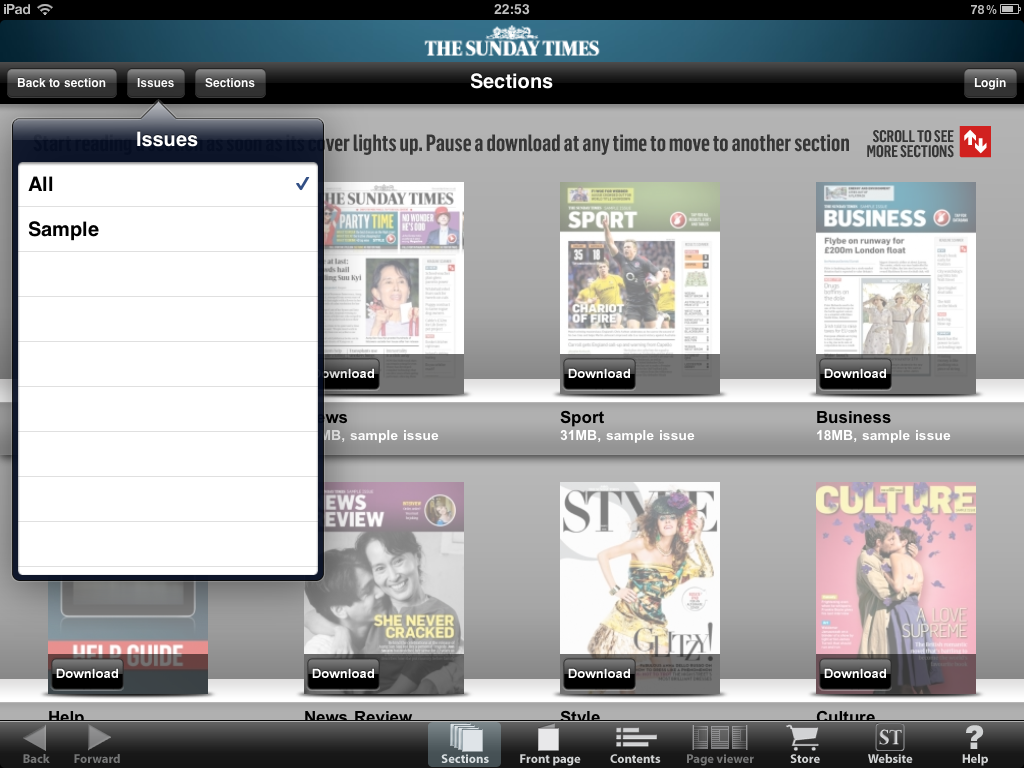
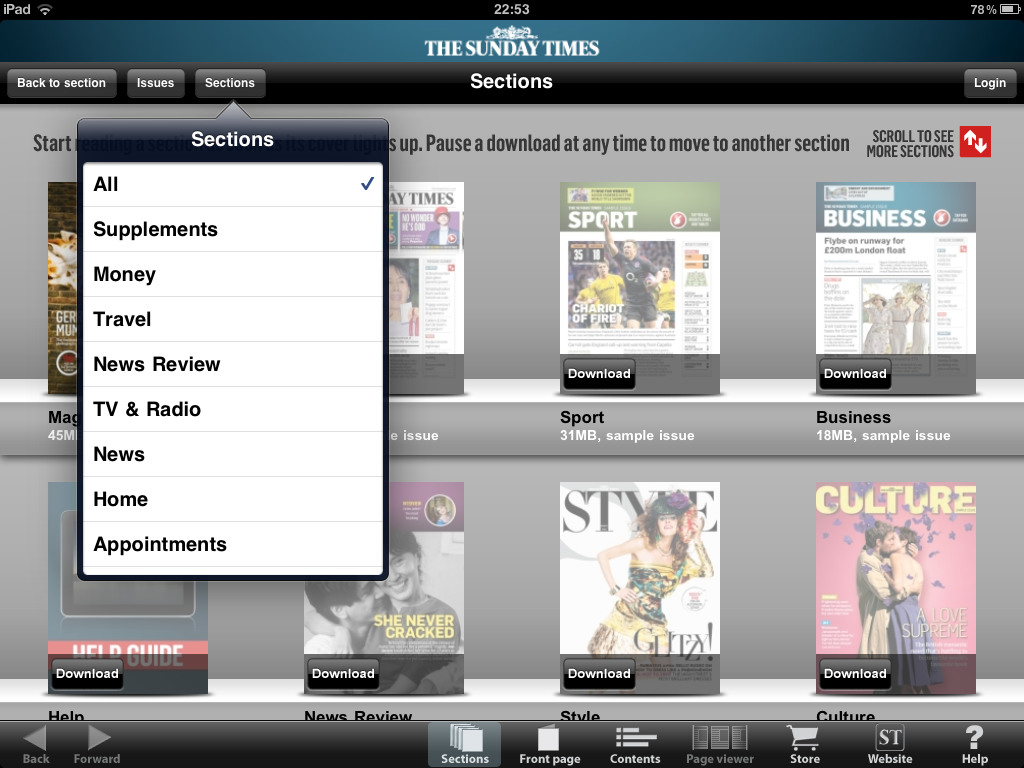
I must say that at least visually, the app is very well designed. For a paper the size of the Sunday Times, the navigation is actually quite simple. Each issue of the times is split up into a number of sections. Each section has a front page and a table of contents for each story in that section.

The majority of your time is going to be spent in the Section part of the application. Her you have the sections laid out for you. Then, you can filter these sections by the issue they come from. So unless you filter, this area is going to be come rather crowded.

This is also where you download the individual sections from the issue you have bought. This is of prime importance for me. Basically because I’m not going to be reading every single section of the paper. So I get to pick and choose what I want to download and I content have to wait for the whole paper to download before I can start reading.

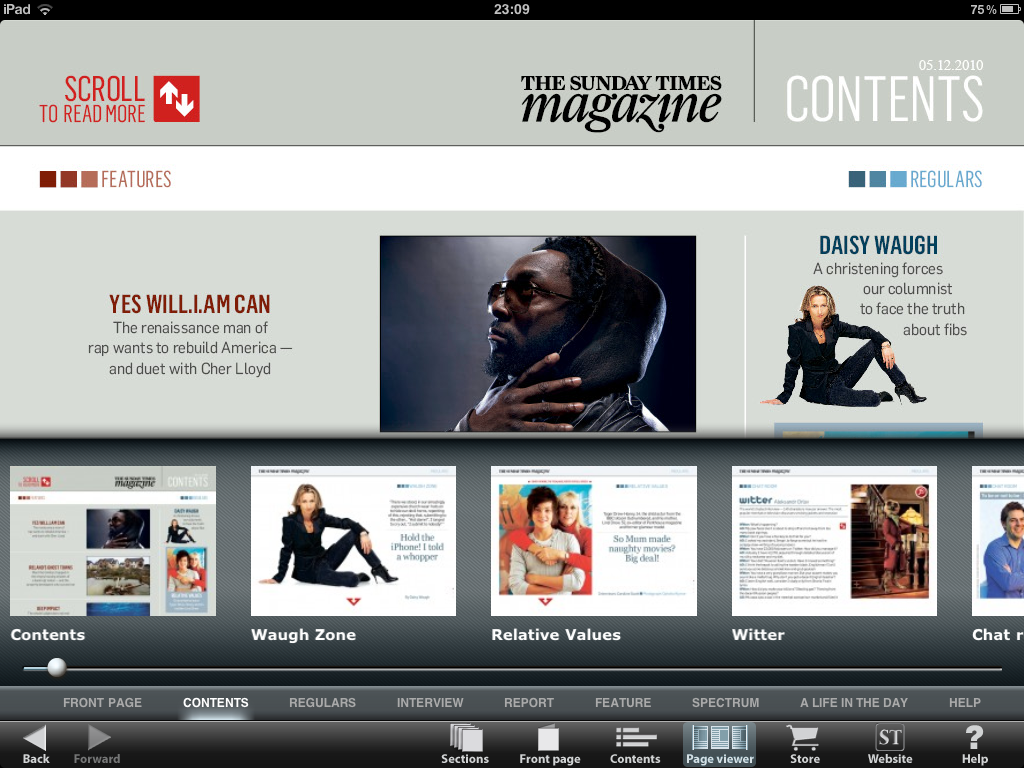
Now, you also get a page view, where you can scrobble along to find the exact page you’d like to read. This is rather useful, specially given the sheer number of pages you’re going to end up with in the larger sections of the paper.

Finally, the store is quite simply laid out, with the option buy the latest issue front and centre. You can swipe to the right to but older issues if you want, though frankly why would you want to? Anyhow, i can see why it could come in useful for some.

Finally, it should be noted that the multimedia content is only visible in landscape mode, or so it appears anyway. You have the option of reading a story in portrait if you went as well, but I fee that this app really is made to be viewed in landscape. It is after all a Sunday paper, made for reading slowly and thoughtfully on the couch, and not a daily paper made for busy people with less time on their hands.

The fact of the matt is that at £1.79 an issue, this is a steal. And in the process, as if its not a bargain already, I get to stay warm in bed and read it on Sunday morning. It doesn’t get much better an that.

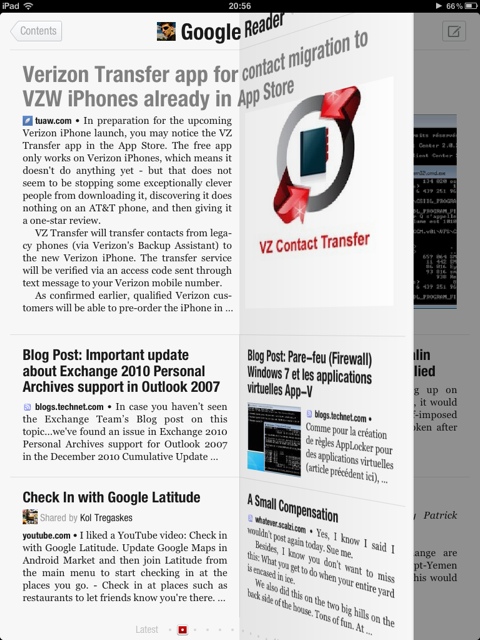
Heres the obligatory screenshot gallery. Note: I used one of the sample issues here and downloaded the Magazine section of the paper.

photo 1photo 2photo 3photo 1photo 2photo 3photo 5photo 4

Flipboard Review

One of the first apps I installed on my 64Gb wifi ipad was the Flipboard app. Now, after all the hoopla I heard from Robert Scoble and others, I was eager to use the app myself.

Now, the fact of the matter is that the app is beautifully designed. Really it is. A work of art. The page flips are beautifully animated. The app start up is brilliant, making me wonder each and every time i start it up what picture I’m going to get. The popout article pages are beautifully presented. Even the twitter client aspect of the app is very nicely done.

However, there are times when I go through my settle very leisurely and rather randomly, and Flipboard is sheer gold dust when it comes to this. Other times I’m more structured about my reading. I read the Tech folder first, then the Space folder, and finally the General folder. Only then, if i have time, do I randomly go through my other folders. This second way of reading my feeds is rather difficult on Flipboard. Moving between folders isn’t a smooth process and it requires too much work.

I actually prefer Feedly on my iPhone for reading my feeds when I’m going through Feedly quickly.

Feedly for iPad is coming soon, and we’ll see what difference it makes in this area.

There is one thing I’ve noticed: read/unread items do not always translate back to Feedly on the desktop. So, in fact, I end up reading some items twice. Since I’ve no idea of how Flipboard works under the hood, I’m not sure where the lag is coming in, whether it’s a Flipboard, Google Reader, or Feedly issue. But it sure would be nice to have some sync going on.

However, that having been said, Flipboard is very much of my routine. I rather enjoy reading it in the mornings over a cup of tea. It’s the first app I open. I really do think that it’s a most marvellous application and will definitely be using it very often.

WordPress Feature Request: A Universal Video Player

As any of you who have been following my screen casts know, I’ve been using Vimeo to host and share my videos.

However, Vimeo as it is is slightly restrictive: 500Mb uploads a week, and one HD video a week. for screen casts, HD is essential. So I’m limited to one video a week, if that.

Now that I’d love to do is to upload my videos to Windows Azure blobs. Blobs is comply format agnostic, so I could upload any format I wanted to: it doesn’t have to be Silverlight Adaptive Streaming (or whatever the term is). The CDN capability of Blobs is also very helpful.

Now nothing is stopping me from moving away from WordPress and being able to customise what every blogging system i’d run to load videos from Windows Azure Blobs. However, that’s a little more trouble that’s it worth right now.

(I’m actually thinking of eventually moving to Windows Azure utilising the extra small instance, but that’s a ways off)

So what I’d love is a video player that you can just point at a URL and it will play the video. It doesn’t have to be Silverlight or Widows Media specific. It could be H.264 files (an iffy proposition with Google yanking H.264 support from Chromium to be sure).

So in other words, WordPress can provide the player in whatever form it wants to. I just provide the player with the URL to the file to be played.

I would think that the HTML5 spec would make this a fairly trivial undertaking.

In fact, now that I think of it. Couldn’t one simply insert a tag in the HTML view of posts??

Apple’s Sony Reader Problem.

As you no doubt have heard already about the fact that Apple has rejected the Sony Reader app for iOS devices. This is apparently based on the fact that all purchases must go though the official apple sanctioned method of using in app purchases and not any third party method of doing things.

This no doubt is causing some executives at Amazon to consider the very real possibility that their highly acclaimed Kindle app for iOS might be pulled as well.

Now let’s stop the hysteria right the heck there. Apple is not stupid. Put your hand up who ought an iPad thinking “The Sony Reader app is going to be awesome on the iPad”?? Anyone, anyone?? Bueller, Bueller??

Now, who bought an iPad thinking “there is both iBooks and the Kindle app on the iPad- I’ll be able to get any book I want”??? I’m betting that a whole lot more people, including me, thought of that.

The fact of the matter is that Apple is not going to get a whole lot of grief from die hard Sony Reader fans for this. Just imagine the uproar if Amazon was forced to withdraw their kindle app for iPad. The horror. I can imagine seeing legions of angry people marching up Infinite Loop with fire torches and pitchforks.

In other words, the Kindle is actually a net benefit for the iOS platform. It actually helps Apple sell iPads and iPhones and iTouches. I doubt they’d be in a hurry to kill what is a net benefit for them.

So provided that Amazon and to a lesser extent, Barnes and Noble, play their cards right, I don’t see the problem.

The is of course the separate issue of Apple wanting all purchases to go through their inapplicable purchases mechanism. On the face of it, it’s possible to see this as simple profiteering. I doubt it’s quite that simple.

However, what apple needs to realise that, almost by accident, they’ve turned the app store into a vital piece of infrastructure, the Windows of the app store world. I’m not sure they’re quite prepared to undertake this role.

Google on the other hand set out to turn themselves into vital piece of the webs infrastructure. Whatever they may do wrong, they do have that goal very clear in mind. Apple not so much. They come across as being quite heavy handed when things like this happen. If anyone should understand the power of perception, it should be Steve Jobs and Apple.

So, ultimately the I believe that Apple will do the pragmatic thing and lay off the heavy handed moves in this space, but in the short term the perception of things may very well work against them.

Windows Azure Feedreader Episode 8

Apologies for the long delay between episodes. I do these in my spare time and my spare time doesn’t always coincide with a quite environment to record the screencast.

But safe to say, I’m super excited to be back and doing these once again.

So, to it!!

This week we follow straight on from what we did in week 7, and modify our backend code to take account of user subscriptions when adding RSS feeds and RSS feeds from OPML files.

Additionally, we lay the ground work for next weeks episode where we will be writing the code that will update the feeds every couple of hours.

And finally, and perhaps most importantly, this week we start using the Windows Azure SDK 1.3. So if you haven’t downloaded and installed it, now is  the time.

There are some slight code modifications to take account of some breaking changes in 1.3 that are detailed in Steve Marx’s post on the subject.

Finally, I’ve just realised that the episode contains the wrong changeset information. The correct changeset is: 84039 (I’ll be correcting this slight oversight. Perfectionism demands it)

So, enjoy the show:

Remember, you can head over to vimeo.com to see the show in all its HD glory.

As I said, next week, We’ll be writing the update code that will automatically update all RSS feeds being tracked by the application.