Quick thoughts on the AppleTv rumours.

4882762097_ee547914db

The rumours are:

  • Supposedly will be priced at $99 which isn’t too bad of a price
  • It will basically be a little, iPhone 4 without the phone or screen…
  • The insides supposedly will be iPhone 4 like:  A4 CPU, 16GB of flash storage
  • Supposedly can only handle up to 720p video
  • Apple will be officially changing the name of the device to iTV…

I just left this reply to this post on the GeekTonic blog discussing the AppleTv rumors that will not die.

Well… 1080i or p is only really viable if you have cable internet… and its a really small market. So 720p is pretty much a good bet as the default res.

I don’t care what anybody says – I ain’t streaming movies. Not with a 15gb fair use download cap. I’m getting a local copy of everything. Download once re-use all over the house. However, a 16Gb capacity is barely enough for the photos I have on the Apple Tv. Currently I play all my TV shows off the server rather than sync them. So while not being able to cache much content locally on the device, as long as i can download a copy to the server, I’m happy.

An App Store would be great – though I would assume it wouldn’t be backwards compatible with older AppleTvs – since it would require apps to be recompiled ( or even re-written) for the older hardware/CPUs.

The $99 price point is also awesome. It does open up the market. Its under the psychological $100 barrier – so people will be more likely to buy it.

The form factor is a persistent rumour – however I don’t see the logic of it. Given the clutter in the TV closet, there’s a real chance of me loosing it. However it will be a boon to those who already have too many set-top boxes in their Tv closets – look out for Steve to mention this prominently in any event. I still think its possible that Apple may keep the current form factor in some way.

However, unless the new Apple Tv ( or as you say, iTV) launches with some really awesome apps that will be worth the outlay of $99, I can’t see myself rushing out to buy one. Since we got satellite Tv installed with the accompanying HD-PVR a few weeks back, the use of the AppleTv has declined a lot – like 2 or 3 times a week as opposed to every day. Purchases sinc3e can be counted on one hand.
So a bit of a mixed reaction to this.

Building a Feed Reader on Windows Azure – Screencast Part 1

As I announced last month, I’ll be screen casting my efforts on the Windows Azure Feed reader.

Well, a couple of weeks ago, I just went ahead and did the first episode. The delay between recording it and posting is due to a weeks holiday and a further week and a half spent offline due to my ISP.

I’ve open sourced the code to http://windowsazurefeeds.codeplex.com.

In this episode I cover:

  • the data access layer
  • associated helper code
  • I add a skeleton Feed class
  • I add all the Windows Azure Roles that we’ll be needing

I’ve tried not only to explain what I’m doing, but also why I’ve done things this way – with a view to how it will affect things down the road.

So here is the screencast:

Next time we’ll begin integrating things with our worker and web roles. We’ll be working with blobs and queues. And we’ll start chewing through some live data.

I’ll try keeping to a weekly schedule, but my schedule of late is anything but regular and predictable.

Enjoy.

WHS – Setting up a VPN server

I’m away on holiday next week and thought, like any good geek, I’d set up a VPN connection to my Windows Home Server.

The thing is that there are Add-Ins that will set up a VPN server for you.

However, by way of The MS Home Server Blog, there is a delightful little walkthrough that is remarkably simple.

This is for when the WHS console just won’t quite do it.

I configured my iPhone with the VPN details, and will probably just RDP in through it. I setup the laptop with it as well – so being able to work remotely now makes this little holiday a little less likely to be relaxing 🙂

I’ll let you know how it goes.

Oil Spills Live Feeds App 1.4 – Alpha

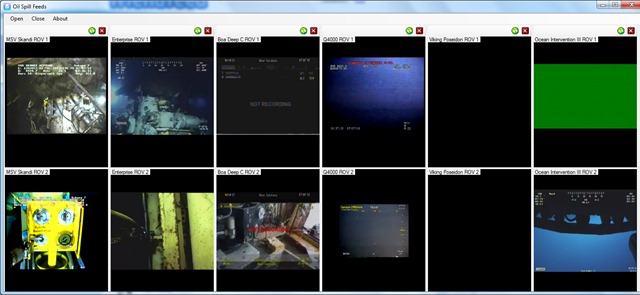
Just pushed out a new version of the application. I added the live feeds from the Ocean Intervention II and Viking Poseidon.

So there are a total of 12 feeds available forming 6 panels:

SpillFeeds6

As usual you can add and remove panels as you wish:

image


This is an alpha release, so it still needs work.


You can download it from here: http://oilslickfeeds.codeplex.com/releases/view/48477

I’ll let you know when a more polished build is done.

The difference between Facebook and Twitter

I just left the following comment at Shel Isreal’s latest blog post (read it first – the comment makes more sense in context):

I’d sign up for that.

Facebook is too unpredictable for my tastes. Even though i have people constantly asking me to friend them on it.

Twitter is a good example of balancing users and advertisers interests. Their private accounts are private. And advertising is only now becoming more of a piece of twitters strategy (@earlybird, promoted tweets etc). However, it is not being done at the users expense. Its an explicitly opt – in thing.

In other words, Twitter has respected its users, working its business model around them.

In the end, everybody wins.

I think it makes sense. Any thoughts?

Awesome code is awesome (LINQ plus Lambdas edition)

While going through my feeds this evening, I found this awesome article from LukeH. He built a raytracer using nothing but C# LINQ to Objects and Lambdas.

While its clear abuse of the syntax (I can imagine my SQL-pure professors having a heart attack at seeing their beloved syntax used this way), it is freaking cool. Head over to read the article and try parsing that monster LINQ statement (I’ll not steal his thunder by posting it here).

Secondly, related to that, is a post on the recursive lambda expressions that Luke uses. I knew I should have paid more attention in maths. 🙂

As a side note, it makes more sense from a programming perspective than it does from a purely math oriented point of view. Had I written my math exam in C# lambdas, I may have got a higher mark 🙂

Both of the above posts show if code that is above and beyond what I do. I remember doing a happy dance a while back after first cutting my teeth with LINQ plus lambdas in the same statement, which now seems a bit premature 🙂

This does speak volumes about the state of C# as a language. It’s an exciting time to be a programmer. 

Screencast Plans

So, I’m prepping to make a start on the screen cast series on Building a Feedreader on Windows Azure. I thought I’d make a list of things to do both  for the screencast itself and for the code.

So this post will be updated as I think of things.

After the test I ran by doing a screencast on the Oil Spills app, I figured that I’m dispensing with the webcam overlay – its too distracting.

Also as the test showed, I’m gonna have to deal with frequent interruptions – for drinking water, for screwing up the explanation of something etc.  So I’m gonna have to record each part in a number of separate chuncks and join them together with Windows Live Movie Maker.

Also, I decided that its best not to start from scratch. I’m gonna have some of the code already written, namely the data access layer for Windows Azure Tables. Two reasons for this. One I have to make adjustments of the previous version of DAL. Two it’s practically boilerplate code and I don’t want to bore you.

After the final commit for each episode, I’ll post the link to the changeset, so you can download the code.

Finally, as we get later into the series (even the earth took 7 days to create), I may do an intro to recap the previous week using the webcam.

Now I do want to add one new feature for sure – and thats shared items, as Google Reader does. This will be entirely straightforward. items will be added to a RSS feed of shared items from that user. On request, i just read the blob and return the contents as an RSS file.

Now one thing is for certain – I’m definitely doing to do some things wrong in my code. So please be nice and pointed out. :)  Or, even better, submit a diff file correcting it 🙂

Thoughts on Windows Azure Storage

I’m sitting here planning what to do with the re-write of the Feedreader I wrote for university. Naturally, the storage solution is always going to be a contentious issue. The NoSql versus SQl debate plays a lot into it.

But, for the most part, i used Windows Azure tables and blobs for its simplicity over SQL Azure. In saying that, SQL is not my favourite thing in the world, so make of that what you will. But also, for a demonstrator application, the use of something completely new played in my hands very well.

So the re-write is also meant to be a demonstrator application. so the Windows Azure storage is staying.

But, not so fast. because Windows Azure Storage  needs something. The way I used Tables and Blobs essentially was as a poor mans object database. Thus meant that there was a lot of leg work involved in this, not to mention tedious plumbing code. The fact is, I think that the is the most logical use case for Windows Azure Storage – where in metadata is stored in the tables and the object themselves are in the blobs.

What I would like to be added, then, is the ability to formalize this relationship in code. Some way of saying “hey, this value in this TableRow actually points to a blob in this container”. So I can call “getBlob()”, or something on a Row an get the blob back. Now, to be clear, I don’t mean this to be a foreign key relationship. I don’t want to cascade updates and deletes. And i certainly don’t want my hands tied by making the Blob Attribute column (or whatever) mandatory.

Now, this could be added right now. And in fact am considering doing that. But support for this in the Storage Client library would be nice. But weather backend support is needed, or in fact a good idea, is another question entirely. The implications of making such a fundamental change on the back end. For example, say you’ve exposed a table via OData. How do you expose the blob as well? And given the nature of the use case, the fact that it is needed on a table by table basis makes it much easier to limit any such functionality to the Tools library only.

I can hear you asking yourself why I’m asking for support in the Storage Client library if I can gin up and duct tape together some Extension Methods? I’m a big proponent of the idea that anything that we use in intact with software, be that actual applications or libraries we use in our code, has a Natural user interface. Think of it, the API methods that are exposed for us as developers to use are in fact a User Interface. so I’m asking for a better user interface that supports this functionality without me having to do the legwork for it. In so delivering support, it is perfectly possible, indeed likely, that the library code that Microsoft ships will be more efficient than whatever code I can write.

My final report on the project did call out VS Windows Azure Tools, mainly for not making my life easier. So I’m looking forward to the new version (1.3) and seeing how it goes, particularly with regard to storage.

Now performance-wise, the version I wrote last wasn’t exactly fast at retrieving data. I suspect that this was due to a) my own code in-efficiencies and b) the fact that my data wasn’t optimally (obviously) normalized. Its also probable that better use of MVC viewdata (actually, I think that should be “better use of MVC, period”) and caching will improve things a lot as well.