Using SQL Azure with ELMAH

If you don’t know what ELMAH is, stop right now and go and read about it.

ELMAH (Error Logging Modules and Handlers) is an application-wide error logging facility that is completely pluggable. It can be dynamically added to a running ASP.NET web application, or even all ASP.NET web applications on a machine, without any need for re-compilation or re-deployment.

Then go and read Scott “TheHa” Hanselman’s post on it.

There is a Nuget package for it as well, to make things really super easy.

In fact, running Nuget, setting up SQL Azure and tweaking some config settings took me all of 20 minutes. No freaking kidding. 

Now remember that this is being installed on an MVC site, so don’t let that put you off. Here we go:

Step One: Install from Nuget (making sure you have the latest build of Nuget in the process)

Step Two: Setup SQL Azure

Step Three configure web.config


And done Smile


So, lets go back and look at the details.

In step two, this is the SQL Azure script that the Migrate Assist wizard spat out:

--~Changing index [dbo].[ELMAH_Error].PK_ELMAH_Error to a clustered index.  You may want to pick a different index to cluster on.
SET ANSI_NULLS ON
SET QUOTED_IDENTIFIER ON
IF NOT EXISTS (SELECT * FROM sys.objects WHERE object_id = OBJECT_ID(N'[dbo].[ELMAH_Error]') AND type in (N'U'))
BEGIN
CREATE TABLE [dbo].[ELMAH_Error](
	[ErrorId] [uniqueidentifier] NOT NULL,
	[Application] [nvarchar](60) NOT NULL,
	[Host] [nvarchar](50) NOT NULL,
	[Type] [nvarchar](100) NOT NULL,
	[Source] [nvarchar](60) NOT NULL,
	[Message] [nvarchar](500) NOT NULL,
	[User] [nvarchar](50) NOT NULL,
	[StatusCode] [int] NOT NULL,
	[TimeUtc] [datetime] NOT NULL,
	[Sequence] [int] IDENTITY(1,1) NOT NULL,
	[AllXml] [nvarchar](max) NOT NULL,
 CONSTRAINT [PK_ELMAH_Error] PRIMARY KEY CLUSTERED 
(
	[ErrorId] ASC
)WITH (STATISTICS_NORECOMPUTE  = OFF, IGNORE_DUP_KEY = OFF)
)
END

IF NOT EXISTS (SELECT * FROM sys.indexes WHERE object_id = OBJECT_ID(N'[dbo].[ELMAH_Error]') AND name = N'IX_ELMAH_Error_App_Time_Seq')
CREATE NONCLUSTERED INDEX [IX_ELMAH_Error_App_Time_Seq] ON [dbo].[ELMAH_Error] 
(
	[Application] ASC,
	[TimeUtc] DESC,
	[Sequence] DESC
)WITH (STATISTICS_NORECOMPUTE  = OFF, IGNORE_DUP_KEY = OFF, DROP_EXISTING = OFF, ONLINE = OFF)
GO
IF NOT EXISTS (SELECT * FROM dbo.sysobjects WHERE id = OBJECT_ID(N'[DF_ELMAH_Error_ErrorId]') AND type = 'D')
BEGIN
ALTER TABLE [dbo].[ELMAH_Error] ADD  CONSTRAINT [DF_ELMAH_Error_ErrorId]  DEFAULT (newid()) FOR [ErrorId]
END

GO
SET ANSI_NULLS ON
SET QUOTED_IDENTIFIER ON
IF NOT EXISTS (SELECT * FROM sys.objects WHERE object_id = OBJECT_ID(N'[dbo].[ELMAH_GetErrorsXml]') AND type in (N'P', N'PC'))
BEGIN
EXEC dbo.sp_executesql @statement = N'
CREATE PROCEDURE [dbo].[ELMAH_GetErrorsXml]
(
    @Application NVARCHAR(60),
    @PageIndex INT = 0,
    @PageSize INT = 15,
    @TotalCount INT OUTPUT
)
AS 

    SET NOCOUNT ON

    DECLARE @FirstTimeUTC DATETIME
    DECLARE @FirstSequence INT
    DECLARE @StartRow INT
    DECLARE @StartRowIndex INT

    SELECT 
        @TotalCount = COUNT(1) 
    FROM 
        [ELMAH_Error]
    WHERE 
        [Application] = @Application

    -- Get the ID of the first error for the requested page

    SET @StartRowIndex = @PageIndex * @PageSize + 1

    IF @StartRowIndex <= @TotalCount
    BEGIN

        SET ROWCOUNT @StartRowIndex

        SELECT  
            @FirstTimeUTC = [TimeUtc],
            @FirstSequence = [Sequence]
        FROM 
            [ELMAH_Error]
        WHERE   
            [Application] = @Application
        ORDER BY 
            [TimeUtc] DESC, 
            [Sequence] DESC

    END
    ELSE
    BEGIN

        SET @PageSize = 0

    END

    -- Now set the row count to the requested page size and get
    -- all records below it for the pertaining application.

    SET ROWCOUNT @PageSize

    SELECT 
        errorId     = [ErrorId], 
        application = [Application],
        host        = [Host], 
        type        = [Type],
        source      = [Source],
        message     = [Message],
        [user]      = [User],
        statusCode  = [StatusCode], 
        time        = CONVERT(VARCHAR(50), [TimeUtc], 126) + ''Z''
    FROM 
        [ELMAH_Error] error
    WHERE
        [Application] = @Application
    AND
        [TimeUtc] <= @FirstTimeUTC
    AND 
        [Sequence] <= @FirstSequence
    ORDER BY
        [TimeUtc] DESC, 
        [Sequence] DESC
    FOR
        XML AUTO

' 
END
GO
SET ANSI_NULLS ON
SET QUOTED_IDENTIFIER ON
IF NOT EXISTS (SELECT * FROM sys.objects WHERE object_id = OBJECT_ID(N'[dbo].[ELMAH_GetErrorXml]') AND type in (N'P', N'PC'))
BEGIN
EXEC dbo.sp_executesql @statement = N'
CREATE PROCEDURE [dbo].[ELMAH_GetErrorXml]
(
    @Application NVARCHAR(60),
    @ErrorId UNIQUEIDENTIFIER
)
AS

    SET NOCOUNT ON

    SELECT 
        [AllXml]
    FROM 
        [ELMAH_Error]
    WHERE
        [ErrorId] = @ErrorId
    AND
        [Application] = @Application

' 
END
GO
SET ANSI_NULLS ON
SET QUOTED_IDENTIFIER ON
IF NOT EXISTS (SELECT * FROM sys.objects WHERE object_id = OBJECT_ID(N'[dbo].[ELMAH_LogError]') AND type in (N'P', N'PC'))
BEGIN
EXEC dbo.sp_executesql @statement = N'
CREATE PROCEDURE [dbo].[ELMAH_LogError]
(
    @ErrorId UNIQUEIDENTIFIER,
    @Application NVARCHAR(60),
    @Host NVARCHAR(30),
    @Type NVARCHAR(100),
    @Source NVARCHAR(60),
    @Message NVARCHAR(500),
    @User NVARCHAR(50),
    @AllXml NVARCHAR(MAX),
    @StatusCode INT,
    @TimeUtc DATETIME
)
AS

    SET NOCOUNT ON

    INSERT
    INTO
        [ELMAH_Error]
        (
            [ErrorId],
            [Application],
            [Host],
            [Type],
            [Source],
            [Message],
            [User],
            [AllXml],
            [StatusCode],
            [TimeUtc]
        )
    VALUES
        (
            @ErrorId,
            @Application,
            @Host,
            @Type,
            @Source,
            @Message,
            @User,
            @AllXml,
            @StatusCode,
            @TimeUtc
        )

' 
END
GO

Log in to SQL Management Studio and run that script against your chosen db and you’re good to go.


In step 3, there are 2 main things you want to do.

The first is obviously setting up ELMAH to talk to the db. We do it like so.

<elmah>
    <errorLog type="Elmah.SqlErrorLog, Elmah" connectionStringName="ConnectionStringhere" />
    <security allowRemoteAccess="yes" />
  </elmah>

And the second is securing the actual elmah.axd page.

  <location path="elmah.axd">
    <system.web>
      <authorization>
        <deny users="?"/>
        <allow roles="Administrator"/>
      </authorization>
    </system.web>
  </location>

And we’re done. Easiest thing I’ve ever done. Smile
Deploying your Database to SQL Azure (and using ASP.Net Membership with it)

Its been quite quiet around here on the blog. And the reason for that is the fact that I got asked by a Herbalife Distributor to put a little e-commerce site together (its called flying Shakes). So its been a very busy few weeks here, and hopefully as things settle down, we can get back to business as usual. I’ve badly neglected the blog and the screencast series.

I have a few instructive posts to write about this whole experience, as it presented a few unique challenges.

Now. I’m staring at the back end here since deploying the database to SQL Azure was the difficult part of deployment. The reason for this is mainly due to the ASP.Net Membership database.

But we’ll start from the beginning. Now I’m assuming here that your database is complete and ready for deployment.

Step 0: Sign up for Windows Azure (if you haven’t already) and provision a new database. Take note of the servers fully qualified DNS address and remember  your username and password. You’ll need it in a bit.

Step 1 Attach your database to to your local SQL Server. Use SQL Server  Management Studio to do that.

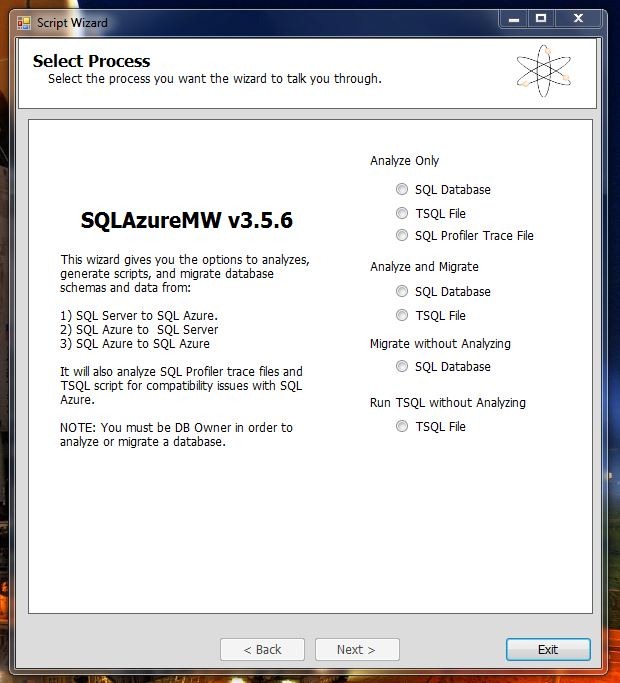
At this point  we have our two databases  and we need to transfer  the schema and data from one to the other. To do that, we’ll use a helpful little Codeplex project called SQL Azure Migration Wizard. Download it and unzip the files.

Run the exe. I chose Analyse and Migrate:

Capture


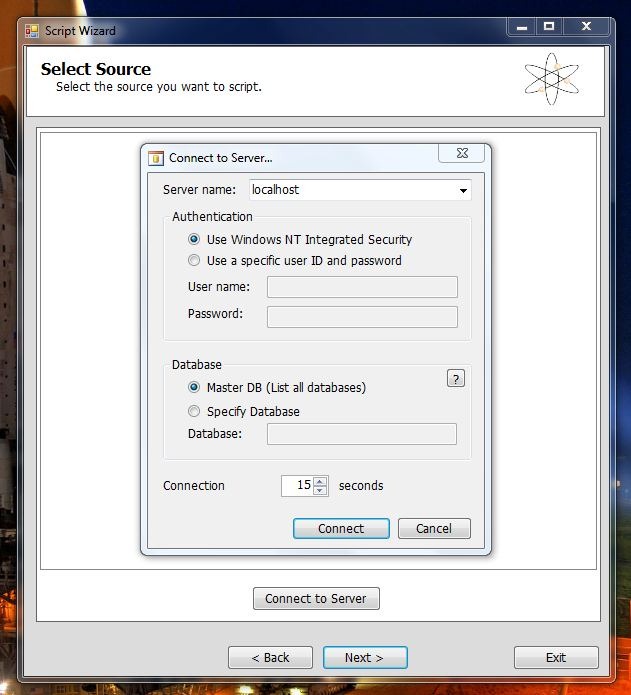
Enter your Local SQL Server details:

Capture2


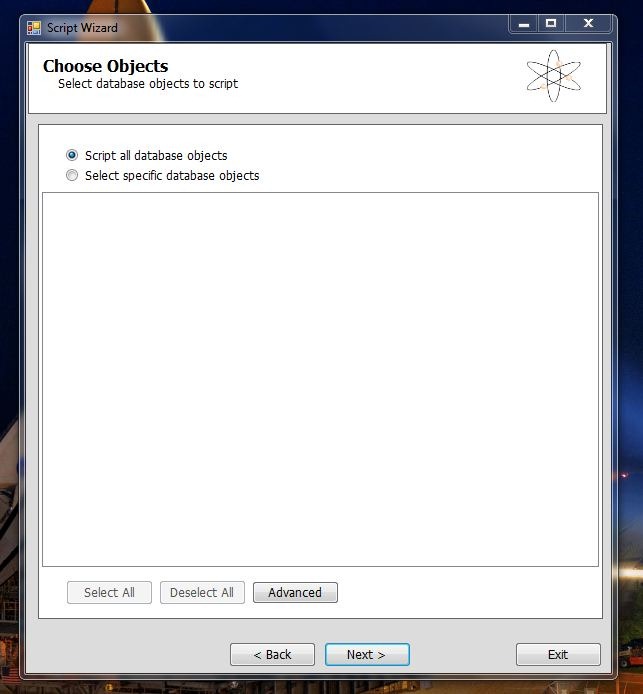
Capture3


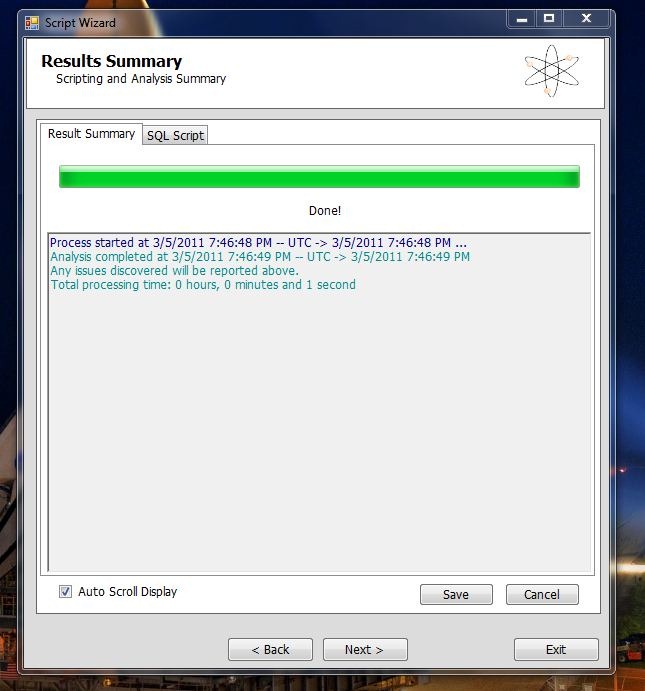
Hit Next until it asks if you’re ready to generate the SQL Scripts. This is the screen you get after its analyse the database and complied the scripts.

Capture4

Now you get the second login in screen that connects you to your newly created SQL Azure Database.

This is the crucial bit. You have to replace SERVER with your server name in both the server name box and the Username box, replacing username with your username in the process. You need to have @SERVER after your username or the connection will fail.

Capture5

Fill in the rest of your details and hit Connect. Press next and at the next screen you’ll be ready to execute the SQL scripts against your SQL Azure database.

And its that easy.

All you have to do is to go ahead and change your connection string from the local DB to the one hosted on SQL Azure.

There is one last thing to do. When you first deploy your site and try and run it against SQL Azure, it won’t work. the reason being is that you have to set a firewall rule for your SQL Azure Database by IP Address range. So you should receive an error message saying that IP address such and such is not authorised to access the database. So you just need to go ahead and set the appropriate rule in the Management Portal. You’ll need to wait a while before those settings take effect.

And you should be good to go.


The ASP.Net Membership Database

In the normal course of events, you can setup Visual Studio to run the SQL Scripts against whatever database you have specified in your connection string when you Publish your project. However, there is a big gotcha. The SQL Scripts that ship with Visual Studio will not run against SQL Azure. This is because SQL Azure is restricted.

Even if you log into your SQL Azure database using SQL Management Studio you’ll see that your options are limited as to what you can do with  the database from within SQL Management Studio. And if you try and run the scripts manually, they still wont run.

However, Microsoft has published a SQL Azure friendly set of scripts for ASP.net.

So we have two options: We can run the migrate tool again, and use the ASP.net Membership database  to transfer over Schema and Data. Or we can run the scripts against the database.

For the sake of variety, I’ll go through the scripts and run them against the database.

  1. Open SQL Management Studio and log into your SQL Azure Database.
  2. Go File-> Open and navigate to the folder the new scripts are in.
  3. Open InstallCommon.sql and run it. You must run this before running any of the others.
  4. For ASP.net Membership run the scripts for Roles, Personalisation, Profile and Membership.

At this point I need to point out that bad things will happen if you try running your website now, even if your connection string has been changed.

ASP.net will try and create a new mdf file for the membership database. You get this error:

An error occurred during the execution of the SQL file ‘InstallCommon.sql’. The SQL error number is 5123 and the SqlException message is: CREATE FILE encountered operating system error 5(failed to retrieve text for this error. Reason: 15105) while attempting to open or create the physical file ‘C:\USERS\ROBERTO\DOCUMENTS\VISUAL STUDIO 2010\PROJECTS\FLYINGSHAKESTORE\MVCMUSICSTORE\APP_DATA\ASPNETDB_TMP.MDF’. CREATE DATABASE failed. Some file names listed could not be created. Check related errors. Creating the ASPNETDB_74b63e50f61642dc8316048e24c7e499 database…

Now, the problem with all this is the machine.config file where all of these default settings actually reside. See internally, it has a LocalSQLServer connection string. And by default, the RoleManager will use it because its a default setting. Here’s what it looks like:

<connectionStrings>		
<add name="LocalSqlServer" connectionString="data source=.\SQLEXPRESS;Integrated security=SSPI;AttachDBFilename=|DataDirectory|aspnetdb.mdf;User Instance=true" providerName="System.Data.SqlClient"/>	</connectionStrings>
<system.web>		
<processModel autoConfig="true"/>	
<httpHandlers/>		
<membership>			
<providers>				
<add name="AspNetSqlMembershipProvider" type="System.Web.Security.SqlMembershipProvider, System.Web, Version=4.0.0.0, Culture=neutral, PublicKeyToken=b03f5f7f11d50a3a" connectionStringName="LocalSqlServer" enablePasswordRetrieval="false" enablePasswordReset="true" requiresQuestionAndAnswer="true" applicationName="/" requiresUniqueEmail="false" passwordFormat="Hashed" maxInvalidPasswordAttempts="5" minRequiredPasswordLength="7" minRequiredNonalphanumericCharacters="1" passwordAttemptWindow="10" passwordStrengthRegularExpression=""/>			</providers>		
</membership>
<profile>
<providers>	
<add name="AspNetSqlProfileProvider" connectionStringName="LocalSqlServer" applicationName="/" type="System.Web.Profile.SqlProfileProvider, System.Web, Version=4.0.0.0, Culture=neutral, PublicKeyToken=b03f5f7f11d50a3a"/>			</providers>
</profile>
<roleManager>
<providers>
<add name="AspNetSqlRoleProvider" connectionStringName="LocalSqlServer" applicationName="/" type="System.Web.Security.SqlRoleProvider, System.Web, Version=4.0.0.0, Culture=neutral, PublicKeyToken=b03f5f7f11d50a3a"/>				<add name="AspNetWindowsTokenRoleProvider" applicationName="/" type="System.Web.Security.WindowsTokenRoleProvider, System.Web, Version=4.0.0.0, Culture=neutral, PublicKeyToken=b03f5f7f11d50a3a"/>
</providers>
</roleManager>
</system.web>

So, we have to overwrite those settings in our own web.config file like so:

<roleManager enabled="true" defaultProvider="AspNetSqlRoleProvider"> 
<providers>
<clear/>
<add name="AspNetSqlRoleProvider" connectionStringName="..." type="System.Web.Security.SqlRoleProvider, System.Web, Version=4.0.0.0, Culture=neutral...."/> 
</providers>
</roleManager>
<membership>
<providers> 
<clear/>
<add name="AspNetSqlMembershipProvider" type="System.Web.Security.SqlMembershipProvider.... connectionStringName=""..../>        </providers> 
</membership>
<profile>
<providers>
<clear/>
<add name="AspNetSqlProfileProvider" connectionStringName="" type="System.Web.Profile.SqlProfileProvider..../>
</providers> 
</profile>

Now, what we are doing here is simply replacing the connectionstringaname attribute in each of these providers with our own connection string name. Before that, however, we put “<clear/>” to dump the previous settings defined in the machine.config file and force it to use our modified settings.

That should  allow the role manager to use the our SQL Azure database instead of trying to attach its own. Things should run perfectly now.

Finally

The Azure Management Portal has a very nice UI for managing and editing your database. You can add and remove tables, columns rows etc. Its really good. And rather welcome. I thought I’d have to script every change and alteration.

Flipboard Review

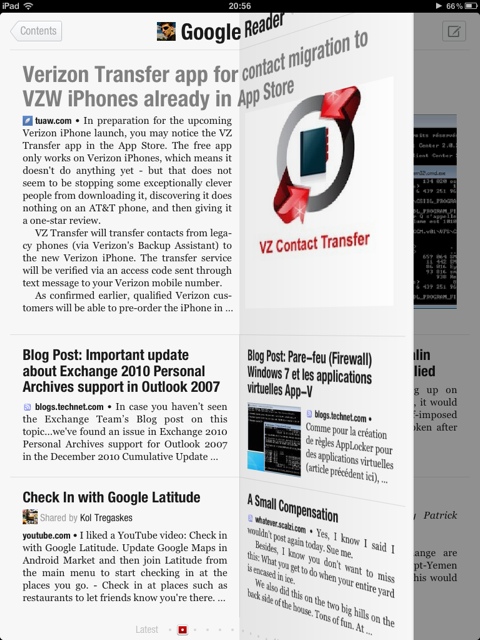
One of the first apps I installed on my 64Gb wifi ipad was the Flipboard app. Now, after all the hoopla I heard from Robert Scoble and others, I was eager to use the app myself.

Now, the fact of the matter is that the app is beautifully designed. Really it is. A work of art. The page flips are beautifully animated. The app start up is brilliant, making me wonder each and every time i start it up what picture I’m going to get. The popout article pages are beautifully presented. Even the twitter client aspect of the app is very nicely done.

However, there are times when I go through my settle very leisurely and rather randomly, and Flipboard is sheer gold dust when it comes to this. Other times I’m more structured about my reading. I read the Tech folder first, then the Space folder, and finally the General folder. Only then, if i have time, do I randomly go through my other folders. This second way of reading my feeds is rather difficult on Flipboard. Moving between folders isn’t a smooth process and it requires too much work.

I actually prefer Feedly on my iPhone for reading my feeds when I’m going through Feedly quickly.

Feedly for iPad is coming soon, and we’ll see what difference it makes in this area.

There is one thing I’ve noticed: read/unread items do not always translate back to Feedly on the desktop. So, in fact, I end up reading some items twice. Since I’ve no idea of how Flipboard works under the hood, I’m not sure where the lag is coming in, whether it’s a Flipboard, Google Reader, or Feedly issue. But it sure would be nice to have some sync going on.

However, that having been said, Flipboard is very much of my routine. I rather enjoy reading it in the mornings over a cup of tea. It’s the first app I open. I really do think that it’s a most marvellous application and will definitely be using it very often.

WordPress Feature Request: A Universal Video Player

As any of you who have been following my screen casts know, I’ve been using Vimeo to host and share my videos.

However, Vimeo as it is is slightly restrictive: 500Mb uploads a week, and one HD video a week. for screen casts, HD is essential. So I’m limited to one video a week, if that.

Now that I’d love to do is to upload my videos to Windows Azure blobs. Blobs is comply format agnostic, so I could upload any format I wanted to: it doesn’t have to be Silverlight Adaptive Streaming (or whatever the term is). The CDN capability of Blobs is also very helpful.

Now nothing is stopping me from moving away from WordPress and being able to customise what every blogging system i’d run to load videos from Windows Azure Blobs. However, that’s a little more trouble that’s it worth right now.

(I’m actually thinking of eventually moving to Windows Azure utilising the extra small instance, but that’s a ways off)

So what I’d love is a video player that you can just point at a URL and it will play the video. It doesn’t have to be Silverlight or Widows Media specific. It could be H.264 files (an iffy proposition with Google yanking H.264 support from Chromium to be sure).

So in other words, WordPress can provide the player in whatever form it wants to. I just provide the player with the URL to the file to be played.

I would think that the HTML5 spec would make this a fairly trivial undertaking.

In fact, now that I think of it. Couldn’t one simply insert a tag in the HTML view of posts??

Apple’s Sony Reader Problem.

As you no doubt have heard already about the fact that Apple has rejected the Sony Reader app for iOS devices. This is apparently based on the fact that all purchases must go though the official apple sanctioned method of using in app purchases and not any third party method of doing things.

This no doubt is causing some executives at Amazon to consider the very real possibility that their highly acclaimed Kindle app for iOS might be pulled as well.

Now let’s stop the hysteria right the heck there. Apple is not stupid. Put your hand up who ought an iPad thinking “The Sony Reader app is going to be awesome on the iPad”?? Anyone, anyone?? Bueller, Bueller??

Now, who bought an iPad thinking “there is both iBooks and the Kindle app on the iPad- I’ll be able to get any book I want”??? I’m betting that a whole lot more people, including me, thought of that.

The fact of the matter is that Apple is not going to get a whole lot of grief from die hard Sony Reader fans for this. Just imagine the uproar if Amazon was forced to withdraw their kindle app for iPad. The horror. I can imagine seeing legions of angry people marching up Infinite Loop with fire torches and pitchforks.

In other words, the Kindle is actually a net benefit for the iOS platform. It actually helps Apple sell iPads and iPhones and iTouches. I doubt they’d be in a hurry to kill what is a net benefit for them.

So provided that Amazon and to a lesser extent, Barnes and Noble, play their cards right, I don’t see the problem.

The is of course the separate issue of Apple wanting all purchases to go through their inapplicable purchases mechanism. On the face of it, it’s possible to see this as simple profiteering. I doubt it’s quite that simple.

However, what apple needs to realise that, almost by accident, they’ve turned the app store into a vital piece of infrastructure, the Windows of the app store world. I’m not sure they’re quite prepared to undertake this role.

Google on the other hand set out to turn themselves into vital piece of the webs infrastructure. Whatever they may do wrong, they do have that goal very clear in mind. Apple not so much. They come across as being quite heavy handed when things like this happen. If anyone should understand the power of perception, it should be Steve Jobs and Apple.

So, ultimately the I believe that Apple will do the pragmatic thing and lay off the heavy handed moves in this space, but in the short term the perception of things may very well work against them.

Windows Azure Feedreader Episode 8

Apologies for the long delay between episodes. I do these in my spare time and my spare time doesn’t always coincide with a quite environment to record the screencast.

But safe to say, I’m super excited to be back and doing these once again.

So, to it!!

This week we follow straight on from what we did in week 7, and modify our backend code to take account of user subscriptions when adding RSS feeds and RSS feeds from OPML files.

Additionally, we lay the ground work for next weeks episode where we will be writing the code that will update the feeds every couple of hours.

And finally, and perhaps most importantly, this week we start using the Windows Azure SDK 1.3. So if you haven’t downloaded and installed it, now is  the time.

There are some slight code modifications to take account of some breaking changes in 1.3 that are detailed in Steve Marx’s post on the subject.

Finally, I’ve just realised that the episode contains the wrong changeset information. The correct changeset is: 84039 (I’ll be correcting this slight oversight. Perfectionism demands it)

So, enjoy the show:

Remember, you can head over to vimeo.com to see the show in all its HD glory.

As I said, next week, We’ll be writing the update code that will automatically update all RSS feeds being tracked by the application.

Client Server Chat with WCF

Almost a year after I wrote this post promising to keep WCF Chat updated, I’m living up to that promise and updating my WCF Chat application over on Codeplex. The original release on Codeplex is actually just a zip file with the project in it. All things considered it was a knee-jerk posting in the mist of the openFF effort to clone Friendfeed. Of course, the original, actual reason why I posted it is lost to history. And in the middle of all that  hoohah I never wrote an introduction to and an explanation of the codebase.

An Introduction


The WCF Chat application was actually a class assignment for a class that included, among other things, WCF, REST and TCP. Its actually interesting to see how that class has changed since I took it three years ago. This year, for example, its including MVC, but I digress. The fact is that my submission did go above and beyond the requirements. And the reason for that is that once I wrote the basic logic, the more complicated stuff was easy. In other words: given enough layers of abstractions, anything is easy.

Having dusted off and worked with the code for a few hours, its rather amazing how easy a chat application is. Now, that statement should be taken in the context of the fact that WCF is doing most of the heavy lifting. So getting the client to ask for data is a relatively trivial task. The tricky bit is the need for a callback.

In this case, I use callbacks for Direct Messages and File transfers. Now, you are probably wonder why I went through the trouble given that the sensible option is simply to poll a server. And it is a sensible option. Tweetdeck, Seesmic and other twitter clients all use polling. Basically, it was in the requirements that there should be two way communication. There are a number of way sto implement this. One could, for example, have a WCF service on the client that the server can call back to. This did occur to me, but its a complex and heavy handed approach, not to mention a resource intensive one. WCF always gives me headaches and so I was only going to do one service. So I wrote a TCP listener that received pings from the server on a particular port.

Thats one peculiarity about this app. The other is the way the server is actually written. We have the WCF service implementation and we have a second server class that the WCF service calls. There is a division of responsibility between the two. The service is always responsible for getting the data ready for transmission and the server does the actual application logic.

The client is fairly straightforward. It uses the Kryton Library from the Component Factory. Its a great UI library that I use anytime I have to write a Windows forms UI. The actual UI code is rather like the Leaning Tower of Pisa – its damn fragile. Basically because it relies on the component designer logic for the way controls are layered. So I haven’t touched it at all. In fact, I haven’t needed to. More on this later.

When you are looking at the client code, you’ll realise that for each type of message control, there is a message type base control. The reason for this is that I foolishly (and successfully) tried to use generic controls. In the current implementation, there is actually precious little code in the MessageBase control. The reason  for this is mainly historical. There was originally a lot of code in there, mainly event code. In testing, I discovered that  those events weren’t actually firing for reasons beyond understanding. So they were moved from the inherited class to the inheriting class.  This is the generic control.

There are message type base controls that inherit from the MessageBase control, and pass in the type (Post, DM, File). This control is in turn inherited by the actual Message, DM or File control. The reason for this long inheritance tree is that the designer will not display generic controls. Rather, that was the case. I’ve yet to actually try it with Visual Studio 2010 Designer. As I said, I haven’t changed the client UI code and architecture at all.

The client has a background thread that runs a TCP Listener to  listen for call backs from the server. Its on a background thread so that it does not block the UI thread. I used a background worker for this rather than the newer Task functionality built into .Net 4 that we have today.

Functionality


Basically, every one sees all the public messages on a given server. There is no mechanism to follow specific people or ever to filter the stream by those usernames. Archaic, I know, But I’m writing my chat application, not Twitter.

There are Direct Messages that can be directed to a specific user. Because the server issues callbacks for DM’s, they appear almost instantly in the users stream.

You can send files to specific users as well. These files are stored on the server when you sent them. The server will issue a call back to the user and the file will be sent to them when the client responds to that callback.  You can also forward a file you have received to another user. Files are private only by implication. They are able to be accessed by whoever is informed of the files existence.

All of the above messages are persisted on the server. However, forwarding messages is not persisted in any shape or form.

Also, you can set status. This status is visible only when you are logged in. In fact, your username is only visible to others when you are logged in.

It should be noted that you have to use the Server Options panel to add and remove users.

Todays Release


Todays changes basically upgrade everything to .Net 4  and make sure its compatible. Todays release does not take advantage of anything new other than some additional LINQ and extension methods. Taking advantage of the new stuff will require a careful think of how and where to use them. I’m not quite willing to sacrifice a working build for new code patterns that do the exact same thing.

The original server was actually just a console application. I took that original code and ported it to a Windows Service. There were trivial logic changes made at most. The UI ( i.e the Options form) that was part of that console application has been moved into its own project.

I also ported the server code to a Windows Azure web role. And let me tell you something- it was even easier that I had anticipated. The XML file and the collections I stored the streams  in  are replaced with Windows Azure Tables for Users, Streams, DMS and Files. The files themselves are written to Windows Azure Blobs rather than being written out to disk. 

The web role as written is actually single instance. The reason is that the collection that stores the active users (i.e. what users are active right now) is still a collection. I haven’t moved it moved it over to windows azure tables yet. You could fire up more than one instance of this role, but all of them would have a different list of active users. And because Windows Azure helpfully provides you with a load balancer, there’s no guaranteeing which instance is going to respond to the client. There is a reason why i haven’t move that collection over to Windows Azure Tables. Basically, I’m not happy with it. If Azure had some sort of caching tier, using Velocity or something so i could instantiate a collection of objects to the cache and have all instances share that collection. The Windows Azure table would be changing from minute to minute with Additions, Edits and Deletions and I don’t think Windows Azure Tables would keep up. I’m interested to now what you think of this.

I also added an Options application to talk to the Windows Azure Web Role, and I wrote a WCF web service in webrole to support this application.

The client  is essentially the same as it has always been. There is the addition of a domain when you are logging in – this could be for either cloud or service based server implementations. Since there is no default domain, the client needs one when you are logging in.  The client will ask for one when logging in. once you have provided one, you’ll have to restart the application.

There are installers for all the applications except for the Cloud project. The service installer will install both the service and the Options application.

Bear in mind that for the Options Applications, there is no authentication and authorisation. If you run the app on a server with the ChatServer installed, or you point the CloudOptions app at the appropriate server, you are in control. This is a concern to me and will be fixed in a future release.

Future changes


I was tempted to write a HTTP POST server for all this. MVC makes it so easy to implement. There would be plenty of XML flying back and forth. Some of the WCF operations would require some high-wire gymnastics to implement as HTTP POST, but its possible. I might to this.

The one thing that I didn’t update was the version of the Kryton UI library I use. I’d very much like to use the latest version to write a new UI from scratch. Again its a possibility.

The fact is that once you start thinking of implementing following a la twitter, your database schema suddenly looks much more complicated. And since I’m not writing Twitter, I’ll pass.

If you have any suggestions on future changes, holler.

Final Words


Bear in mind that for the Options Applications, there is no authentication and authorisation. If you run the app on a server with the ChatServer installed, or you point the CloudOptions app at the appropriate server, you are in control. This is a concern to me and will be fixed in a future release.

Also, bear in mind that this is marked Alpha for a reason. If it eats your homework and scares your dog, its not my fault – I’m just some guy that writes code.

Finally, this code all works IN THEORY. I’ll be testing all these pieces throughly in the coming weeks.

Where you can get it


You can get it off Codeplex. The source code for all the above mentioned components is checked into SVN source control.

For this 1.1 Alpha release, you’ll find each setup files for each component in a separate downloadable zip file. The CloudServer code is included as is, since no setup files are possible for Cloud projects.

Using MVC and jQuery to build a NewsTicker

Scott Guthrie tweeted a link to an article by Scott Mitchell. In it Scott wrote a handy news ticker in Asp.Net . And he wrote it in VB. I recommend going to read it before doing anything else.

It is a handy little example and a very good demonstration of jQuery in action. I actually first thought of using it in The Feedreader. Of course if I wanted to do that I’d have to re-write it as an MVC application rather than an ASP.Net website.

This is a nice academic exercise on moving from ASP.Met to MVC.

So lets get cracking.

Groundwork

So. We begin by creating an empty MVC2 project.

Actually, we began when we read Scott article. Its important to understand what Scotts trying toacomplish and how Scotts code works, before we shamelessly copy it.

The first thing you are going to want to do is make sure that Scotts’ ticker.js and jquery-1.4.4.min.js are in your MVC Scripts folder and included in the project. Also, you’ll want to copy Scott’s css files across. I put them in a folder called Styles and made sure it was included in the project.

Now, we need a Masterpage before we can create any Views. So add one in Views/Shared. We are shamelessly copying Scotts example in every detail. So go ahead and copy the markup in Scotts example and paste it into the your masterpage. You’ll want to change the script and css paths accordingly.

<!DOCTYPE html PUBLIC "-//W3C//DTD XHTML 1.0 Transitional//EN" "http://www.w3.org/TR/xhtml1/DTD/xhtml1-transitional.dtd">

<html xmlns="http://www.w3.org/1999/xhtml">
<head id="Head1" runat="server">
<title>Untitled Page</title>
<script type="text/javascript" src="../../Scripts/jquery-1.4.4.min.js"></script>
<script type="text/javascript" src="../../Scripts/ticker.js"></script>
<asp:ContentPlaceHolder id="head" runat="server">
</asp:ContentPlaceHolder>
<link href="../../Styles/sinorcaish-screen.css" rel="stylesheet" type="text/css" />
<link href="../../Styles/CustomStyles.css" rel="stylesheet" type="text/css" />
<link href="../../Styles/NewsTicker.css" rel="stylesheet" type="text/css" />
</head>
<body>
<form id="form1" runat="server">
<!-- ======== Header ======== -->
<div id="header">
<div class="left">
News Ticker Demo
</div>
<div class="right">
<%=DateTime.Now.ToShortDateString()%>
</div>
<div class="subheader">
<em>News me!</em>
</div>
</div>

<!-- ======== Left Sidebar ======== -->
<div id="sidebar">
<div>
<ul>
<li><%: Html.ActionLink("Simple Ticker Demo", "Simple","Home")%></li>
<li><%: Html.ActionLink("Dynamic Ticker Demo", "Dynamic","Home")%></li>
</ul>
</div>
</div>

<!-- ======== Main Content ======== -->
<div id="main">
<asp:ContentPlaceHolder id="ContentPlaceHolder1" runat="server">

</asp:ContentPlaceHolder>
</div>

<!-- ======== Footer ======== -->

<div id="footer">
ASP.NET application designed by <a href="http://www.4guysfromrolla.com/ScottMitchell.shtml">Scott Mitchell</a>.
Website design by <a href="mailto:J.Zaitseff@zap.org.au">John Zaitseff</a>, and available
at <a href="http://www.opendesigns.org/preview/?template=1700">OpenDesigns.org</a>.
</div>

</form>
</body>
</html>

Remember to change the links in the sidebar to ActionLinks.

Controllers

The next thing we need to do is to write a Controller. Typically the first controller in any MVC application is the home controller.

So go ahead and create one, adding three ActionResult methods: Index, Simple and Dynamic.

public class HomeController : Controller
{
//
// GET: /Home/

public ActionResult Index()
{
return View();
}
public ActionResult Simple()
{
return View();
}
public ActionResult Dynamic()
{
return View();
}
}

At this point, create a View for Index and copy the HTML from Default.aspx and stick it in the content control thats been created in the view.
Then, add an empty view for the Simple controller. Since this is straightforward HTML, we simply copy the contents of both ContentPlaceHolders in Simple.aspx into the two that have been created for us in the view

<asp:Content ID="Content1" ContentPlaceHolderID="ContentPlaceHolder1" runat="server">

<h2>Simple News Ticker Demo</h2>
<p>
This demo shows two simple news tickers. Each news ticker has the same hard-coded news items. The
first one shows only the body of each news item, one at a time; the second one shows the headline,
body, and published date of each news item and shows three at a time.
</p>

<h3>One Row News Ticker</h3>
<div class="ticker stretched">
<ul id="latestNews1">
<li>
<div class="body">Politician Joe Smith has assembled a news conference for this afternoon to apologize for some
indiscretion he had. This is Mr. Smith's third such "apology press conference" this year.</div>
</li>
<li>
<div class="body">Did you know that you can play the fun (and addictive!) board game
Axis &amp; Allies online? Head on over to <a target="_blank" href="http://gamesbyemail.com/Games/WW2">http://gamesbyemail.com/Games/WW2</a>
and give it a whirl!</div>
</li>
<li>
<div class="body">A recent study by some doctors somewhere showed a strong correlation between unhealthy eating
and unheathly people. More studies are to be performed to verify these findings.</div>
</li>
<li>
<div class="body">This just in - ASP.NET is awesome! jQuery is not so bad, either. In fact, most technologies are pretty darn
cool. For more information, see <a href="http://www.4guysfromrolla.com/" target="_blank">4GuysFromRolla.com</a>.</div>
</li>
<li>
<div class="body">Last night the local sports team won a convincing victory over their hated rivals. After the game there was much
jubilation.</div>
</li>
<li>
<div class="body">Visit my blog. Please. You can find it at <a href="http://scottonwriting.net/sowblog/">ScottOnWriting.NET</a>.</div>
</li>
</ul>
</div>

<h3>Three Rows News Ticker</h3>
<div class="ticker threeRows medium">
<ul id="latestNews3">
<li>
<div class="header">Politician schedules news conference</div>
<div class="body">Politician Joe Smith has assembled a news conference for this afternoon to apologize for some
indiscretion he had. This is Mr. Smith's third such "apology press conference" this year.</div>
<div class="footer">Published @ 8:30 AM</div>
</li>
<li>
<div class="header">Play Axis &amp; Allies Online!</div>
<div class="body">Did you know that you can play the fun (and addictive!) board game
Axis &amp; Allies online? Head on over to <a target="_blank" href="http://gamesbyemail.com/Games/WW2">http://gamesbyemail.com/Games/WW2</a>
and give it a whirl!</div>
<div class="footer">Published @ 8:38 AM</div>
</li>
<li>
<div class="header">Study links unhealthy food to unhealthy people</div>
<div class="body">A recent study by some doctors somewhere showed a strong correlation between unhealthy eating
and unheathy people. More studies are to be performed to verify these findings.</div>
<div class="footer">Published @ 9:00 AM</div>
</li>
<li>
<div class="header">ASP.NET is awesome!</div>
<div class="body">This just in - ASP.NET is awesome! jQuery is not so bad, either. In fact, most technologies are pretty darn
cool. For more information, see <a href="http://www.4guysfromrolla.com/" target="_blank">4GuysFromRolla.com</a>.</div>
<div class="footer">Published @ 9:09 AM</div>
</li>
<li>
<div class="header">Local sports team wins</div>
<div class="body">Last night the local sports team won a convincing victory over their hated rivals. After the game there was much
jubilation.</div>
<div class="footer">Published @ 9:35 AM</div>
</li>
<li>
<div class="header">Read my blog</div>
<div class="body">Please. You can find it at <a href="http://scottonwriting.net/sowblog/">ScottOnWriting.NET</a>.</div>
<div class="footer">Published @ 10:30 AM</div>
</li>
</ul>
</div>

</asp:Content>

<asp:Content ID="Content2" ContentPlaceHolderID="head" runat="server">
<script type="text/javascript">
$(document).ready(function () {
startTicker('#latestNews1', 1, 5000);
startTicker('#latestNews3', 3, 5000);
});
</script>
</asp:Content>

Note the javascript in the “head” ContentPlaceHolder. This fires as soon as the page as finished rendering. Scott has more details about it in his article.

Model

Now, this is the hard part.

Scott Mitchells’ example used an ASP ListView control. If you’re writing ASP.Net code a listview is the easiest way to accomplish what we’re trying to do.  You’ll notice as well that Scott passes the contents of SyndicationFeed.Items directly to the databound control. Now there is most probably a way of using Scott’s code directly in an MVC view. However, for the purposes of convenience we’ll dispense with the ListView and iterate over items ourselves.

There is also the issue of the Formatting of the items. You’ll notice that the ItemTemplate in Scotts’ code calls FormatSummary and FormatPubDate from the HTML. Because of the separation between code and HTML in MVC we can’t do that.

The solution to both of these “problems” is to do things ourselves. The M in MVC stands for model. So we need a model before we go any further. The two pieces of data we need are contained in the Summary and the PublishDate fields of the SyndicationItems. So this is what our model looks like:

public class Model
{
public String Title { get; set; }
public string Date { get; set; }
}

FormatSummary and Format PubDate, obviously need to be part of  the HomeController class:

public static string FormatSummary(string summary){
string header = "ScottOnWriting: ";

//Remove the leading "ScottOnWriting: "
if (summary.StartsWith(header)){
return summary.Substring(header.Length);
}
return summary;
}

public static string FormatPubDate(DateTimeOffset pubDate)
{
return pubDate.ToString("h:mm, MMM d");
}

View

Now that the groundwork has been laid, we can write our actual HTML view.  First we need to add our javascript function:

<asp:Content ID="Content2" ContentPlaceHolderID="head" runat="server">
<script type="text/javascript">
$(document).ready(function () {
startTicker('#tweets', 2, 4500);
});
</script>
</asp:Content>

This javascript function will do nothing unless ticker.js exists in your scripts folder. It will end up in the page header and will be executed as soon as the document has finished rendering. Also note that we are passing 2 in here. We could pass in any number we wanted. Scott explains more about this in his article.

Now, the fact is that the original implementation using a ListView basically iterated over all the objects in the datasource and output a select piece of HTML for each item in that collection. So, we’ll do the same.

<asp:Content ID="Content1" ContentPlaceHolderID="ContentPlaceHolder1" runat="server">

<h2>Dynamic News Ticker Demo</h2>
<p>
This demo shows a ticker whose contents are populated dynamically. This particular example pulls the most recent tweets from
<a href="http://twitter.com/ScottOnWriting">my Twitter account</a> and displays them in a ticker, showing two entries at a time.
</p>
<h3>@ScottOnWriting's Latest Tweets</h3>
<div class="ticker twoRows medium">
<ul id="tweets">
<%foreach (var item in this.Model)
{  %>
<li>
<div class="header" style="font-weight: normal">
<%= item.Title.ToString()%>
</div>
<div class="footer">Tweeted @ <%: item.Date.ToString()%></div>
</li>
<%} %>
</ul>
</div>
</asp:Content>

Note the careful placement of our Foreach  statement. Our list item (<li/>) and the HTML with in it will be repeated on each pass over the loop body. Also, note how we are using var item in this.Model. Our View knows exactly what datatype has been passed to it. In fact, our view is actually View<Model.Model>. Yes, its a generic. And we are using var here to avoid typing Model.Model over and over again.


So, in a nutshell, the above code does the exact same thing as a ListView Control.

Hit run and it should be working.