
Windows Azure Feed Reader Episode 4: The OPML Edition

As you’ve no doubt surmised from the title, this weeks episode deals almost entirely with the OPML reader and fitting it in with the rest of our code base.

If you remember, last week I showed a brand new version of the OPML reader code using LINQ and Extension Methods. This week, we begin by testing said code. Given that its never been been tested before, bugs are virtually guaranteed. Hence we debug the code, make the appropriate changes and fold the changes back into our code base.

We then go on to creating an Upload page to upload the OPML file. We store the OPML file in a Blob and drop a message in a special queue for this OPML file to be uploaded. We make the changes to WorkerRole.cs to pull that message off the queue and process the file correctly, retrieve the feeds and store them. If you’ve been following along, none of this code will be earth shattering to you either.

The fact is that a) making the show any longer would bust my Vimeo Basic upload limit  and b) I couldn’t think of anything else to do that could be completed in ~10 minutes.

The good thing is that we’re back to our 45 minute-ish show time, after last weeks aberration.

Don’t forget, you can head over to Vimeo to see the show in all its HD glory: http://www.vimeo.com/14510034

After last weeks harsh lessons in web-casting, file backup and the difference between 480p and 720p when displaying code, this weeks show should go perfectly well.

Enjoy.

Remember, the code lives at http://windowsazurefeeds.codeplex.com

PS. Some occasional interference in the sound. I’m wondering if the subwoofer is causing it while I’m recording it. Apologies.
Windows Azure Feed Reader Episode 3

Sorry for the lateness of this posting. Real life keeps getting in the way.

This weeks episode is a bit of a departure from the previous two episodes. The original recording I did on Friday had absolutely no sound. So, instead of re-doing everything. I give you a deep walkthrough of the code. Be as that may, I did condense an hours worth of coding into a 20 minute segment – which is probably a good thing.

As I mentioned last week, this week we get our code to actually do stuff – like downloading, parsing and displaying a feed in the MVCFrontEnd.

We get some housekeeping done as well – I re-wrote the OPML reader using LINQ and Extension Methods. We’ll test this next week.

The final 20 minutes, or so is a fine demonstration of voodoo troubleshooting ( i.e. Hit run and see what breaks) but we get Scott Hanselmans feed parsed and displayed. The View needs a bit of touching up to display the feed better, but be as that may, it works.

Since we get a lot done this week, its rather longer – 1 hour and 9 minutes. I could probably edit out all the pregnant pauses. 🙂

Here’s the show:

Success! My 2nd HD attempt uploaded last night. Click here to see the HD on vimeo.com. Enjoy.

Remember, the code lives at http://windowsazurefeeds.codeplex.com

Windows Azure Feed Reader, Episode 2

A few days late (meant to have this up on Tuesday). Sorry. But here is part 2 of my Series on building a Feed Reader for the windows Azure platform.

If you remember, last week we covered the basics and we ended  by saying that this week’s episode would be working with Windows Azure proper.

Well this week we cover the following:

  • Webroles (continued)
  • CloudQueueClient
  • CloudQueue
  • CloudBlobClient
  • CloudBlobContainer
  • CloudBlob
  • Windows Azure tables
  • LINQ (no PLINQ yet)
  • Lambdas (the very basics)
  • Extension Methods

Now, I did do some unplanned stuff this week. I abstracted away all the storage logic into its own worker class. I originally planned to have this in Fetchfeed itself. This actually makes more sense than my original plan.

I’ve added Name services classes for Containers and Queues as well, just so each class lives in its own file.

Like last weeks, this episode is warts and all. I’m slowly getting the hang of this screencasting thing, so I’ll be getting better as time goes on I’m sure. Its forcing me to think things through a little more thoroughly as well.

Enjoy:

Next week we’ll start looking at the MVC project and hopefully get it to display a few feeds for us. We might even try get the OPML reader up to scratch as well.

PS. This weeks show is higher res than the last time. let me know if its better.

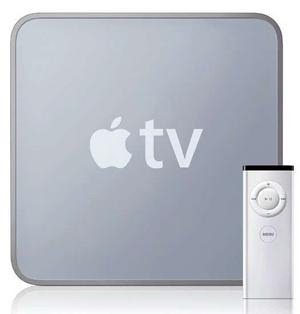
Quick thoughts on the AppleTv rumours.

4882762097_ee547914db

The rumours are:

  • Supposedly will be priced at $99 which isn’t too bad of a price
  • It will basically be a little, iPhone 4 without the phone or screen…
  • The insides supposedly will be iPhone 4 like:  A4 CPU, 16GB of flash storage
  • Supposedly can only handle up to 720p video
  • Apple will be officially changing the name of the device to iTV…

I just left this reply to this post on the GeekTonic blog discussing the AppleTv rumors that will not die.

Well… 1080i or p is only really viable if you have cable internet… and its a really small market. So 720p is pretty much a good bet as the default res.

I don’t care what anybody says – I ain’t streaming movies. Not with a 15gb fair use download cap. I’m getting a local copy of everything. Download once re-use all over the house. However, a 16Gb capacity is barely enough for the photos I have on the Apple Tv. Currently I play all my TV shows off the server rather than sync them. So while not being able to cache much content locally on the device, as long as i can download a copy to the server, I’m happy.

An App Store would be great – though I would assume it wouldn’t be backwards compatible with older AppleTvs – since it would require apps to be recompiled ( or even re-written) for the older hardware/CPUs.

The $99 price point is also awesome. It does open up the market. Its under the psychological $100 barrier – so people will be more likely to buy it.

The form factor is a persistent rumour – however I don’t see the logic of it. Given the clutter in the TV closet, there’s a real chance of me loosing it. However it will be a boon to those who already have too many set-top boxes in their Tv closets – look out for Steve to mention this prominently in any event. I still think its possible that Apple may keep the current form factor in some way.

However, unless the new Apple Tv ( or as you say, iTV) launches with some really awesome apps that will be worth the outlay of $99, I can’t see myself rushing out to buy one. Since we got satellite Tv installed with the accompanying HD-PVR a few weeks back, the use of the AppleTv has declined a lot – like 2 or 3 times a week as opposed to every day. Purchases sinc3e can be counted on one hand.
So a bit of a mixed reaction to this.

Building a Feed Reader on Windows Azure – Screencast Part 1

As I announced last month, I’ll be screen casting my efforts on the Windows Azure Feed reader.

Well, a couple of weeks ago, I just went ahead and did the first episode. The delay between recording it and posting is due to a weeks holiday and a further week and a half spent offline due to my ISP.

I’ve open sourced the code to http://windowsazurefeeds.codeplex.com.

In this episode I cover:

  • the data access layer
  • associated helper code
  • I add a skeleton Feed class
  • I add all the Windows Azure Roles that we’ll be needing

I’ve tried not only to explain what I’m doing, but also why I’ve done things this way – with a view to how it will affect things down the road.

So here is the screencast:

Next time we’ll begin integrating things with our worker and web roles. We’ll be working with blobs and queues. And we’ll start chewing through some live data.

I’ll try keeping to a weekly schedule, but my schedule of late is anything but regular and predictable.

Enjoy.

Oil Spills Live Feeds App 1.4 – Alpha

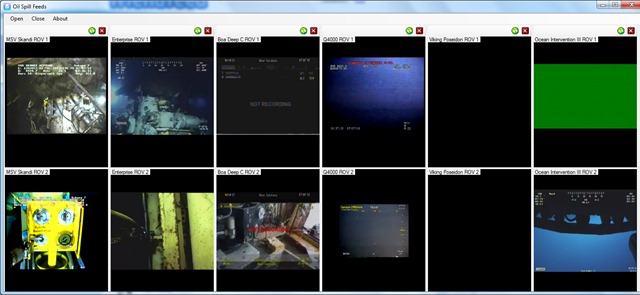
Just pushed out a new version of the application. I added the live feeds from the Ocean Intervention II and Viking Poseidon.

So there are a total of 12 feeds available forming 6 panels:

SpillFeeds6

As usual you can add and remove panels as you wish:

image


This is an alpha release, so it still needs work.


You can download it from here: http://oilslickfeeds.codeplex.com/releases/view/48477

I’ll let you know when a more polished build is done.

Screencast Plans

So, I’m prepping to make a start on the screen cast series on Building a Feedreader on Windows Azure. I thought I’d make a list of things to do both  for the screencast itself and for the code.

So this post will be updated as I think of things.

After the test I ran by doing a screencast on the Oil Spills app, I figured that I’m dispensing with the webcam overlay – its too distracting.

Also as the test showed, I’m gonna have to deal with frequent interruptions – for drinking water, for screwing up the explanation of something etc.  So I’m gonna have to record each part in a number of separate chuncks and join them together with Windows Live Movie Maker.

Also, I decided that its best not to start from scratch. I’m gonna have some of the code already written, namely the data access layer for Windows Azure Tables. Two reasons for this. One I have to make adjustments of the previous version of DAL. Two it’s practically boilerplate code and I don’t want to bore you.

After the final commit for each episode, I’ll post the link to the changeset, so you can download the code.

Finally, as we get later into the series (even the earth took 7 days to create), I may do an intro to recap the previous week using the webcam.

Now I do want to add one new feature for sure – and thats shared items, as Google Reader does. This will be entirely straightforward. items will be added to a RSS feed of shared items from that user. On request, i just read the blob and return the contents as an RSS file.

Now one thing is for certain – I’m definitely doing to do some things wrong in my code. So please be nice and pointed out. :)  Or, even better, submit a diff file correcting it 🙂

Oil Spill Live Feeds App 1.3 & Screencast

This is my attempt to kill 2 birds with one stone.

So, item number one is a new version of the Oil Spills application. New features added are:

  • ability to add and remove panels
  • ability to refresh feeds that have gone down
  • all panels now have the same size – the application will adjust this based on the number of panels and the size of the form
  • added some application icons

You can get the new release here: http://oilslickfeeds.codeplex.com/releases/view/47469

This may seem like a little, but its really a total re-write.

Being able to remove panels that you do not want to watch makes the application more memory efficient. Though there is more work that can be done in this area, there is only so much you can do when streaming 8 live feeds.

Item number 2 is the fact that I did a short, 6 minute screen cast discussing the innards of the application. Now, it may seem silly to do a screencast for something so trivial, but I wanted some practice. It turns out that its not as easy as it sounds. So this video is my 4th attempt (which I’m still not 100% happy with, mainly because of the overlay).

I did this with Expression Encoder 3 Screen Capture. I usually use Community Clips for this sort of stuff. But, its not a half bad screen capture program. Expression Encoder Screen capture will let you add an overlay from an external camera, in this case, my laptops integrated webcam. I’m not too sure about this for future screencasts – so do let me know what you think.

So here it is: