
Windows 7 (Part 1)

One question: is it the bees knees??? Yes it is.

At this point every other review is going wax philosophic about how great Windows 7 is, how its what Vista was supposed to be. And then go on to debate whether it should be a Service Pack instead.

I’m going to try avoid all those issues. But I will say this. Microsoft think that it should stand alone as it own OS, and that’s how I’m going to review it.

Its running on a Dell Inspiron 6400, 1.72Ghz dual Core with 1gb RAM.

First off. the problems I’ve had with it have been few and far between.

Now, every time a close the lid and then re-open it, the screen refuses to display the screen again. Its really annoying and requires a restart. The fix is simple – change the power options to do nothing when I close the lid. And it works like a charm now.

Second, IE8 RC wont install here. Don’t ask. But and earlier version of IE8 is installed. No solution as far as I know and I use Firefox anyway.

Third, iTunes runs quite well. Its faster. but not much else. however, it hangs on exit when its saving the iTunes library. And there’s not much choice here but to kill it with task manager.

You can get around this problem, perversely, by running iTunes as an Administrator. I suspect that the UAC tweaks are  the culprit here.

Fourth, every now and again 7 will hang at the shutdown screen (when it says “Shutting down”). This is annoying because you’re not quite sure what’s going on.

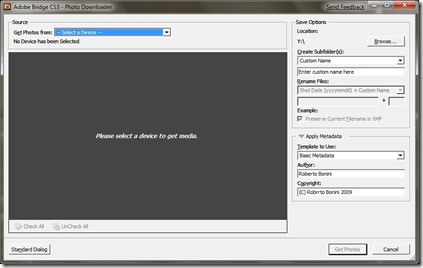
Finally, and i don’t know why this happens, the Adobe Bridge Photo Downloader no longer has the “Convert to DNG” option.
Adobe

Before everyone leaves comment, I have installed all the updates delivered to me. And Adobe Bridge tells me its version 2.1.1.9. Since I convert everything to DNG on import, this is really a disaster.

Most programs, actually run in Windows 7 quite well. I did have a problem with Windows Live and Visual Studio 2008 SP1 but hey, all installed eventually.

The Taskbar

7 is done right in a number of ways. The taskbar is particularly important as its the primary focus of any interaction with the OS.

On first use, telling the difference between pinned and active icons can be difficult. Its a very subtle UI cue there.
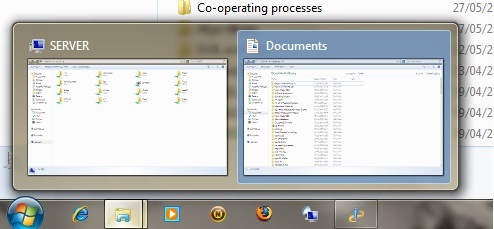
Taskbar


The Icons and notifications are better and never become too cluttered. Handling overflow is done particularly well.

At the bottom right of the taskbar, a little area sits on its own, separated from the rest of the taskbar. Clicking on this shows the desktop. However its not immediately obvious what this is for.

The taskbar itself stays transparent even when viewing a maximised window. I’m not sure about this. There is an argument to keeping the Vista behaviour of a solid taskbar when working with a maximised window.

The Start Menu

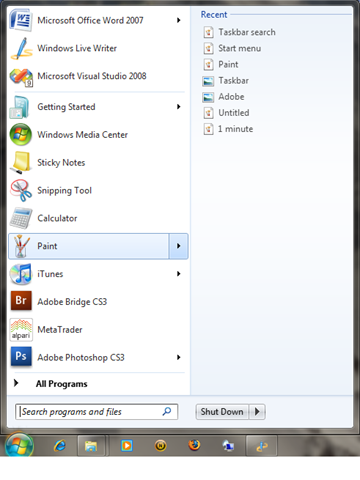
The Start Menu isn’t visually different from Vista’s. There are subtle UI cues however, that give away further functionality.

Programs that have been used have arrows next to them. Clicking on this arrow give the documents recently used by this program. the time saving nature of this cannot be over stated.
Taskbar2

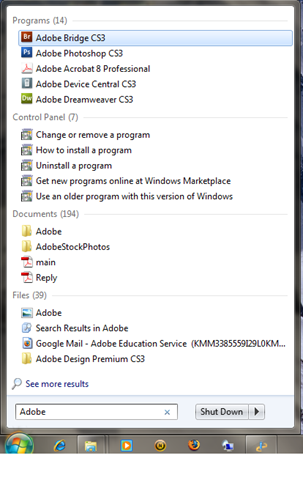
The search box now says “Search programs and files” instead of start search. Its more obvious about the function of the search box, and encourages users to use it more. This is one of my favourite features of the Vista-esque UI ( i.e since Vista)
Taskbar search

The Shutdown button is quite blunt as to what it does, differing from Vista’s Off icon. It is possible to change the functionality of these buttons in the power settings and this always confused me. text makes it so much easier to distinguish  what’s going on.

Paint and Wordpad

Both Paint and Wordpad have the new Ribbon toolbar. this makes them much better as applications.
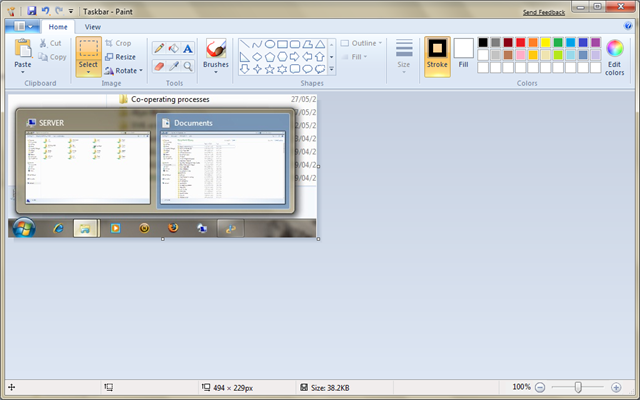
Paint

I tend to use paint quite a lot for situations when its not worth firing up Photoshop or Illustrator. Even in the few times I’ve used it, the Ribbon toolbar makes it so much better to use. and its not crappy old paint anymore either.

A few nice additions include the ability to Zoom right out ( right click to zoom out). This jumped out at me as being new.

Edit: Jordan Hofker pointed out on Freindfeed that its Wordpad not note pad. Many Thanks.

Personalization

The changing backgrounds have been around for ages in third party programs or as part of the Power Toys stuff. however this time its baked right into the OS.

The themes feature is very powerful. Of course I can still remember how Microsoft offered Plus for windows 95. I was too much of a cheapskate to get it, but the idea of a theme has been around for a while.

This marks the first time (that i can remember, anyway) that themes are actually files you can share rather than an amorphous collection of settings.

Whereas before (pre-vista, anyway) settings and dialogs had to be navigated with a map ( literally), important dialogs such as for the mouse pointers, screen resolutions, screen saver and sounds are literally a click away. This will encourage people to get more out of their computers (even the not so computer literate ones).

More later this week as i continue exploring Windows 7.

Tweets of the Week

This weeks round up of  my favourite tweets:

Rex Hammockr Night has fallen on DC, but inauguration parade route is being lit by Joe Biden’s teeth. 10:57 PM Jan 20th from twhirl

Scott Hanselmanshanselman RT @SeanAlex: http://www.whitehouse.gov has relaunched, the executive branch has been rebooted. 5:41 PM Jan 20th from TwitterFon

Rafe NeedlemanRafe My son the train nut: "Obama and Mama and Dada and me are all going to ride in the caboose!" 3:35 PM Jan 20th from twhirl

jonathan rossWossy @rickwray Just got text back from Thom – " No sir I don’t twitter." 12:46 PM Jan 20th from web in reply to rickwray

(Classic British stiff upper lip, no??)

eclipse115eclipse115 David Bowie is kicking muppets. Ahhhh life is good 🙂 10:35 PM Jan 19th from digsby

Benjamin Spectorbenjaminspector Anne Coulter and Rush Limbaugh just attacked the Democratic Party as the party of immigrants. I wonder what Indian Tribe they come from. 7:40 PM Jan 19th from web

Spirit and Oppy MarsRovers Miles: "You are big gamblers. You risk a whole career on a 6 minute plunge in the atmosphere. That’s ALL IN baby." 11:54 PM Jan 15th from twhirl

Jeff Atwoodcodinghorror you haven’t truly lived until you’ve plugged 24 GB of memory into a server. I got chills. And this will be *peanuts* in 3 years. 11:42 PM Jan 14th from web

Robert ScobleScobleizer Hah, yeah @Carnage4Life my yogurt guy wasn’t right. I was wrong to get involved in Steve Jobs’ private life by reporting that. 10:39 PM Jan 14th from web

Dave Winerdavewiner steve jobs steve jobs steve jobs steve jobs steve jobs steve jobs steve jobs steve jobs steve jobs steve jobs steve jobs steve jobs 9:56 PM Jan 14th from web

Scott Hanselmanshanselman RT @mhumphrey: Had to stop following Hanselman. Great guy, but blabs like a woman 8:56 PM Jan 14th from TweetDeck

Remember I’m http://twitter.com/rbonini

Apple and Steve Jobs

So its all over the internet. Its covered both my FriendFeed and Twiter streams. Scoble already has a post out.

TechCrunch is on it.

Engadget is on it.

Dave Winer said it for all of us:

Dave Winerdavewiner steve jobs steve jobs steve jobs steve jobs steve jobs steve jobs steve jobs steve jobs steve jobs steve jobs steve jobs steve jobs 29 minutes ago from web

Steve Jobs is stepping down. Albeit for 5 months.

On the one hand since something changed between the time he issued THAT press release, it is a course for concern. Especially worrying is that according to the BBC, his health issues are more serious than first imagined.

On the other hand, my non-tech-savvy mother got an iPhone today. How is that related? Apple does not stop making money, selling iPhone, Macs or Apple Tv’s.Apple is more than Steve Jobs. Just because Steve Jobs is not at the helm, does NOT mean anything will interrupt apples string of successes. Since Jobs took Apple over, he has imbued it with his vison, his persona, his drive, his ambition. It has worked for Apple and will continue working.

Work is the largest obstacle to recovery. I know that for experience. So i applaud Steve for taking the time off to recover fully and completely. I send him and his family my good wishes.

Hopefully, the Apple faithful will see him once again in June.

Tweets of the week (So far)

The second such post in an infinite series, hopefully:

Wil Wheatonwilw Retweeting @levarburton for truth: "I come FTW or not at all." 8:56 PM Jan 12th from twitterrific

Loic Le Meurloic OMG can someone find something serious to do for @scobleizer? He is so bored he writes nonsense how to get followed http://is.gd/flyJ 7:22 AM Jan 12th from twhirl

Hugh MacLeodgapingvoid Why are the called "Companies"? Latin: "Cum" + "Pagnia"… "With + Bread" i.e. "Breaking bread together". 5:05 PM Jan 11th from web

Dave Winerdavewiner Funny thing happened on the way to writing a standard, today — found one already existed, by Digg. Didn’t reinvent. http://bit.ly/lvQi 5:32 AM Jan 10th from web

Yuvi Pandayuvipanda RT @karthiksn: ok college politics is hard to navigate when you are in the most hated department. (Am yet to determine the hatedness of CS) 2:55 PM Jan 9th from TweetDeck

Tim Braytimbray W000t! I have wrestled Android to the mat and crushed its feeble but subtle resistance. Mind you, now I have to refactor everything. 11:52 PM Jan 7th from twitterrific

Steve Isaacssteveisaacs If Twitter were a giant room, and you threw a rock, it would hit around 11 or 12 thousand "Social Media Experts" before hitting the floor. 10:14 PM Jan 7th from web

Jeff Atwoodcodinghorror somehow, we ended up with a table where the IsLocked field means Closed and IsClosed field means Locked. PROJECT MANAGEMENT GOLD, PEOPLE!! 10:10 AM Jan 7th from web

Jeff Atwoodcodinghorror uservoice item: "improve fascist voting system". HEIL! 11:54 PM Jan 6th from web

Jeff Atwoodcodinghorror actual comment left on Stack Overflow question: "You can’t just say something like ‘Fix this for me my peasant slaves’." LOL 10:50 AM Jan 2nd from web

Hope you enjoyed these as much as I did.

Remember I’m http://twitter.com/rbonini

Windows 7

Yep. I’m writing this from my Windows 7 VM (on Virtual PC 2007 SP2).

Performance wise, The setup inside of the Vm is making it sluggish. But of the gig of RAM its got, its only using 32%. Which is notable. Vista beta 2, on the other hand) on the same machine in a dual boot configuration used up 80% (of one gig of RAM) standing still.

Talking of performance, I’ve backed the VM up to Windows Home Server. It took all of 20 minutes. Which frankly surprised me. given the fact that this was a new OS running under a VM.

So I’m inclined to wonder exactly how similar to Vista is 7, file wise? Since WHS only copies to the server files which it does not have a copy of (or a version of). Or, it could be that 7 is optimised for WHS to backup (Which makes sense on a number of levels, but not to the European Union).

The other thing i notice is the new taskbar. I’ve grown used to the Vista taskbar for some reason or other, but this is a pleasant change. The fact that the  task bar items can be configured to show application names or not, is really neat.

They do, however get confused with the buttons in the Quick Launch bar quite easily.

The UAC logo has changed colour, to yellow and blue, in keeping with the OS colour scheme. The UAC prompts themselves are worded differently.

The absence of a sidebar is nice. And I hope that the performance hit that running Sidebar produced is gone too. Gadgets are still there, just in the background and way less conspicuous.

Its quite a please feel to the whole OS. Does it feel like Vista?? A little. Its familiar territory. But In truth, I’ve yet to explorer the OS thoroughly. So that answer will have to wait.

One thing that is defiantly different is that Google Chrome 1.0 looks different.its a dark Blue instead of alight blue.

Talking of web browsers, i decided to install IE8. Which didn’t install. It didn’t recognize the OS for some strange reason. Must try again cause I hear that a few people have managed to do it.

I must say that I’m impressed enough to be considering upgrading one of my Vista machines to Windows 7.

This Beta 1 makes me look to Beta 2 and Release with a lot of hope that Microsoft have learned their lesson of the Vista Release debacle.

The one thing that no ones said anything much about is the WinFS file system that Vista was supposed to ship.

With Sun’s ZFS redundant file system, Microsoft are lagging behind. Even OSX has ZFS built in ( it has to be enabled with some obscure command line tricks, but its there).

Even if Microsoft released a separate beta version with WinFS, I’d be happy. 

NTFS is old. Time to innovate it.

Favorite Tweets/ FriendFeed Comments of the Day

Ok, quickie post here. I’m still alive but busy on university projects and studying for exams :(.

In no particular order

  1. FF : Ian May posted “My wife said, "Whatcha doin today?" I said, "Nothing." She said, "You did that yesterday." I said, "I wasn’t finished."”
  2. FF: Stupid Sleepy (aka Tina) asked: “Caption, please!”

    sumocaption.png

    See the suggested captions at FriendFeed here.

  3. FF: BreakingNewsOn – Tweeted:

    “Statement from Israel on boat collision involving former US Congresswoman McKinney: http://www.bnonews.com

    To which Evan Brown commented: “Thankfully, McKinney is no longer in Washington screwing things up. Unfortunately, she is now oversees screwing things up”

  4. FF: Stupid Sleepy (aka Tina) posted this story:

    Mr Fixit’s Emily Newton, left, and Sara Cooper are ready to make the Taste toilet experience more enjoyable.

    I beg you to read the hilarious comments on FriendFeed here.

  5. And finally, while there its not funny, theres a twitter/Friendfeed effort to get Robert Scoble an interview with Steve Jobs of Apple. See here (FriendFeed) and here (Scoble’s original tweet) and here (@joshaidan’s response).

To be honest, emailing Steve Jobs is a bit daunting. But I will get round to it.

So come on,  help Scoble get an interview with Steve Jobs: email Steve: sjobs@apple.com. @joshaidan says to make it personal.

Back and ready to rock

So I’m back from holiday (Florida – no ride queues and was great).

And I’m raring to go .

To start the year off, WHS4Smugmug development will resume ( after a year of being busy and feeling guilty). There’s a great series of posts on Add-In development on the tentacleBlog:

And I’ll be using them to bootstrap development and hopefully get moving.

One area I’m worries about is the file/folder structure that it’ll pull the photos from and send them to Smugmug.

So I’ll crowdsource this problem. Please leave a comment on how you organise your photo folder. Thanks.

This’ll help me with the 8000 photos I took in Florida.

Twitter Vs FriendFeed

Ok, so I got the FF bug before going to Twitter (you can follow me here).

So I installed Twitterific on my iPhone and turned on FF-to-Twitter integration. And I imported Twitter into FF, too.

This whole set up works very well. Twitters that go out of FF (as items that are posted to FF) aren’t re-imported to my FriendFeed stream (clever!). And comments in reply to twitters also go to Twitter.

The above accounts for 90% of the updates on Twitter.

So, what value do I see on Twitter?

Well, I have had several conversations, both public and private on Twitter with people all over the world. So yes, there is value there.

But I increasingly find that its easier to talk to those people that I’ve been following on FF for a few months already. And you’ll find that most of those people I follow on Twitter I also subscribe to in FF.

This raises an interesting comparison: what service do I get the most value from when i follow the exact same people in both?

FriendFeed is the clear winner here.

  • One, FF makes it a lot easier to follow conversations, even across several different items. This makes for focused interaction on specifics. Threads rarely ramble, and usually spark a new one if that happens. I’ve see and been part of more debates that I can count, but always come out of it feeling good – win lose or draw.
  • Two, we get far more from the stream. FF allows anything with a link or even just a message to be posted. Videos play right in the stream. YouTube video appear automatically when you post them. Google maps appear for location based services. Pictures can accompany the links, giving nice visual feedback on the item even before you click on it. all these little things and more engage the user far more than simple text can.
  • Three, Likes and Comments. Both are nice to get on a item you’ve posted. And both help item to rise to the top of your stream. Its not unusual to see items a few hours or even days old suddenly appear. These are usually some of the good stuff that been posted. these allow you to see the real hotbeds of activity on FF. Twitter has no such system.
  • Four. Twitter integration. This is a circular argument, but its nice to pull stuff back into Twitter. Especially since I’m not that fussy about using twitter directly.
  • Fifth. The team. The FF team use FF itself to engage and interact with the users, giving them a voice into changes to layout and such. This is important. user know that they are being looked after. this will prevent people leaving easily. it certainly makes me feel better that they’ve got my back.
  • Sixth, and finally – the API. The FF API has no restrictions on it and they provide libraries for all platforms and languages. Getting data in and out is easy.
  • Seventh, Ok, this really is the final point. Rooms. The notion of subject oriented streams has really taken off. You name the subject and there’s a room for it on FF. The US Politics room was particularly useful during the election. The nearest Twitter has are hashtags.

So, I will continue to use Twitter. And I’ll continue to use FriendFeed. Both are very much essentials for the modern internet hog. Even if you don’t like (or have) an account with the facebooks and myspace’s of the internet, even if blogs don’t figure in your online presence, both Twitter and FriendFeed are as good a start as any.

The shared opinions of millions live on the internet, but I have my little corner of that universe. And that good enough for me.

Bad Design, Illustrated

image

So here I am. Sick as a dog. And I need to renew my tvtv subscription. Which mean I need to re-select my device (why I need to do this in the first place is a mystery to me).

So I get to the above screen. What does it say? Read it: Select Device Password. Which leaves me wondering.

Call it stupid ( or not, depending on you point of view – but remember that this is seen through the fog of a muddled brain), but I check all my instruction manuals in vain. I spent a few hours scouring various forums. Only then did it dawn on me that since there was nothing on this mythical device password, there must be none.

So I went back and checked ever so carefully the help section of TVTV’s website for the 21st time. And there it was “Please re-enter your password for security reasons”. Since this is not part of the shopping bit, I can’t imagine why all the security.

My point being that a little clarity on the above page would have saved me loads of time.

In 20/20 – hindsight, the page does make some sort of sense. “Select” is never used in conjunction with a textbox. But the style of both the headings (since they are indeed supposed to be separate) is the same – font, weight, colour, size. And they are right underneath the other, as if following on. Separation of these two headings in some way – certainly i terms of style or better yet, in spacing – would clear any confusion.

“Please retype your password” makes sense in the light of know that its your password they want. But given the design miscues above, looked out of place and perhaps referred to when I’d actually have to retype this mythical device password .

There is no obvious help button or icon, or even tooltip that is visible on this form – bad practice in any situation. A tooltip/label saying “Please enter you TVTV password here” would do wonders. I’ve seen websites that actively display help in a side bar, explaining the purpose of each and every form field. A “what does this do” explanation never hurts either.

Even when one is confronted with readily intuitive fields such as credit/debit card forms online, help makes the process a whole lot less daunting ( one is after all, dealing with real money. Making mistakes is not the way forward).

The point is that as winforms, webforms, WPF, Silverlight –developers and UI designers, making our users happy is the number one priority. That means designing good, intuitive UI’s and helping them to use it, too.

I’ve had my share or websites that the thought of using them gets me angry. There are others that I think are a little too liberal with their help information, coddling their users in wool. But I’ve never ever had an issue with those websites, ever.

The iPhone is, I think, the canonical expression of a good UI. My very tech-limited mother likes mine so much that she is getting one herself ( she’s had her current phone for two years and still hasn’t figured out how to text/SMS, yet has almost total command of the iPhone). Its a combination of UI touch screen that makes the difference. touching, pointing, dragging, pinching. These are all actions we use naturally every day – no mice to move and click, no keys to press. Its the intuitiveness of the whole experience that makes it so successful as a UI.

So while we may still depend on mice and keyboards, intuitiveness in our UI is something that our users will be grateful for.

iPhone UI Rant

I present to you my dear reader the first in an infinite series of posts in which I rant.

Now my iPhone ( which I got about 4 weeks ago) is great. I love it.

But every now an against there are a few things that crop up and bite me.

Now I’m a big believer in the UI. the UI makes or breaks a program or device. And the Ui needs to steer a fine line between restricting the options avaliable and leaving its users howling. Or opening too many options that can end up breaking the program (one cannot know the precise combination of large numbers of inputs an their effects in a large number of different situations).

So I understand that. But I’m asking for Apple to enable a few more options in the settings

  • Apple: the battery on your device sucks. Unless you turn off 3G, you battery life goes down the toilet. So heres what I’m asking you to do ( since this is your problem in the first place). Allow me to toggle a setting such that 3G is only turned on for Safari or other internet applications and turned off when I quit. Do the same with Wi-Fi. And since there is no MMS or video calling, no one is gonna need it anyway for calling and texts anyway.
  • Your keyboard sucks too. But your software dosen’t. I’ve even taken notes for a two hour lecture on my iPhone and its worked out well enough. Just let me have pervasive tilting so that I can type on the larger keys.
  • Mobile Safari crashes on me with astounding regularity. When an app crashes, at least do it gracefully. A black screen or the home screen does not cut it. Do something like your arch rivals in Redmond do and let your users know that you have collected the error data so  that you can work on it. Its amazingly calming (the flow of updates on the first Tuesday of every month provides that psychic calm to Jerry Sienfeld). And offer to restart the app too. Since you don’t get crashes on OSX very often, we’ll give you some time to get it right.
  • The appearance of an unified mailbox would be nice. Its a pain having to go all the way back to the accounts tab to swap accounts.
  • Do not tell me that syncing with a new exchange server wipes my current calendar and contacts. Seriously Apple this is a major mistake. And has multiple level of fail. This is 2008 and people are going to have more than one calender. Get used to it. And people have hundreds of contacts. Who is going to take responsibility if they mysteriously disappear?
  • If a Youtube video is unavailable tell me, don’t take me to the Youtube mobile search page. Is that so difficult?

Now don’t get me wrong, the UI is brilliant. It answers all my other gripes about other phones.

Even my mother (who would have been frightened of a Mechanical Turk) can use it. She required no instruction whatsoever and is as happy as a clam using it.

Apple, history has handed you on a golden platter the chance to completely redefine what people do with handheld devices forever.

Use it.
